Please REGISTER or RENEW your account on RAPiDGATOR.net and support us by doing through all RAPiDGATOR working download links on main posts...
Sept 9

AirMail Pro 26.0.37

Airmail 4 is a new mail client designed with performance and intuitive interaction in mind optimized for macOS High Sierra! Support for iCloud™, MS Exchange, Gmail™, Google™ Apps, IMAP, POP3, Yahoo!™, AOL™, Outlook.com™, Live.com™
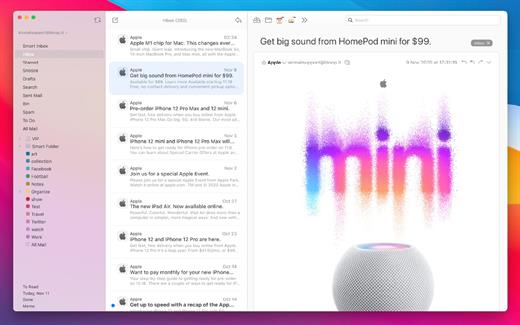
Airmail was designed from the ground UP to retain the same experience with a single or multiple accounts and provide a quick, modern and easy-to-use user experience. Airmail is clean and allows you to get to your emails without interruption – it’s the mail client for the 21st century.

We have taken usability and function to the next level with Airmail and bring a striking-design with support for all major email services. Switch between accounts like a breeze and quick reply to incoming messages within seconds – email has never been so easy and productive.


  • iCloud Account sync
  • iCloud attachment upload and share the link.
  • Handoff support, Composing Draft and folder selection are mirrored on different devices
  • Today Extension, quick access to your inbox.
  • Action Extension, Airmail Compose, Inline create and send messages directly form other apps
  • Action Extension, Airmail Share to quick send messages and attachments.
Accounting:

  • Unified Inbox
  • Alias with custom SMTP
  • Exchange, iCloud™, Gmail™, IMAP, POP3, Google™ Apps, Yahoo!™, AOL™, Outlook.com™, Live.com™
  • Local Accounts
  • Import from Apple Mail, MBOX archive, EML, EMLX, Airmail 1.x
Interactions:

  • Quick Reply
  • Undo History
  • Offline operations
  • Move messages on Different mailboxes
  • Interaction sounds
  • Multi Touch gestures
  • Exchange Meeting Invite
Shortcuts:

  • Gmail Shortcuts
  • Custom global shortcuts
  • Quick Label, Move, Label and Archive
  • Quick folder selection
Attachment:

  • Drag and drop
  • Quick Look preview
  • Google Drive, Dropbox, CloudApp, Box, Onedrive, Droplr, FTP
  • Inline image attachments
  • Winmail.dat preview
  • VCalendar
Conversations:

  • Group by id
  • Group by subject
  • Chronological Reverse
  • Muted CC’d conversation
Visual:

  • Multiple visual themes
  • Minimal and extended Mode
  • Plain Text Rendering
Notifications:

  • Per account notifications
  • Notification center support
  • Notification alerts with custom actions
Address:

  • Gmail, Exchange and OS X contacts
  • Contacts Group
  • Filter by address
  • Open Directory search
Composer:

  • Google App Directory
  • Exchange Global Address List
  • LDAP directory
  • Markdown, Html(Html Source for templates), and text only.
  • Custom settings per single account
  • Bullet and numbered list.
Sending:

  • Auto CC, BCC.
  • Pending operations
  • Send Delay
  • Redirect
  • Send again
  • Bounce
Advanced:

  • Split Screen Support
  • Time Machine friendly
  • Deckles mode
  • EML Import/Export
  • Disable GPU to save battery life
  • Applescript
  • Activity monitor
  • Data Detectors
Signatures:

  • Multiple Account Signatures
  • Markdown, Rich text, Html Source, and text only.
  • Signature above or below the quote
Search & Filtering:

  • Global search for multiple accounts
  • Realtime powerful filters
  • Sort messages, Date, Attachments, Conversations ….
  • Show messages of the same user
  • Flags and filters
Folders, Labels:

  • Nested folders
  • Create, Delete and edit folders
  • Custom colors synced by iCloud
  • Custom folder mappings
  • ToDo, Done, Memo
Send to:

  • Omnifocus
  • Fantastical
  • Evernote
  • Apple Reminder
  • Calendar
  • BusyCal
  • Things
  • 2To
  • Wunderlist
  • Todoist
Privacy:

  • Per user Autoload Remote Images,
  • Disable icon detection
What’s New

Version 26.0.37:


  • Release notes were unavailable when this listing was updated.
Compatibility

macOS 10.12 or later.
Apple Silicon or Intel Core processor


Release Name: AirMail Pro 26.0.37
Size: 47.3 MB
Links: HOMEPAGE – NFO – Torrent Search

Download: UPLOADYRAPiDGATOR

5 Comments
Sept 9

PullTube 1.8.6.39

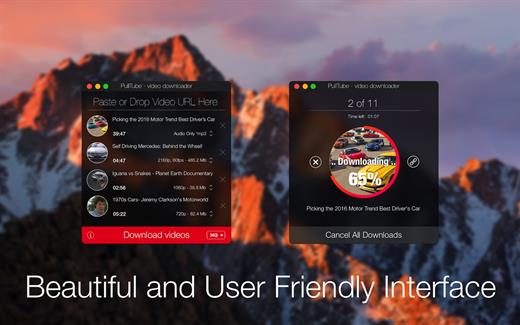
Sharing videos via online hosting services, such as YouTube or Vimeo is a common practice, yet streaming the content might not work as expected if you have a slow internet connection.

PullTube offers you the possibility to download videos from both sources (YouTube and Vimeo), while other platforms might be added at a later time. The app can handle playlists, allows you to select the output quality, and can even extract only the audio.

Video downloader that can import links with drag and drop and can detect playlists

The PullTube user interface is represented by a small window where you get to quickly paste the video URL. Note that you can also add a video by dropping the link on top of the PullTube window.

Worth mentioning is that, if PullTube detects that the video is part of a playlist, will offer to download the entire collection: will fetch the data for each entry and handle the downloads consecutively.

Download videos hosted on YouTube or Vimeo to different output sizes and formats

PullTube will start fetching the video data right away so you can see the video name, duration, and a small thumbnail. When configuring a download, you get to select the output quality (highest, 4K, HD or regular with different resolutions) or choose to export only the audio to an M4A or MP3 file.

Via the PullTube Settings panel, you can change the default download location and the default MP3 bitrate (320Kbps, 256Kbps, 128Kbps, 64Kbps). You can also add the quality info to the video’s name and choose to quit the app when all downloads are completed.

Get offline access to videos hosted online in just a few steps

PullTube proposes a streamlined workflow for quickly downloading videos from YouTube or Vimeo, provides control over the output quality, and enables you to extract the audio to MP3 or M4A files.

However, during our tests, we have noticed that PullTube has trouble completing the download when handling videos that are longer that 2 minutes. The process stops without any explanation, and you can eventually complete the task, but you need to add the link to download tool multiple times.

What’s New

Version 1.8.6.39:


  • Release notes were unavailable when this listing was updated.
Compatibility

macOS 10.12 or later


Release Name: PullTube 1.8.6.39
Size: 251.8 MB
Links: HOMEPAGE – NFO – Torrent Search

Download: UPLOADYRAPiDGATOR

6 Comments
Sept 9

CyberLink PhotoDirector Ultra 2027 v18.0.0828.0 Pre-Cracked (Incl. AI Models)

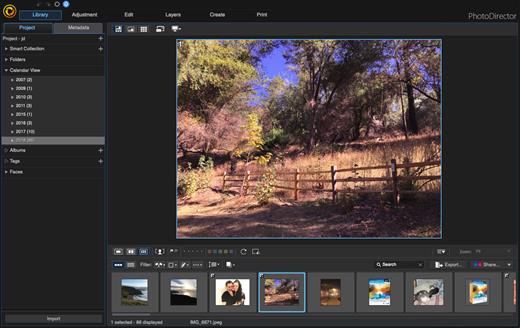
Description: Premium photo editing software for creative professionals. Create your masterpiece today. Capture. Edit. Retouch. Photo Editing, Now With AI. Split and combine color layers and reveal infinite variations around one theme. Enhance or totally replace the sky. Animate, blend, position, relight, and re-align.

Glitch Effect
Split and combine color layers and reveal infinite variations around one theme.

AI Sky Replacement
Enhance or totally replace the sky. Animate, blend, position, relight, and re-align.

Show Your True Colors
Customize colors with precision tools to edit the world the way you imagined.

Illuminate Photos
Create dreamy effects with Bokeh. Add natural glows, sparkles, or intense bursts of light.

Photo Editing Made Easier With AI
Automatically remove unwanted objects or people for a perfect shot, every time.

Precision Layer Editing
Layer, shape, and blend to create artistic scenes.

Immaculate Photo Retouching
From touch-ups to a complete overhaul, look flawless in every snap.

RAW Power
Support for all professional file formats, and the most popular cameras.

System Requirements
- Microsoft Windows 11, 10, 8/8.1, 7 (64 bit OS only)
- Intel Core™ i-series or AMD Phenom® II and above
- 128 MB VGA VRAM or higher
- 4GB memory required (For AI style transfer, 8GB or above recommended)
- 2GB space required
- 1024 x 768, 16-bit color or above

Supported Languages
- English
- French
- German
- Italian
- Spanish (European)
- Chinese Simplified
- Chinese Traditional
- Japanese
- Korean
- Dutch

Release Name: CyberLink PhotoDirector Ultra 2027 v18.0.0828.0 Pre-Cracked (Incl. AI Models)
Size: 2.4 GB
Links: HOMEPAGE – NFO – Torrent Search

Download: UPLOADYRAPiDGATOR

3 Comments
Sept 9

Adobe After Effects 2026 26.5

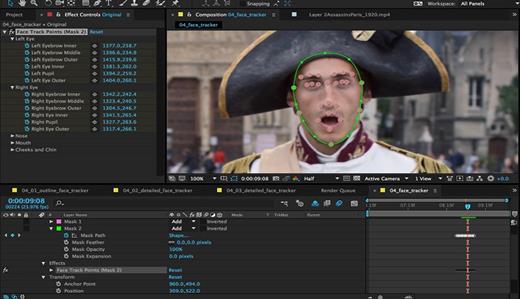
Description: Make a big scene bigger. Create cinematic movie titles, intros, and transitions. Remove an object from a clip. Start a fire or make it rain. Animate a logo or character. With After Effects, the industry-standard motion graphics and visual effects software, you can take any idea and make it move.

There.s nothing you can.t create with After Effects.
Animators, designers, and compositors use After Effects to create motion graphics and visual effects for film, TV, video, and the web.

Roll credits. Spin words. Twirl titles.
Create animated titles, credits, and lower thirds. Start from scratch or with one of the animation presets available right inside the app. From spin to swipe to slide .?there are countless ways to make your text move with After Effects.

Explosive effects. Mind-blowing results.
Combine videos and images to send a UFO across the sky or create an explosion . the possibilities are endless. Remove objects like booms, wires, or even people. Apply hundreds of effects to do anything from adding fog to making it snow. And create VR videos to drop your audience right into the center of the action.

Get animated.
Set anything in motion.from logos to shapes to cartoons.with keyframes or expressions. Or use presets to kick-off your designs and get unique results.

Plays well with others.
After Effects works seamlessly with other Adobe apps. Create comps and immediately see how they look in Premiere Pro with Adobe Dynamic Link. Import work from Photoshop, Illustrator, Character Animator, Adobe XD, and Animate. Use Team Projects to collaborate with editors no matter where they.re located. And After Effects is integrated with 300+ software and hardware partners.

Remove objects from video clips fast and easy
Want an object or person gone from your footage? With Content-Aware Fill, remove unwanted items quickly . no need to mask or cut out frame by frame.

Get depth passes from native 3D elements
Apply depth effects such as Depth of Field, Fog 3D, and Depth Matte so elements look natural . or use depth data to simulate 3D looks.

Release Name: Adobe After Effects 2026 26.5
Size: 4.5 GB
Links: HOMEPAGE – NFO – Torrent Search

Download: UPLOADYRAPiDGATOR

4 Comments
Sept 9

Adobe Acrobat Pro DC 2026 26.2.21901

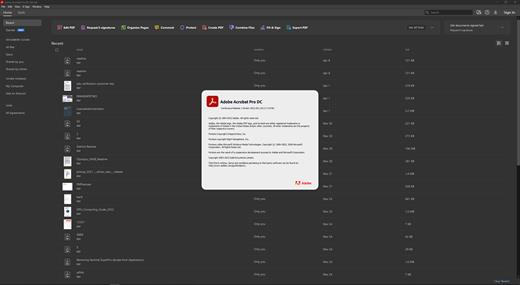
Description: Adobe Acrobat Pro DC is the leading PDF converter and much more. Adobe Acrobat Pro DC software lets you deliver professional PDF communications. It's packed with smart tools that give you even more power to communicate. Create and edit PDF files with rich media included, share information more securely, and gather feedback more efficiently.

Adobe Acrobat Pro DC software is the advanced way for business professionals to create, combine, control, and deliver more secure, high-quality Adobe PDF documents for easy, more secure distribution, collaboration, and data collection.

Assemble electronic or paper files into reliable PDF documents that are easy to share with others using free Adobe Reader. You can assemble even Web sites, engineering drawings, and e-mail.

With Adobe Acrobat Pro DC you can manage document reviews, synthesizing feedback from multiple reviewers while preserving document format and integrity. Extend commenting capabilities to anyone using Adobe Reader. Windows users can design intelligent Adobe PDF forms that include business logic, such as calculations and data validations, to help increase the accuracy of data collection while reducing the costs of manual data entry.

Use Adobe Acrobat Pro DC to create high-impact PDF communications, collaborate more easily, and streamline reviews. Adobe Acrobat Dynamic PDF helps you get more done - easier, faster, better.

Edit PDF files
With Adobe Acrobat Pro DC, you can make minor edits to text and images right in your PDF file without requiring the original document or graphic. Edit text in a PDF. Fix a typo, change a font, or add a paragraph to your PDF as easily as you do in other applications using a new point-and-click interface. Edit images in a PDF. Resize, replace, and adjust images in your PDF with no need to track down the original file or graphic.

Export from PDF files
Reduce the time you spend retyping information stuck in PDF files. Convert PDF files to editable Microsoft Office documents. And save fonts, formatting, and effort.
Convert PDF files to Word. Save your PDF as a Microsoft Word document and take your fonts, formatting, and layouts with you. Convert PDF files to Excel. Turn your PDF or just part of it into an editable Excel spreadsheet you can use for data analysis right away. Convert PDF files to PowerPoint. Get a head start on new projects by saving a PDF file as a fully editable PowerPoint presentation.

Create PDF files
Stop worrying about whether the files you send will look right on other people's screens. Turn documents into PDF files anyone can reliably view with free Adobe Reader.
Convert Word, Excel, or PowerPoint to PDF. Right from your Office application in Windows, you can create PDFs, start a shared review, restrict PDF edits, and more. Print to PDF. Convert files to PDF from virtually any application that prints simply by selecting Adobe PDF as your printer. Scan to PDF. When you need to turn a paper document or form into a digital file, just scan it to create a searchable PDF file you can edit. Convert HTML pages to PDF. Save web pages as PDF files to archive web content, review the pages offline, or print them more reliably.

Create and analyze forms
Cut the time you spend creating forms, rekeying data, and correcting errors. Distribute forms online, and then collect responses and analyze results in real time.
Create new PDF and web forms. Customize professional templates or design from scratch with the Adobe FormsCentral desktop app included in Adobe Acrobat Pro DC. Collect form responses with FormsCentral. Easily collect responses by moving your PDF or web forms online with the Adobe FormsCentral online service. Convert existing forms to fillable PDFs. Type less, gather more. Quickly convert your paper, Word, or Excel forms to fillable PDF forms. Collect form responses using Adobe Acrobat tools. Compile returned forms into one PDF, or host forms using a network folder or Microsoft SharePoint server.

System Requirements:
Intel® or AMD processor; 1.5GHz or faster processor
Windows 11 (64 bit), Windows 10 (64 bit) version 1809 or later, Windows Server 2016 (64 bit), or Windows Server 2019 (64 bit)
2GB of RAM
4.5GB of available hard-disk space.
1024x768 screen resolution
Video hardware acceleration (optional)

Release Name: Adobe Acrobat Pro DC 2026 26.2.21901
Size: 1.6 GB
Links: HOMEPAGE – NFO – Torrent Search

Download: UPLOADY – RAPiDGATOR

4 Comments
Sept 9

PanoramaStudio Pro 4.2.5.507

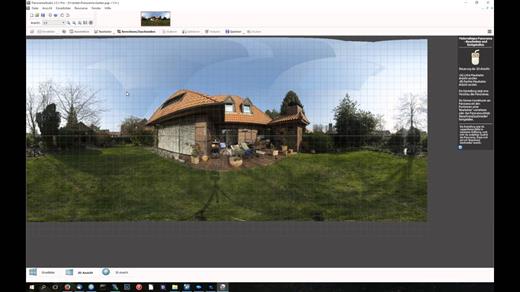
Description: PanoramaStudio Pro offers numerous additional features in addition to all the functions of the standard version. These include the creation of HDR panoramas with HDR/Tonemapping or Exposure Fusion, support for fisheye lenses, more visualization options, automatic white balance, viewpoint correction and a grid assistant for panoramas consisting of a large number of images.

This version not only saves various image formats but also HDR formats, offers a poster printing function and lets you export interactive 3D panoramas or virtual tours consisting of multiple linked panoramas. The proven and simple creation of perfect panoramas is extended in this Pro version by a whole range of functions for ambitious users.

Key Features

Panorama Creation
Automatic stitching of arbitrary image arrangements into seamless panoramas
Automatic correction of exposure mismatches, brightness, vignetting and white balance
Full HDR support to create high dynamic range panoramas
15 different projections for visually different visualizations - in addition to the standards also Mercator, Little Planets, Fisheyes, Pannini and transversal projections such as Cassini

Supported Cameras and Lenses
Processing of photos from any conventional camera as well as fisheye lenses
Recognition of more than 2830 cameras based on their Exif data
Automatic correction of lens distortion

Editing
Manual correction of all individual steps, for example with the control point editor, the viewpoint correction PRO or the masking tool
Dynamic real-time preview in a 2D or 3D view
Numerous non-destructive image processing filters
In HDR mode, real-time preview while adjusting the tone mapping and Exposure Fusion parameters
Grid assistant for pre-sorting large numbers of input images

Import/Export
Export of interactive HTML5 panoramas and virtual tours for local viewing or embedding in websites
Import/export of the most common image formats
Direct import of more than 1250 RAW formats
Import/export of HDR image formats – OpenEXR, HDR, JXL (JPEG-XL), 32-bit TIFF
Poster printing function

Release Name: PanoramaStudio Pro 4.2.5.507
Size: 47.6 MB
Links: HOMEPAGE – NFO – Torrent Search

Download: UPLOADYRAPiDGATOR

7 Comments
Sept 9

QueueExplorer Professional 5.0.92

Description: Explorer-like management for queues. Works with multiple queuing systems. QueueExplorer supports multiple systems from the same installation, without need for additional licensing: MSMQ, Azure Service Bus, RabbitMQ, and ActiveMQ. With QueueExplorer you can do much more than with built-in management console - copy, move or delete messages, save and load, stress test, view and edit full message bodies (with support for XML, JSON, .Net objects...), and much more. QueueExplorer is a fast, native Windows application.

The indispensable tool for working with queues and messages:
understand and manage your system
figure out what went wrong
fix it

Find out all about your messages
With QueueExplorer you can dig into your queues and see which message went where, whether they were correctly formatted, with correct headers and settings, etc. Multiple viewers are at your disposal: JSON, XML, WCF, Hex, text with different encodings...

Develop and test producers and consumers separately
With QueueExplorer you can test individual pieces of your solution, or even simulate third party messages going in or out. You can create and edit test messages, send one by one or bunch of them together.

Test performance and load handling of your app
Send thousands of messages for performance testing to see how system handles that load.

Troubleshoot, fix, and resend problematic messages
If something is wrong, QueueExplorer is the fastest and easiest way to investigate and fix incorrect, poison, or failed/deadletter messages.

See status of your system at glance
Check if some of queues are growing too large, if there are messages in deadletter queues, etc. With autorefresh functionality see how entire system works in near real time.

Filter and sort messages to quickly find important data
QueueExplorer allows you to quickly find messages you're interested in. Professional edition allows you to even extract your business data from within messages using XPath, JSON, or Regex, and to immediately see e.g. invoice totals, etc.

Backup and restore messages
Backup messages to files, or move/copy them to another queue.

Copy, compare and sync queues, topics and other schema (metadata) objects
This can be used to migrate queues (and other objects) to another server, e.g. to propagate from development to production. Or just to compare and see which changes were made. Or to backup schema before changes are made. You can also duplicate queues with all their settings on the same server (Professional).

Release Name: QueueExplorer Professional 5.0.92
Size: 36.2 MB
Links: HOMEPAGE – NFO – Torrent Search

Download: UPLOADYRAPiDGATOR

6 Comments
Sept 9

Pano2VR Pro 8.0.7

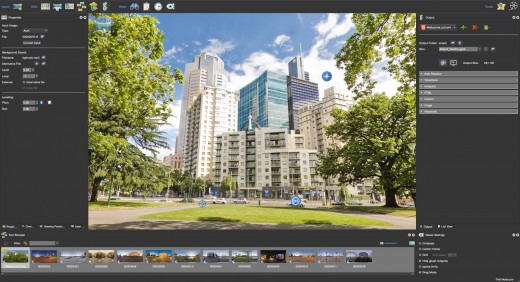
Description: Pano2VR is a powerful virtual tour software that converts your panoramic or 360° photos and videos into interactive experiences.

Whether you’re working on a single gigapixel panorama or a virtual tour with thousands of scenes, Pano2VR can help you create an immersive experience for any modern browser. Finished projects can be seamlessly integrated with existing websites and viewed on desktops and mobile or VR devices.

Build a Virtual Tour
From homes and real estate to museums and landmarks, virtual tours allow users to explore real places from around the world. In Pano2VR, link panoramic photo scenes, or nodes, using your choice of transitions and let the user navigate from scene to scene with just a click or tap. Provide greater location context to the scene by using our built-in Tour Map or by easily integrating floor plans or Google Maps.

Improve Your Images
Remove tripods and other image imperfections using Pano2VR’s Patch mode. With this invaluable tool, you can extract a defined patch area from the panorama without distortion, making it easier to retouch. Define and extract the image patch in Pano2VR. Then, edit it in your favorite editor. Once it’s saved, the modified patch will be automatically applied non-destructively to the panorama. Or never leave Pano2VR and instead use AI to correct the image for you.

Enhance the Experience
Add interactive elements like informational popups, photo hotspots, directional sound, and video to your panoramas. Use the included user interface overlays, called skins, or dive into the powerful Skin Editor to design custom buttons and controllers in your own unique interface design – all of which can be made responsive so that the design fits any screen. Create your skins or connect with the third-party designers here to help you achieve your goals.

Reveal the Highlights
Highlight significant scenes in your tours by creating animation paths that automatically navigate through each tour node. At any time, the viewer can choose to pause the animation to interact and explore further. You can even export this walk-through as a video file.

Zoom In
Pano2VR supports gigapixel images and multi-resolution so viewers can zoom deep in to the image to see amazing details. Load in the largest panorama you can find! Pano2VR can not only handle it but processing the panoramas is fast and the output is pixel perfect.

Show Your Work
Export panoramas in HTML5 format and upload to your web server. We even offer a handy plugin that lets you post your finished projects directly to your WordPress site.

Want to share your work in virtual reality? The program supports WebXR, which allows you to create a fully immersive VR experience directly from a web page so you can view projects on Apple Vision Pro and Meta Quest. Alternatively, use the  VRTourviewer  app integration for offline VR tours.

Google Street View
Pano2VR is a Street View ready application that gives you the ability to edit and publish tours to Google Street View.

Projections
Easily change projections during viewing or fly in from little planet view.

Directional Sound
Use Pano2VR's Sound Mode to add directional sound to your projects.

Droplets
If you need to create many projects on a regular basis, droplets let you do this with minimal effort.

Integrated Web Server
Pano2VR has a built-in web server so that once you create your tour, you can immediately see the results of an HTML5 output.

Video Panoramas
In addition to flat, cylindrical, and spherical panoramic images, Pano2VR also supports 360° videos.

Live Update
When Live Update is active, every change to the project is updated live in the browser after saving.

WordPress Plugin
Embed panoramas, VR tours, and object VRs in your WordPress site.

Release Name: Pano2VR Pro 8.0.7
Size: 266.8 MB
Links: HOMEPAGE – NFO – Torrent Search

Download: UPLOADYRAPiDGATOR

5 Comments
Sept 9

Advanced SystemCare Pro 19.6.0.238

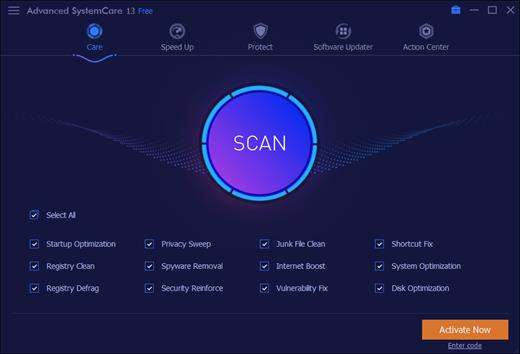
Description: Advanced SystemCare Pro provides an always-on, automated, the all-in-one PC optimization utility. It specializes in ONE-Click solutions to detect, clean, repair, speed up and eventually protect PC. Advanced SystemCare is a PC maintenance program that's incredibly easy to use, the World's Top System Utility for Superior PC Health! With the novel system technology, Advanced SystemCare empowers you to run your computer faster. Ensures more stably and more efficiently than with any other system utilities.

Clean & Optimize PC Performance:
- Basic PC cleaning and optimization
- 1-click to fix disk errors for more stable and efficient PC system
- Smarter AI mode for intelligent scan and premium PC cleaning & optimization
- Deep clean registry to prevent system crash
- Defrag hard drive data to optimize PC performance
- Auto RAM clean to stop unused programs and processes
- Auto care for PC as scheduled
- Monitor system condition in real-time
- 1-click to keep important programs up-to-date

Boost PC Speed:
- Up to 200% quicker PC startup
- Up to 300% Internet speedup with Internet Booster

Ensure PC & Privacy Security:
- Basic PC protection with spyware removal
- Full PC protection for detecting and removing deepest infections
- Capture intruders automatically with FaceID
- Block malicious links and suspicious senders in web emails
- Premium surfing protection with automatically clear tracking data
- Disguise digital fingerprint to keep online behaviour private
- Keep your personal data away from untrusted programs
- Proactively detect and block security holes in real-time
- Detect and enable both antivirus & firewall for dual protection

Release Name: Advanced SystemCare Pro 19.6.0.238
Size: 74.3 MB
Links: HOMEPAGE – NFO – Torrent Search

Download: UPLOADYRAPiDGATOR

6 Comments
Sept 9

Pepakura Designer 6.3.5

Description: Pepakura Designer is a Windows application which makes unfolded patterns from 3D data. Pepakura Designer features to automatically unfold 3D polygon-mesh models, and allow you to edit them. Pepakura Designer allows you to create real paper craft models from digital data!

You can try Pepakura Designer with no charge. (The data exporting feature is activated with purchase of the license keycode.) Note that Pepakura Designer does not have 3D data design features. You require 3D data before starting to use Pepakura Designer. Pepakura Designer supports common 3DCG file formats. Recommended 3DCG software is Metasequoia. You can use it for 3D model design at no charge. Pepakura Designer reads Metasequoia files with high compatibility.

One Button Unfolding
An unfolded 3D model pattern will be generated once you press the button.

Useful Toolset for Layout Editing
Pepakura Designer provides a simple and useful toolset for layout editing.
The Move, Rotate, and Join/Disjoin Parts editing tools, and the Adding Flaps support to arrange the layout.

Assemble Assistance
Pepakura Designer assists in the assembly process.
For example, ID numbers are assigned to edges, so you can understand the pairs of edges to be glued together. The positions of the pairs to be glued together are indicated by an arrow.

Exporting
Pepakura Designer supports the export in several file formats, including BMP, PNG, GIF, JPG, EPS, DXF, and PDF.

Texture Setting
By switching the textures on and off, you can assemble the color model or the white model, whichever you prefer.
You can also change the texture images on Pepakura Designer.

Operating System: Windows 8/10/11 (64bit)

Release Name: Pepakura Designer 6.3.5
Size: 18.5 MB
Links: HOMEPAGE – NFO – Torrent Search

Download: UPLOADYRAPiDGATOR

6 Comments