

ColoFolXS 2.2.1
A compact icon tool to color folders.
Click to enlarge Basic steps are very simple:
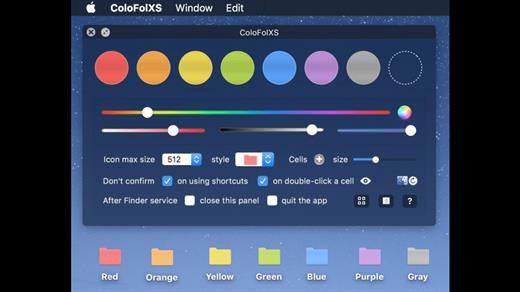
- Launch ColoFolXS.
- Drag & drop a folder to a color cell.
- Right- (or ctrl-) click a folder in the Finder.
- Select “ColoFolXS” from the contextual menu.
- Click a color cell.
Main Features:
- Cell colors are adjustable with the color sliders or using the color panel.
- Possible to keep not only colors but also your favorite folder icons on the main panel (drop an icon image to the empty cell while pressing the alt (option ⌥)-key).
- Custom icon max size can be limited to reduce memory use.
- Finder tags can be linked to the ColoFolXS colors, so that they are added or removed when you change icons with ColoFolXS.
- Possible to list the items marked with ColoFolXS.
- Shortcuts can be assigned to the removal function and each ColoFolXS color (Note: they work while ColoFolXS is running, while the shortcut assigned to the Finder service works to launch the app).
- For more details, please click the ‘?’ buttons in the app.
Version 2.2.1:
- Release notes were unavailable when this listing was updated.
macOS 10.15 or later
Release Name: ColoFolXS 2.2.1
Size: 18.3 MB
Links: HOMEPAGE – NFO – Torrent Search
Download: UPLOADGiG – NiTROFLARE – RAPiDGATOR



