Please REGISTER or RENEW your account on RAPiDGATOR.net and support us by doing through all RAPiDGATOR working download links on main posts...
May 22

A Better Finder Attributes 7.46

A Better Finder Attributes 7 allows you to change JPEG & RAW shooting dates, JPEG EXIF meta-data tags, file creation & modification dates, file flags and deal with invisible files.
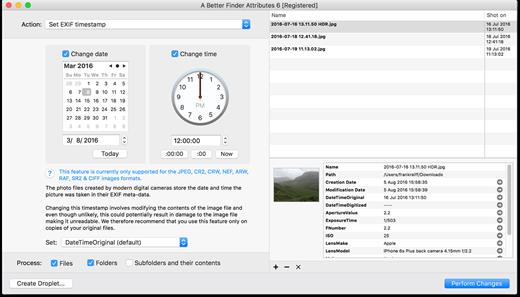
Correct EXIF Digital Photo Shooting Timestamps

A Better Finder Attributes 7 allows you to manipulate JPEG, CR2, NEF, ARF, RAF, SR2, CRW & CIFF EXIF timestamps at will by setting them to specific times or batch adjusting them by adding and removing time (useful for correcting the timestamps of images taken with a digital camera with a incorrectly set clock and to compensate for timezone changes).

Correct Finder Sorting for Digital Photos

A Better Finder Attributes 7 also allows you to synchronize the file creation and modification dates with the shooting dates of JPEG EXIF as well as a wide variety of RAW formats, so that files sort properly in the Finder and other systems.

Change, Add & Remove JPEG EXIF Meta-Data

A Better Finder Attributes 7 allows the most commonly used JPEG EXIF meta-data tags, such as copyright & owner information, camera & lens specifactions, some exposure information and much else besides to be directly manipulated.

You can strip JPEG EXIF information from a file altogether, strip GPS and IPTC location data or edit individual tags.

Total File Creation & Modification Date Control

A Better Finder Attributes 7 gives you total control over file creation and modification dates, setting them to specific times and dates, adding or removing time or simply removing them altogether.

Setting Mac File Flags

A Better Finder Attributes 7 supports setting all common Mac file system flags. You can set whether or not file extensions appear in the Finder, batch lock or unlock files, set or remove legacy creation & type codes, remove invisible files, restart the Finder in a special mode that shows invisible files, batch set Finder labels and force Finder updates.

Showing & Deleting Invisible Files

A Better Finder Attributes 7 can delete invisible files, such as .DS_Store, that can lead to problems when delivering files to non-Mac systems and play havoc with Unix tools such as version control and archiving tools.

On top of this A Better Finder Attributes has a special “Show Invisible Files” feature hidden in the “Tools” menu that switches the Finder to a special mode in which invisible files become visible

Other Noteworthy Features

  • Batch operation
  • Create Droplets for automated processing
  • Drag-and-drop into the file list or onto the application icon
  • Select files in the Finder and activate A Better Finder Attributes 5 via the Finder context menu or via a hot key
  • Automatically deals with file date consistency rules
  • Separate processing for files and folders, batch processing of sub-folders
  • Additionally, A Better Finder Attributes 5 gives you control over:
  • Whether or not file extensions appear in the Finder
  • Batch locking or unlocking of files
  • Setting or removing legacy creator and type codes
  • Removing invisible files
  • Seeing invisible files in the Finder
  • Batch setting of Finder labels
  • Forcing the Finder to update its information about files and folders
What’s New

Version 7.46:


  • Release notes were unavailable when this listing was updated.
Compatibility

macOS 10.11 or later


Release Name: A Better Finder Attributes 7.46
Size: 15.1 MB
Links: HOMEPAGE – NFO – Torrent Search

Download: RAPiDGATOR

4 Comments
Apr 24

A Better Finder Attributes 7.45

A Better Finder Attributes 7 allows you to change JPEG & RAW shooting dates, JPEG EXIF meta-data tags, file creation & modification dates, file flags and deal with invisible files.

Correct EXIF Digital Photo Shooting Timestamps

A Better Finder Attributes 7 allows you to manipulate JPEG, CR2, NEF, ARF, RAF, SR2, CRW & CIFF EXIF timestamps at will by setting them to specific times or batch adjusting them by adding and removing time (useful for correcting the timestamps of images taken with a digital camera with a incorrectly set clock and to compensate for timezone changes).

Correct Finder Sorting for Digital Photos

A Better Finder Attributes 7 also allows you to synchronize the file creation and modification dates with the shooting dates of JPEG EXIF as well as a wide variety of RAW formats, so that files sort properly in the Finder and other systems.

Change, Add & Remove JPEG EXIF Meta-Data

A Better Finder Attributes 7 allows the most commonly used JPEG EXIF meta-data tags, such as copyright & owner information, camera & lens specifactions, some exposure information and much else besides to be directly manipulated.

You can strip JPEG EXIF information from a file altogether, strip GPS and IPTC location data or edit individual tags.

Total File Creation & Modification Date Control

A Better Finder Attributes 7 gives you total control over file creation and modification dates, setting them to specific times and dates, adding or removing time or simply removing them altogether.

Setting Mac File Flags

A Better Finder Attributes 7 supports setting all common Mac file system flags. You can set whether or not file extensions appear in the Finder, batch lock or unlock files, set or remove legacy creation & type codes, remove invisible files, restart the Finder in a special mode that shows invisible files, batch set Finder labels and force Finder updates.

Showing & Deleting Invisible Files

A Better Finder Attributes 7 can delete invisible files, such as .DS_Store, that can lead to problems when delivering files to non-Mac systems and play havoc with Unix tools such as version control and archiving tools.

On top of this A Better Finder Attributes has a special “Show Invisible Files” feature hidden in the “Tools” menu that switches the Finder to a special mode in which invisible files become visible

Other Noteworthy Features


  • Batch operation
  • Create Droplets for automated processing
  • Drag-and-drop into the file list or onto the application icon
  • Select files in the Finder and activate A Better Finder Attributes 5 via the Finder context menu or via a hot key
  • Automatically deals with file date consistency rules
  • Separate processing for files and folders, batch processing of sub-folders
  • Additionally, A Better Finder Attributes 5 gives you control over:
  • Whether or not file extensions appear in the Finder
  • Batch locking or unlocking of files
  • Setting or removing legacy creator and type codes
  • Removing invisible files
  • Seeing invisible files in the Finder
  • Batch setting of Finder labels
  • Forcing the Finder to update its information about files and folders
What’s New

Version 7.45:


  • Release notes were unavailable when this listing was updated.
Compatibility

macOS 10.11 or later


Release Name: A Better Finder Attributes 7.45
Size: 15.1 MB
Links: HOMEPAGE – NFO – Torrent Search

Download: RAPiDGATOR

3 Comments
Apr 8

A Better Finder Attributes 7.44

A Better Finder Attributes 7 allows you to change JPEG & RAW shooting dates, JPEG EXIF meta-data tags, file creation & modification dates, file flags and deal with invisible files.

Correct EXIF Digital Photo Shooting Timestamps

A Better Finder Attributes 7 allows you to manipulate JPEG, CR2, NEF, ARF, RAF, SR2, CRW & CIFF EXIF timestamps at will by setting them to specific times or batch adjusting them by adding and removing time (useful for correcting the timestamps of images taken with a digital camera with a incorrectly set clock and to compensate for timezone changes).

Correct Finder Sorting for Digital Photos

A Better Finder Attributes 7 also allows you to synchronize the file creation and modification dates with the shooting dates of JPEG EXIF as well as a wide variety of RAW formats, so that files sort properly in the Finder and other systems.

Change, Add & Remove JPEG EXIF Meta-Data

A Better Finder Attributes 7 allows the most commonly used JPEG EXIF meta-data tags, such as copyright & owner information, camera & lens specifactions, some exposure information and much else besides to be directly manipulated.

You can strip JPEG EXIF information from a file altogether, strip GPS and IPTC location data or edit individual tags.

Total File Creation & Modification Date Control

A Better Finder Attributes 7 gives you total control over file creation and modification dates, setting them to specific times and dates, adding or removing time or simply removing them altogether.

Setting Mac File Flags

A Better Finder Attributes 7 supports setting all common Mac file system flags. You can set whether or not file extensions appear in the Finder, batch lock or unlock files, set or remove legacy creation & type codes, remove invisible files, restart the Finder in a special mode that shows invisible files, batch set Finder labels and force Finder updates.

Showing & Deleting Invisible Files

A Better Finder Attributes 7 can delete invisible files, such as .DS_Store, that can lead to problems when delivering files to non-Mac systems and play havoc with Unix tools such as version control and archiving tools.

On top of this A Better Finder Attributes has a special “Show Invisible Files” feature hidden in the “Tools” menu that switches the Finder to a special mode in which invisible files become visible

Other Noteworthy Features


  • Batch operation
  • Create Droplets for automated processing
  • Drag-and-drop into the file list or onto the application icon
  • Select files in the Finder and activate A Better Finder Attributes 5 via the Finder context menu or via a hot key
  • Automatically deals with file date consistency rules
  • Separate processing for files and folders, batch processing of sub-folders
  • Additionally, A Better Finder Attributes 5 gives you control over:
  • Whether or not file extensions appear in the Finder
  • Batch locking or unlocking of files
  • Setting or removing legacy creator and type codes
  • Removing invisible files
  • Seeing invisible files in the Finder
  • Batch setting of Finder labels
  • Forcing the Finder to update its information about files and folders
What’s New

Version 7.44:


  • Release notes were unavailable when this listing was updated.
Compatibility

macOS 10.11 or later


Release Name: A Better Finder Attributes 7.44
Size: 15 MB
Links: HOMEPAGE – NFO – Torrent Search

Download: RAPiDGATOR

5 Comments
Mar 5

A Better Finder Attributes 7.43

A Better Finder Attributes 7 allows you to change JPEG & RAW shooting dates, JPEG EXIF meta-data tags, file creation & modification dates, file flags and deal with invisible files.

Correct EXIF Digital Photo Shooting Timestamps

A Better Finder Attributes 7 allows you to manipulate JPEG, CR2, NEF, ARF, RAF, SR2, CRW & CIFF EXIF timestamps at will by setting them to specific times or batch adjusting them by adding and removing time (useful for correcting the timestamps of images taken with a digital camera with a incorrectly set clock and to compensate for timezone changes).

Correct Finder Sorting for Digital Photos

A Better Finder Attributes 7 also allows you to synchronize the file creation and modification dates with the shooting dates of JPEG EXIF as well as a wide variety of RAW formats, so that files sort properly in the Finder and other systems.

Change, Add & Remove JPEG EXIF Meta-Data

A Better Finder Attributes 7 allows the most commonly used JPEG EXIF meta-data tags, such as copyright & owner information, camera & lens specifactions, some exposure information and much else besides to be directly manipulated.

You can strip JPEG EXIF information from a file altogether, strip GPS and IPTC location data or edit individual tags.

Total File Creation & Modification Date Control

A Better Finder Attributes 7 gives you total control over file creation and modification dates, setting them to specific times and dates, adding or removing time or simply removing them altogether.

Setting Mac File Flags

A Better Finder Attributes 7 supports setting all common Mac file system flags. You can set whether or not file extensions appear in the Finder, batch lock or unlock files, set or remove legacy creation & type codes, remove invisible files, restart the Finder in a special mode that shows invisible files, batch set Finder labels and force Finder updates.

Showing & Deleting Invisible Files

A Better Finder Attributes 7 can delete invisible files, such as .DS_Store, that can lead to problems when delivering files to non-Mac systems and play havoc with Unix tools such as version control and archiving tools.

On top of this A Better Finder Attributes has a special “Show Invisible Files” feature hidden in the “Tools” menu that switches the Finder to a special mode in which invisible files become visible

Other Noteworthy Features


  • Batch operation
  • Create Droplets for automated processing
  • Drag-and-drop into the file list or onto the application icon
  • Select files in the Finder and activate A Better Finder Attributes 5 via the Finder context menu or via a hot key
  • Automatically deals with file date consistency rules
  • Separate processing for files and folders, batch processing of sub-folders
  • Additionally, A Better Finder Attributes 5 gives you control over:
  • Whether or not file extensions appear in the Finder
  • Batch locking or unlocking of files
  • Setting or removing legacy creator and type codes
  • Removing invisible files
  • Seeing invisible files in the Finder
  • Batch setting of Finder labels
  • Forcing the Finder to update its information about files and folders
What’s New

Version 7.43:


  • Release notes were unavailable when this listing was updated.
Compatibility

macOS 10.11 or later


Release Name: A Better Finder Attributes 7.43
Size: 13.8 MB
Links: HOMEPAGE – NFO – Torrent Search

Download: RAPiDGATOR

7 Comments
Feb 12

A Better Finder Attributes 7.42

A Better Finder Attributes 7 allows you to change JPEG & RAW shooting dates, JPEG EXIF meta-data tags, file creation & modification dates, file flags and deal with invisible files.

Correct EXIF Digital Photo Shooting Timestamps

A Better Finder Attributes 7 allows you to manipulate JPEG, CR2, NEF, ARF, RAF, SR2, CRW & CIFF EXIF timestamps at will by setting them to specific times or batch adjusting them by adding and removing time (useful for correcting the timestamps of images taken with a digital camera with a incorrectly set clock and to compensate for timezone changes).

Correct Finder Sorting for Digital Photos

A Better Finder Attributes 7 also allows you to synchronize the file creation and modification dates with the shooting dates of JPEG EXIF as well as a wide variety of RAW formats, so that files sort properly in the Finder and other systems.

Change, Add & Remove JPEG EXIF Meta-Data

A Better Finder Attributes 7 allows the most commonly used JPEG EXIF meta-data tags, such as copyright & owner information, camera & lens specifactions, some exposure information and much else besides to be directly manipulated.

You can strip JPEG EXIF information from a file altogether, strip GPS and IPTC location data or edit individual tags.

Total File Creation & Modification Date Control

A Better Finder Attributes 7 gives you total control over file creation and modification dates, setting them to specific times and dates, adding or removing time or simply removing them altogether.

Setting Mac File Flags

A Better Finder Attributes 7 supports setting all common Mac file system flags. You can set whether or not file extensions appear in the Finder, batch lock or unlock files, set or remove legacy creation & type codes, remove invisible files, restart the Finder in a special mode that shows invisible files, batch set Finder labels and force Finder updates.

Showing & Deleting Invisible Files

A Better Finder Attributes 7 can delete invisible files, such as .DS_Store, that can lead to problems when delivering files to non-Mac systems and play havoc with Unix tools such as version control and archiving tools.

On top of this A Better Finder Attributes has a special “Show Invisible Files” feature hidden in the “Tools” menu that switches the Finder to a special mode in which invisible files become visible

Other Noteworthy Features


  • Batch operation
  • Create Droplets for automated processing
  • Drag-and-drop into the file list or onto the application icon
  • Select files in the Finder and activate A Better Finder Attributes 5 via the Finder context menu or via a hot key
  • Automatically deals with file date consistency rules
  • Separate processing for files and folders, batch processing of sub-folders
  • Additionally, A Better Finder Attributes 5 gives you control over:
  • Whether or not file extensions appear in the Finder
  • Batch locking or unlocking of files
  • Setting or removing legacy creator and type codes
  • Removing invisible files
  • Seeing invisible files in the Finder
  • Batch setting of Finder labels
  • Forcing the Finder to update its information about files and folders
What’s New

Version 7.42:


  • Release notes were unavailable when this listing was updated.
Compatibility

macOS 10.11 or later


Release Name: A Better Finder Attributes 7.42
Size: 11.6 MB
Links: HOMEPAGE – NFO – Torrent Search

Download: RAPiDGATOR

11 Comments
Nov 8

A Better Finder Attributes 7.36

A Better Finder Attributes 7 allows you to change JPEG & RAW shooting dates, JPEG EXIF meta-data tags, file creation & modification dates, file flags and deal with invisible files.

Correct EXIF Digital Photo Shooting Timestamps

A Better Finder Attributes 7 allows you to manipulate JPEG, CR2, NEF, ARF, RAF, SR2, CRW & CIFF EXIF timestamps at will by setting them to specific times or batch adjusting them by adding and removing time (useful for correcting the timestamps of images taken with a digital camera with a incorrectly set clock and to compensate for timezone changes).

Correct Finder Sorting for Digital Photos

A Better Finder Attributes 7 also allows you to synchronize the file creation and modification dates with the shooting dates of JPEG EXIF as well as a wide variety of RAW formats, so that files sort properly in the Finder and other systems.

Change, Add & Remove JPEG EXIF Meta-Data

A Better Finder Attributes 7 allows the most commonly used JPEG EXIF meta-data tags, such as copyright & owner information, camera & lens specifactions, some exposure information and much else besides to be directly manipulated.

You can strip JPEG EXIF information from a file altogether, strip GPS and IPTC location data or edit individual tags.

Total File Creation & Modification Date Control

A Better Finder Attributes 7 gives you total control over file creation and modification dates, setting them to specific times and dates, adding or removing time or simply removing them altogether.

Setting Mac File Flags

A Better Finder Attributes 7 supports setting all common Mac file system flags. You can set whether or not file extensions appear in the Finder, batch lock or unlock files, set or remove legacy creation & type codes, remove invisible files, restart the Finder in a special mode that shows invisible files, batch set Finder labels and force Finder updates.

Showing & Deleting Invisible Files

A Better Finder Attributes 7 can delete invisible files, such as .DS_Store, that can lead to problems when delivering files to non-Mac systems and play havoc with Unix tools such as version control and archiving tools.

On top of this A Better Finder Attributes has a special “Show Invisible Files” feature hidden in the “Tools” menu that switches the Finder to a special mode in which invisible files become visible

Other Noteworthy Features


  • Batch operation
  • Create Droplets for automated processing
  • Drag-and-drop into the file list or onto the application icon
  • Select files in the Finder and activate A Better Finder Attributes 5 via the Finder context menu or via a hot key
  • Automatically deals with file date consistency rules
  • Separate processing for files and folders, batch processing of sub-folders
  • Additionally, A Better Finder Attributes 5 gives you control over:
  • Whether or not file extensions appear in the Finder
  • Batch locking or unlocking of files
  • Setting or removing legacy creator and type codes
  • Removing invisible files
  • Seeing invisible files in the Finder
  • Batch setting of Finder labels
  • Forcing the Finder to update its information about files and folders
What’s New

Version 7.36:


  • Release notes were unavailable when this listing was updated.
Compatibility

macOS 10.11 or later


Release Name: A Better Finder Attributes 7.36
Size: 12.6 MB
Links: HOMEPAGE – NFO – Torrent Search

Download: FiKPERNiTROFLARERAPiDGATOR

5 Comments
Feb 15

A Better Finder Attributes 7.30

A Better Finder Attributes 7 allows you to change JPEG & RAW shooting dates, JPEG EXIF meta-data tags, file creation & modification dates, file flags and deal with invisible files.

Correct EXIF Digital Photo Shooting Timestamps

A Better Finder Attributes 7 allows you to manipulate JPEG, CR2, NEF, ARF, RAF, SR2, CRW & CIFF EXIF timestamps at will by setting them to specific times or batch adjusting them by adding and removing time (useful for correcting the timestamps of images taken with a digital camera with a incorrectly set clock and to compensate for timezone changes).

Correct Finder Sorting for Digital Photos

A Better Finder Attributes 7 also allows you to synchronize the file creation and modification dates with the shooting dates of JPEG EXIF as well as a wide variety of RAW formats, so that files sort properly in the Finder and other systems.

Change, Add & Remove JPEG EXIF Meta-Data

A Better Finder Attributes 7 allows the most commonly used JPEG EXIF meta-data tags, such as copyright & owner information, camera & lens specifactions, some exposure information and much else besides to be directly manipulated.

You can strip JPEG EXIF information from a file altogether, strip GPS and IPTC location data or edit individual tags.

Total File Creation & Modification Date Control

A Better Finder Attributes 7 gives you total control over file creation and modification dates, setting them to specific times and dates, adding or removing time or simply removing them altogether.

Setting Mac File Flags

A Better Finder Attributes 7 supports setting all common Mac file system flags. You can set whether or not file extensions appear in the Finder, batch lock or unlock files, set or remove legacy creation & type codes, remove invisible files, restart the Finder in a special mode that shows invisible files, batch set Finder labels and force Finder updates.

Showing & Deleting Invisible Files

A Better Finder Attributes 7 can delete invisible files, such as .DS_Store, that can lead to problems when delivering files to non-Mac systems and play havoc with Unix tools such as version control and archiving tools.

On top of this A Better Finder Attributes has a special “Show Invisible Files” feature hidden in the “Tools” menu that switches the Finder to a special mode in which invisible files become visible

Other Noteworthy Features


  • Batch operation
  • Create Droplets for automated processing
  • Drag-and-drop into the file list or onto the application icon
  • Select files in the Finder and activate A Better Finder Attributes 5 via the Finder context menu or via a hot key
  • Automatically deals with file date consistency rules
  • Separate processing for files and folders, batch processing of sub-folders
  • Additionally, A Better Finder Attributes 5 gives you control over:
  • Whether or not file extensions appear in the Finder
  • Batch locking or unlocking of files
  • Setting or removing legacy creator and type codes
  • Removing invisible files
  • Seeing invisible files in the Finder
  • Batch setting of Finder labels
  • Forcing the Finder to update its information about files and folders
What’s New

Version 7.30:


  • This version fixes a dark mode bug
Compatibility

macOS 10.11 or later


Release Name: A Better Finder Attributes 7.30
Size: 11.6 MB
Links: HOMEPAGE – NFO – Torrent Search

Download: FiKPERNiTROFLARERAPiDGATOR

6 Comments
Feb 25

A Better Finder Attributes 7.25

A Better Finder Attributes 7 allows you to change JPEG & RAW shooting dates, JPEG EXIF meta-data tags, file creation & modification dates, file flags and deal with invisible files.

Correct EXIF Digital Photo Shooting Timestamps

A Better Finder Attributes 7 allows you to manipulate JPEG, CR2, NEF, ARF, RAF, SR2, CRW & CIFF EXIF timestamps at will by setting them to specific times or batch adjusting them by adding and removing time (useful for correcting the timestamps of images taken with a digital camera with a incorrectly set clock and to compensate for timezone changes).

Correct Finder Sorting for Digital Photos

A Better Finder Attributes 7 also allows you to synchronize the file creation and modification dates with the shooting dates of JPEG EXIF as well as a wide variety of RAW formats, so that files sort properly in the Finder and other systems.

Change, Add & Remove JPEG EXIF Meta-Data

A Better Finder Attributes 7 allows the most commonly used JPEG EXIF meta-data tags, such as copyright & owner information, camera & lens specifactions, some exposure information and much else besides to be directly manipulated.

You can strip JPEG EXIF information from a file altogether, strip GPS and IPTC location data or edit individual tags.

Total File Creation & Modification Date Control

A Better Finder Attributes 7 gives you total control over file creation and modification dates, setting them to specific times and dates, adding or removing time or simply removing them altogether.

Setting Mac File Flags

A Better Finder Attributes 7 supports setting all common Mac file system flags. You can set whether or not file extensions appear in the Finder, batch lock or unlock files, set or remove legacy creation & type codes, remove invisible files, restart the Finder in a special mode that shows invisible files, batch set Finder labels and force Finder updates.

Showing & Deleting Invisible Files

A Better Finder Attributes 7 can delete invisible files, such as .DS_Store, that can lead to problems when delivering files to non-Mac systems and play havoc with Unix tools such as version control and archiving tools.

On top of this A Better Finder Attributes has a special “Show Invisible Files” feature hidden in the “Tools” menu that switches the Finder to a special mode in which invisible files become visible

Other Noteworthy Features


  • Batch operation
  • Create Droplets for automated processing
  • Drag-and-drop into the file list or onto the application icon
  • Select files in the Finder and activate A Better Finder Attributes 5 via the Finder context menu or via a hot key
  • Automatically deals with file date consistency rules
  • Separate processing for files and folders, batch processing of sub-folders
  • Additionally, A Better Finder Attributes 5 gives you control over:
  • Whether or not file extensions appear in the Finder
  • Batch locking or unlocking of files
  • Setting or removing legacy creator and type codes
  • Removing invisible files
  • Seeing invisible files in the Finder
  • Batch setting of Finder labels
  • Forcing the Finder to update its information about files and folders
What’s New

Version 7.25:


  • This version fixes a dark mode bug
Compatibility

macOS 10.11 or later


Release Name: A Better Finder Attributes 7.25
Size: 18.8 MB
Links: HOMEPAGE – NFO – Torrent Search

Download: UPLOADGiGNiTROFLARERAPiDGATOR

5 Comments
Oct 25

A Better Finder Attributes 7.24

A Better Finder Attributes 7 allows you to change JPEG & RAW shooting dates, JPEG EXIF meta-data tags, file creation & modification dates, file flags and deal with invisible files.

Correct EXIF Digital Photo Shooting Timestamps

A Better Finder Attributes 7 allows you to manipulate JPEG, CR2, NEF, ARF, RAF, SR2, CRW & CIFF EXIF timestamps at will by setting them to specific times or batch adjusting them by adding and removing time (useful for correcting the timestamps of images taken with a digital camera with a incorrectly set clock and to compensate for timezone changes).

Correct Finder Sorting for Digital Photos

A Better Finder Attributes 7 also allows you to synchronize the file creation and modification dates with the shooting dates of JPEG EXIF as well as a wide variety of RAW formats, so that files sort properly in the Finder and other systems.

Change, Add & Remove JPEG EXIF Meta-Data

A Better Finder Attributes 7 allows the most commonly used JPEG EXIF meta-data tags, such as copyright & owner information, camera & lens specifactions, some exposure information and much else besides to be directly manipulated.

You can strip JPEG EXIF information from a file altogether, strip GPS and IPTC location data or edit individual tags.

Total File Creation & Modification Date Control

A Better Finder Attributes 7 gives you total control over file creation and modification dates, setting them to specific times and dates, adding or removing time or simply removing them altogether.

Setting Mac File Flags

A Better Finder Attributes 7 supports setting all common Mac file system flags. You can set whether or not file extensions appear in the Finder, batch lock or unlock files, set or remove legacy creation & type codes, remove invisible files, restart the Finder in a special mode that shows invisible files, batch set Finder labels and force Finder updates.

Showing & Deleting Invisible Files

A Better Finder Attributes 7 can delete invisible files, such as .DS_Store, that can lead to problems when delivering files to non-Mac systems and play havoc with Unix tools such as version control and archiving tools.

On top of this A Better Finder Attributes has a special “Show Invisible Files” feature hidden in the “Tools” menu that switches the Finder to a special mode in which invisible files become visible

Other Noteworthy Features


  • Batch operation
  • Create Droplets for automated processing
  • Drag-and-drop into the file list or onto the application icon
  • Select files in the Finder and activate A Better Finder Attributes 5 via the Finder context menu or via a hot key
  • Automatically deals with file date consistency rules
  • Separate processing for files and folders, batch processing of sub-folders
  • Additionally, A Better Finder Attributes 5 gives you control over:
  • Whether or not file extensions appear in the Finder
  • Batch locking or unlocking of files
  • Setting or removing legacy creator and type codes
  • Removing invisible files
  • Seeing invisible files in the Finder
  • Batch setting of Finder labels
  • Forcing the Finder to update its information about files and folders
What’s New

Version 7.24:


  • This version fixes a dark mode bug
Compatibility

macOS 10.11 or later


Release Name: A Better Finder Attributes 7.24
Size: 19.2 MB
Links: HOMEPAGE – NFO – Torrent Search

Download: UPLOADGiGNiTROFLARERAPiDGATOR

3 Comments
Aug 1

A Better Finder Attributes 7.21

A Better Finder Attributes 7 allows you to change JPEG & RAW shooting dates, JPEG EXIF meta-data tags, file creation & modification dates, file flags and deal with invisible files.

Correct EXIF Digital Photo Shooting Timestamps

A Better Finder Attributes 7 allows you to manipulate JPEG, CR2, NEF, ARF, RAF, SR2, CRW & CIFF EXIF timestamps at will by setting them to specific times or batch adjusting them by adding and removing time (useful for correcting the timestamps of images taken with a digital camera with a incorrectly set clock and to compensate for timezone changes).

Correct Finder Sorting for Digital Photos

A Better Finder Attributes 7 also allows you to synchronize the file creation and modification dates with the shooting dates of JPEG EXIF as well as a wide variety of RAW formats, so that files sort properly in the Finder and other systems.

Change, Add & Remove JPEG EXIF Meta-Data

A Better Finder Attributes 7 allows the most commonly used JPEG EXIF meta-data tags, such as copyright & owner information, camera & lens specifactions, some exposure information and much else besides to be directly manipulated.

You can strip JPEG EXIF information from a file altogether, strip GPS and IPTC location data or edit individual tags.

Total File Creation & Modification Date Control

A Better Finder Attributes 7 gives you total control over file creation and modification dates, setting them to specific times and dates, adding or removing time or simply removing them altogether.

Setting Mac File Flags

A Better Finder Attributes 7 supports setting all common Mac file system flags. You can set whether or not file extensions appear in the Finder, batch lock or unlock files, set or remove legacy creation & type codes, remove invisible files, restart the Finder in a special mode that shows invisible files, batch set Finder labels and force Finder updates.

Showing & Deleting Invisible Files

A Better Finder Attributes 7 can delete invisible files, such as .DS_Store, that can lead to problems when delivering files to non-Mac systems and play havoc with Unix tools such as version control and archiving tools.

On top of this A Better Finder Attributes has a special “Show Invisible Files” feature hidden in the “Tools” menu that switches the Finder to a special mode in which invisible files become visible

Other Noteworthy Features


  • Batch operation
  • Create Droplets for automated processing
  • Drag-and-drop into the file list or onto the application icon
  • Select files in the Finder and activate A Better Finder Attributes 5 via the Finder context menu or via a hot key
  • Automatically deals with file date consistency rules
  • Separate processing for files and folders, batch processing of sub-folders
  • Additionally, A Better Finder Attributes 5 gives you control over:
  • Whether or not file extensions appear in the Finder
  • Batch locking or unlocking of files
  • Setting or removing legacy creator and type codes
  • Removing invisible files
  • Seeing invisible files in the Finder
  • Batch setting of Finder labels
  • Forcing the Finder to update its information about files and folders
What’s New

Version 7.21:


  • This version fixes a dark mode bug
Compatibility

OS X 10.10 or later, 64-bit processor


Release Name: A Better Finder Attributes 7.21
Size: 16.3 MB
Links: HOMEPAGE – NFO – Torrent Search

Download: UPLOADGiG – NiTROFLARE – RAPiDGATOR

5 Comments