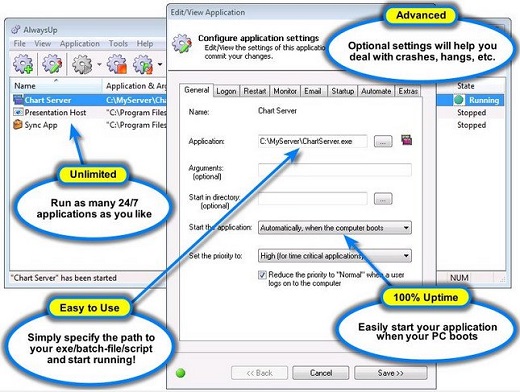
AlwaysUp 14.5.1.68

Description: AlwaysUp runs your executable, batch file, or shortcut as a Windows Service, managing and monitoring it constantly to ensure 100% uptime. It will automatically restart your application if it crashes, hangs, or grows too large, dismiss "Application error" dialogs, and run customized "sanity checks" to ensure that your application is available 24/7. Regular, detailed email from AlwaysUp will keep you abreast of crashes, scheduled restarts and other relevant events. AlwaysUp leverages the Windows Services architecture to provide robust, low-level application control in a secure environment. As a Windows Service, your application can start automatically when the computer boots, survive user logons/logoffs, and run entirely without user intervention.
Key Features & Benefits of Running an Application as a Windows Service with AlwaysUp
Ensure that any application (.exe, batch file, .com, .pif, script, shortcut, perl script, java app, php, delphi, vb, etc.) runs 24x7
Very easy to use — install your application as a Windows Service in just a few seconds!
Able to automatically start your application when your computer boots, to run when no user is logged in and to run despite logon/logoffs — all to guarantee uptime without manual user intervention
Converts both GUI and non-GUI applications to run as Services
Constantly monitors your application and restarts it whenever it fails
Secure — no need to auto-logon to Windows
Able to detect and restart "misbehaving" applications that hang, hog the CPU, or consume too much memory
Able to restart your application (or reboot the computer) at a scheduled time
Able to boost your application's priority to ensure that it gets preferential treatment on the host computer
Emails you with details of crashes, restarts and other problems
Supports the integration of your own custom "sanity check" utilities, executed regularly to test if your application is functioning normally or not
Automatically dismisses common "Application error" dialog boxes that prevent crashed applications from fully exiting
The intuitive GUI makes it easy to set up your application as a Windows Service, but no GUI is necessary once your application has been configured
Supports powerful automation, to automatically dismiss custom dialogs, fill in forms, etc. from your program running as a Windows Service
Reports all activities to the Windows Event Log
Works flawlessly in all virtual environments (VMWare, Virtual PC, etc.)
Very efficient; demands minimal CPU & memory resources
Compatible with Session 0 Isolation in Windows Server 2012/2008/R2 and Windows 8/7/Vista
Control AlwaysUp applications from your web browser using our free add-on program, AlwaysUp Web Service
Free, courteous technical support via email or phone
Site, OEM and Volume licensing available to suit your needs
Branding for Enterprise, Site and OEM licensees
No programming required
Future-proof; tailored for Windows 8 & Server 2012 and has earned the "Certified for Windows Server 2012" logo (and others) from Microsoft.
Trusted by many of the world's most recognizable companies
Robust and stable, with an installed base in the tens of thousands
Release Name: AlwaysUp 14.5.1.68
Size: 8.4 MB
Links: HOMEPAGE – NFO – Torrent Search
Download: FiKPER – UPLOADGiG – NiTROFLARE – RAPiDGATOR