Please REGISTER or RENEW your account on RAPiDGATOR.net and support us by doing through all RAPiDGATOR working download links on main posts...
May 19

Apowersoft Screen Capture Pro 1.5.6

Description: Capture Anything on Screen. Thanks to the user-friendly interface, you are able to quickly access the features included in this program. Be it quick snapshot or easy screen recording, Apowersoft Screen Capture Pro allows you to utilize all of these through the stunning and reliable interface.
Multiple capture modes
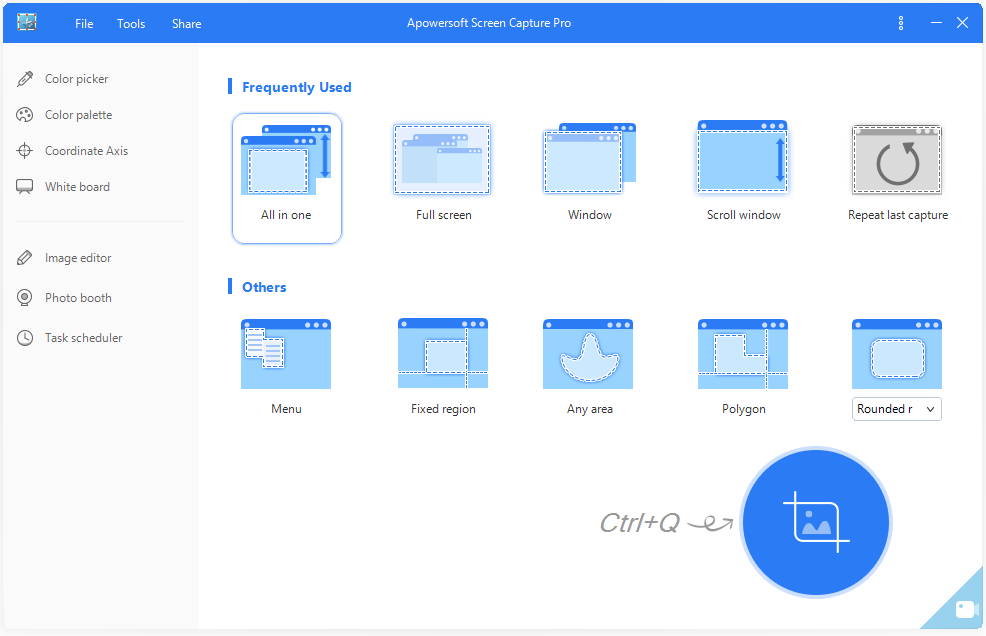
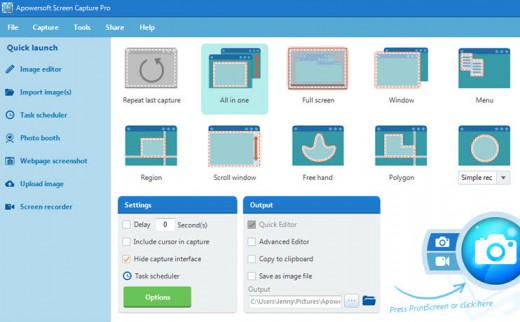
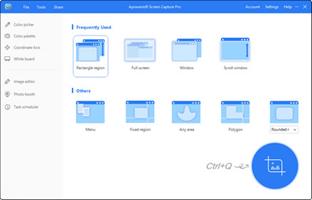
From fixed region to window, full-screen, there's a wide range of capture modes that you can take full advantage of. The captured images can be saved in various formats such as PNG, JPG, BMP, PDF, etc. While, videos can be saved in MP4, WMV, AVI, FLV and many other formats.

Different scenarios
There are different situations in which you want to take screenshots or make video recording. For example, you may want to capture a single window, web pages, webcams, or select the capture area on your own. This screen capture software provides you with the unique opportunity to do all of these and much more.

Simple and Advanced Image Editors
Upon creating a snapshot, this professional screenshot tool will help you do everything no matter you need to perform multiple modifications, add annotations or just bring some effects. Thanks to the instant editing sidebars and advanced editing panel, all edits can be done quickly without any hassle.

Annotate screenshot instantly
By using the quick editor of this screenshot software, you can annotate the snapshot with editing options on the horizontal toolbar. It can help you quickly add lines, text, arrows, highlight, blur and others to the captured image.

Professional image editor
This application is also equipped with a professional image editor with which users can do all the annotations that simple editor provides, and make other advanced edits such as cropping, resizing, rotating, or even adding effects like shadow, torn edge, etc.

Create schedule tasks
The screenshot scheduler gives you the best option in this regard. Just take a short while to configure the time for activating the snapshot, and then you can rest assured and leave the other things for the program. It can also be used to surveil your computer in the background.

Flexible settings for scheduler
Users won't find it hard to create scheduled screenshots as it provides flexible settings for customizing the specific time, internal, region and the output folder for taking snapshots automatically.

Schedule screenshots daily/weekly
For those who need to make scheduled snapshots on daily/weekly basis, you can also make use of this screenshot tool to do this trick. You can access this feature simply by enabling the daily trigger for making screenshots.

Upload and share images
Apowersoft Screen Capture Pro also comes with an integrated image uploading and social sharing function, so if you want to upload images to cloud space or share the images with friends, you will be able to work it out within a few clicks. The whole uploading and sharing process comes seamlessly in this screen capture software.

Release Name: Apowersoft Screen Capture Pro 1.5.6
Size: 33.8 MB
Links: HOMEPAGE – NFO – Torrent Search

Download: RAPiDGATOR
3 Comments
May 17

Apowersoft Screen Capture Pro 1.5.6

Description: Capture Anything on Screen. Thanks to the user-friendly interface, you are able to quickly access the features included in this program. Be it quick snapshot or easy screen recording, Apowersoft Screen Capture Pro allows you to utilize all of these through the stunning and reliable interface.

Multiple capture modes
From fixed region to window, full-screen, there's a wide range of capture modes that you can take full advantage of. The captured images can be saved in various formats such as PNG, JPG, BMP, PDF, etc. While, videos can be saved in MP4, WMV, AVI, FLV and many other formats.

Different scenarios
There are different situations in which you want to take screenshots or make video recording. For example, you may want to capture a single window, web pages, webcams, or select the capture area on your own. This screen capture software provides you with the unique opportunity to do all of these and much more.

Simple and Advanced Image Editors
Upon creating a snapshot, this professional screenshot tool will help you do everything no matter you need to perform multiple modifications, add annotations or just bring some effects. Thanks to the instant editing sidebars and advanced editing panel, all edits can be done quickly without any hassle.

Annotate screenshot instantly
By using the quick editor of this screenshot software, you can annotate the snapshot with editing options on the horizontal toolbar. It can help you quickly add lines, text, arrows, highlight, blur and others to the captured image.

Professional image editor
This application is also equipped with a professional image editor with which users can do all the annotations that simple editor provides, and make other advanced edits such as cropping, resizing, rotating, or even adding effects like shadow, torn edge, etc.

Create schedule tasks
The screenshot scheduler gives you the best option in this regard. Just take a short while to configure the time for activating the snapshot, and then you can rest assured and leave the other things for the program. It can also be used to surveil your computer in the background.

Flexible settings for scheduler
Users won't find it hard to create scheduled screenshots as it provides flexible settings for customizing the specific time, internal, region and the output folder for taking snapshots automatically.

Schedule screenshots daily/weekly
For those who need to make scheduled snapshots on daily/weekly basis, you can also make use of this screenshot tool to do this trick. You can access this feature simply by enabling the daily trigger for making screenshots.

Upload and share images
Apowersoft Screen Capture Pro also comes with an integrated image uploading and social sharing function, so if you want to upload images to cloud space or share the images with friends, you will be able to work it out within a few clicks. The whole uploading and sharing process comes seamlessly in this screen capture software.

Release Name: Apowersoft Screen Capture Pro 1.5.6
Size: 33.8 MB
Links: HOMEPAGE – NFO – Torrent Search

Download: RAPiDGATOR
7 Comments
Aug 3

Apowersoft Screen Capture Pro 1.5.2.0 Multilingual

Description: Screenshots have always been a part of our daily routine, because with them we have the opportunity to instantly record our endeavors and trifles. It's also a liable means for sharing the passion and experience that we have online and offline with other people. That is exactly what Apowersoft Screen Capture Pro will allow you to do. It also provides best possibilities like ease of use, great editing options and a free cloud storage that you can hardly find anywhere on internet.

Furthermore, this tool features both simple and advanced modes to customize and manage screenshots as you see fit!

Main Features:
- Intelligible and Elegant Ribbon Interface
- Capture anything on screen
- Abundant capture modes for all needs
- Simple and advanced Ways for editing images
- Share Images to social networks in one click
- Free cloud storage for all users
- Robust Task Scheduler for Capture Screen

Elegant and Friendly Interface
Thanks to the great ribbon interface, you are enabled to quickly access the features included in the application at your own convenience. Be it quick snapshot, advanced mode or settings, Apowersoft Screen Capture Pro allows you to utilize all of these through the stunning and reliable interface. Working with it will definitely make you have a high morale and become more productive.

Screenshot Anything Displayed on Screen
There are different situations in which you want to take a screenshot, sometimes you want to capture a single window, other times you need to take screenshots for web pages or for webcams, and you may also need to select the capture area on your own. Moreover, there’s the fact that you need to capture screenshots on multiple devices as well. This tool provides you with the unique opportunity to do all of these and much more.

Multiple Capture Modes to Choose from
Having different capture modes is essential for any user who wants to make a screenshot, and the application comes with just about every capture mode that you can imagine. From polygon to window, full-screen and free hand, there’s a wide range of options that you can take full advantage of. You can even set delay in capture to trigger the snapshot at a certain time automatically.

Built-in Simple and Advanced Image Editors
Upon creating a snapshot, no matter you need to perform multiple modifications, add annotations or just bring some effects, this professional screenshot tool will help you do that and even more. Thanks to the instant editing sidebars and advanced editing panel, you will have no problem getting the best results without wasting a lot of time in the editing room. Instead, all edits are done quickly and seamlessly without any hassle.

Share Images Online in One-click
Having the ability to take screenshots and edit them is very neat, but we usually take snapshots for sharing with others. This is the main reason why the application comes with an integrated social sharing set of buttons, so if you do want to share the images with friends, you will be able to work it out within a few clicks. The whole sharing process comes seamless in screen capture that you will fancy sharing the joy of snapshots.

Free Cloud Storage with No Registration Required
All users that get the application will be able to have their images uploaded in the cloud. Even if you remove images by mistake, you will still have them in cloud and can retrieve them at any time. This utterly free feature was added to provide everyone with all the necessary convenience in regards to handling files. What's more, there's no need to register or subscribe – you can use the free storage right away.

Create Schedule Tasks for Taking Screenshot
You don't have the time to take as many snapshots as you wish? Or do you need to capture a screen during your absence? Then the screenshot scheduler gives you the best option in this regard. Just take a short while to configure the time for activating the snapshot, and then you can rest assured and leave the other things for the program. It can also be used to surveil your computer in the background.

Release Name: Apowersoft Screen Capture Pro 1.5.2.0 Multilingual
Size: 33.4 MB
Links: HOMEPAGE – NFO – Torrent Search

Download: FiKPERUPLOADGiGNiTROFLARERAPiDGATOR

3 Comments
July 4

Apowersoft Screen Capture Pro 1.5.1.2 Multilingual

Description: Screenshots have always been a part of our daily routine, because with them we have the opportunity to instantly record our endeavors and trifles. It's also a liable means for sharing the passion and experience that we have online and offline with other people. That is exactly what Apowersoft Screen Capture Pro will allow you to do. It also provides best possibilities like ease of use, great editing options and a free cloud storage that you can hardly find anywhere on internet.

Furthermore, this tool features both simple and advanced modes to customize and manage screenshots as you see fit!

Main Features:
- Intelligible and Elegant Ribbon Interface
- Capture anything on screen
- Abundant capture modes for all needs
- Simple and advanced Ways for editing images
- Share Images to social networks in one click
- Free cloud storage for all users
- Robust Task Scheduler for Capture Screen

Elegant and Friendly Interface
Thanks to the great ribbon interface, you are enabled to quickly access the features included in the application at your own convenience. Be it quick snapshot, advanced mode or settings, Apowersoft Screen Capture Pro allows you to utilize all of these through the stunning and reliable interface. Working with it will definitely make you have a high morale and become more productive.

Screenshot Anything Displayed on Screen
There are different situations in which you want to take a screenshot, sometimes you want to capture a single window, other times you need to take screenshots for web pages or for webcams, and you may also need to select the capture area on your own. Moreover, there’s the fact that you need to capture screenshots on multiple devices as well. This tool provides you with the unique opportunity to do all of these and much more.

Multiple Capture Modes to Choose from
Having different capture modes is essential for any user who wants to make a screenshot, and the application comes with just about every capture mode that you can imagine. From polygon to window, full-screen and free hand, there’s a wide range of options that you can take full advantage of. You can even set delay in capture to trigger the snapshot at a certain time automatically.

Built-in Simple and Advanced Image Editors
Upon creating a snapshot, no matter you need to perform multiple modifications, add annotations or just bring some effects, this professional screenshot tool will help you do that and even more. Thanks to the instant editing sidebars and advanced editing panel, you will have no problem getting the best results without wasting a lot of time in the editing room. Instead, all edits are done quickly and seamlessly without any hassle.

Share Images Online in One-click
Having the ability to take screenshots and edit them is very neat, but we usually take snapshots for sharing with others. This is the main reason why the application comes with an integrated social sharing set of buttons, so if you do want to share the images with friends, you will be able to work it out within a few clicks. The whole sharing process comes seamless in screen capture that you will fancy sharing the joy of snapshots.

Free Cloud Storage with No Registration Required
All users that get the application will be able to have their images uploaded in the cloud. Even if you remove images by mistake, you will still have them in cloud and can retrieve them at any time. This utterly free feature was added to provide everyone with all the necessary convenience in regards to handling files. What's more, there's no need to register or subscribe – you can use the free storage right away.

Create Schedule Tasks for Taking Screenshot
You don't have the time to take as many snapshots as you wish? Or do you need to capture a screen during your absence? Then the screenshot scheduler gives you the best option in this regard. Just take a short while to configure the time for activating the snapshot, and then you can rest assured and leave the other things for the program. It can also be used to surveil your computer in the background.


Release Name: Apowersoft Screen Capture Pro 1.5.1.2 Multilingual
Size: 43.5 MB
Links: HOMEPAGE – NFO – Torrent Search

Download: FiKPERUPLOADGiGNiTROFLARERAPiDGATOR

7 Comments
Sept 18

Apowersoft Screen Capture Pro 1.4.8.1 Multilingual-P2P

Description: Screen Capture Pro – Multi-functional Screenshot Program. Thanks to the user-friendly interface, you are able to quickly access the features included in this program. Be it quick snapshot or easy screen recording, Apowersoft Screen Capture Pro allows you to utilize all of these through the stunning and reliable interface.

Feature :

  • Multiple capture modes
  • Different scenarios
  • Capture Anything on Screen
  • Simple and Advanced Image Editors
  • Annotate screenshot instantly
  • Professional image editor
  • Create schedule tasks
Release Names: Apowersoft Screen Capture Pro 1.4.8.1 Multilingual-P2P
Size: 38MB
Links: HOMEPAGE – NFO – Torrent Search

Download: UPLOADGiGNiTROFLARERAPiDGATOR

10 Comments