Please REGISTER or RENEW your account on RAPiDGATOR.net and support us by doing through all RAPiDGATOR working download links on main posts...

Butler makes it easier for you to perform a wide variety of potentially recurring tasks. Just arrange these tasks in Butler’s fully customizable configuration and assign one or more triggers to a task.
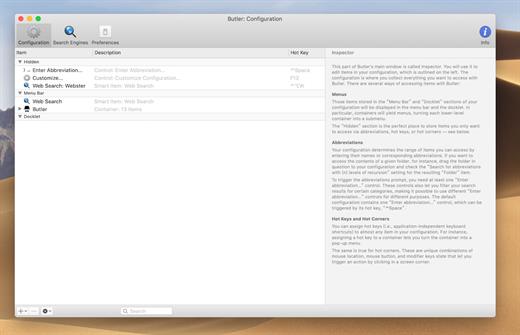
Available Triggers
- freely configurable system-wide menus in your menu bar/Butler’s docklet
- freely configurable pop-up menus — triggered via hot key or hot corner (see below)
- abbreviations — for example, enter “qt” to launch QuickTime Player
- hot keys — for example, hit [F1] make iTunes switch to the next track
- hot corners — for example, [shift]-[right mouse button click] in the lower left corner of your screen to pop up a menu that lists all system preference panes
- events — for example, launch iChat when Butler starts up and the [option] key is not held
Possible Tasks
- launch applications
- open files
- access preference panes
- manage bookmarks
- search the web
- run AppleScripts
- extend the pasteboard
- enter text snippets
- simulate keystrokes
- control iTunes
- more…
What’s New Version 4.4.8:
- Release notes were unavailable when this listing was updated.
Compatibility macOS 10.13 or later
Release Name: Butler 4.4.8
Size: 7 MB
Links: HOMEPAGE – NFO – Torrent Search
Download: RAPiDGATOR

Butler makes it easier for you to perform a wide variety of potentially recurring tasks. Just arrange these tasks in Butler’s fully customizable configuration and assign one or more triggers to a task.
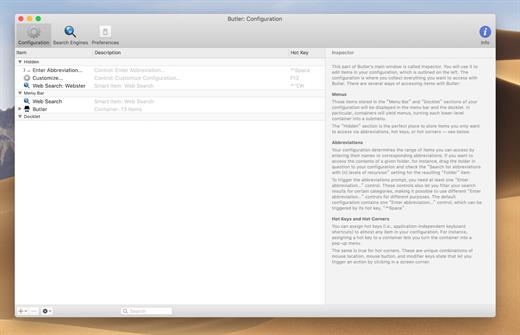
Available Triggers
- freely configurable system-wide menus in your menu bar/Butler’s docklet
- freely configurable pop-up menus — triggered via hot key or hot corner (see below)
- abbreviations — for example, enter “qt” to launch QuickTime Player
- hot keys — for example, hit [F1] make iTunes switch to the next track
- hot corners — for example, [shift]-[right mouse button click] in the lower left corner of your screen to pop up a menu that lists all system preference panes
- events — for example, launch iChat when Butler starts up and the [option] key is not held
Possible Tasks
- launch applications
- open files
- access preference panes
- manage bookmarks
- search the web
- run AppleScripts
- extend the pasteboard
- enter text snippets
- simulate keystrokes
- control iTunes
- more…
What’s New Version 4.4.7:
- Release notes were unavailable when this listing was updated.
Compatibility OS X 10.8 or later, 64-bit processor
Release Name: Butler 4.4.7
Size: 7.2 MB
Links: HOMEPAGE – NFO – Torrent Search
Download: UPLOADGiG – NiTROFLARE – RAPiDGATOR
Butler makes it easier for you to perform a wide variety of potentially recurring tasks. Just arrange these tasks in Butler’s fully customizable configuration and assign one or more triggers to a task.
Available Triggers
- freely configurable system-wide menus in your menu bar/Butler’s docklet
- freely configurable pop-up menus — triggered via hot key or hot corner (see below)
- abbreviations — for example, enter “qt” to launch QuickTime Player
- hot keys — for example, hit [F1] make iTunes switch to the next track
- hot corners — for example, [shift]-[right mouse button click] in the lower left corner of your screen to pop up a menu that lists all system preference panes
- events — for example, launch iChat when Butler starts up and the [option] key is not held
Possible Tasks
- launch applications
- open files
- access preference panes
- manage bookmarks
- search the web
- run AppleScripts
- extend the pasteboard
- enter text snippets
- simulate keystrokes
- control iTunes
- more…
What’s New Version 4.4.6:
- Fixed a bug related to dragging and dropping items to Butler icons in the menu bar.
Compatibility OS X 10.8 or later, 64-bit processor
Release Name: Butler 4.4.6
Size: 5.9 MB
Links: HOMEPAGE – NFO – Torrent Search
Download: UPLOADGiG – NiTROFLARE – RAPiDGATOR

Butler makes it easier for you to perform a wide variety of potentially recurring tasks. Just arrange these tasks in Butler’s fully customizable configuration and assign one or more triggers to a task.
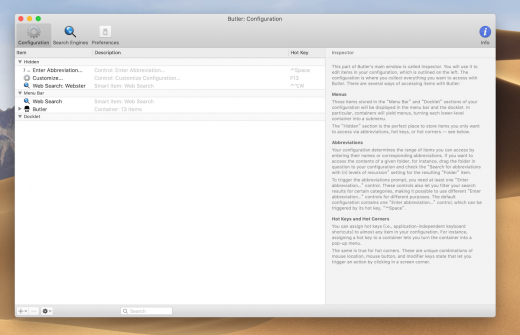
Available Triggers
- freely configurable system-wide menus in your menu bar/Butler’s docklet
- freely configurable pop-up menus — triggered via hot key or hot corner (see below)
- abbreviations — for example, enter “qt” to launch QuickTime Player
- hot keys — for example, hit [F1] make iTunes switch to the next track
- hot corners — for example, [shift]-[right mouse button click] in the lower left corner of your screen to pop up a menu that lists all system preference panes
- events — for example, launch iChat when Butler starts up and the [option] key is not held
Possible Tasks
- launch applications
- open files
- access preference panes
- manage bookmarks
- search the web
- run AppleScripts
- extend the pasteboard
- enter text snippets
- simulate keystrokes
- control iTunes
- more…
What’s New Version 4.4.5:
- Fixed an issue where adding a new "Music: [number of stars]" Smart Item would give you a defective Smart Item. If you have any Smart Item like that with a lightbulb icon, delete it and add a new one after updating Butler. (Hat tip to Steve K.)
- Fixed an issue where Butler would sometimes hang while Music was running.
- Improved dark mode support for menu bar separators.
Compatibility OS X 10.8 or later, 64-bit processor
Release Name: Butler 4.4.5
Size: 6.5 MB
Links: HOMEPAGE – NFO – Torrent Search
Download: UPLOADGiG – NiTROFLARE – RAPiDGATOR



