Please REGISTER or RENEW your account on RAPiDGATOR.net and support us by doing through all RAPiDGATOR working download links on main posts...
June 3

Capture One 16.8.1.3586

Description: Mind-blowing colors and quality. Get true-to-life colors and superb image quality right from the start of your photo process. Fine-tuned by our in-house experts, our RAW converter is customized for nearly 600 camera profiles and over 700 lenses. With true-to-life color processing, you can spend less time editing and reach your final look even faster.
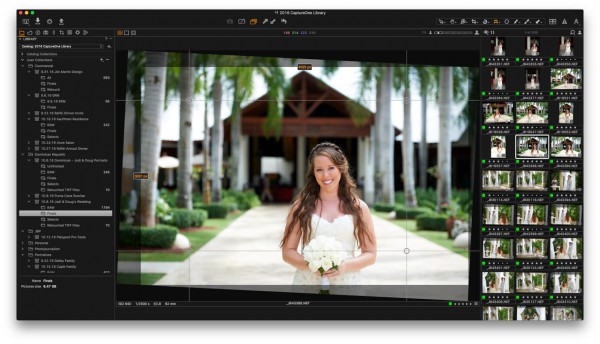
Shoot tethered. Fast.
Connect your camera and shoot tethered into Capture One. Organize shots, make changes on the spot, auto-apply edits to incoming shots, and get the perfect image every time. See what your camera sees with Live View, and don’t miss out on some of our smart features like ReTether and Save to Card, which will make sure you stay flexible and never lose a shot.

Work together with anyone, anywhere
Collaborating with teams and clients – whether in the same room or on different continents – is made easy with Capture One Live. Share, view, comment, rate, tag, and get feedback. All in one place. No uploading, exporting, or downloading a single photo ever again.

Edit intelligently. Easily.
With assisted editing, you can start and finish your projects with just a few clicks.

With a single click, you can instantly match the style or edits of a reference image. Whether from a previous project, a film still, or a mood board, it automatically transfers the look to your current photo(s), giving you a strong starting point for editing and color grading.

Mask skin, hair, eyes, facial features, subjects, and backgrounds with extreme precision. Save time by creating complex masks quickly for multiple images. You can even combine them with other adjustments and save them as a Style.

You can now set your crop reference to a single image and apply it to a batch of photos or incoming shots. Capture One will detect whether to focus on a face or a subject and automatically make consistent crops for all your shots.

Finish most of your edits in seconds with Smart Adjustments by automatically adjusting Exposure and White Balance. Unlike copy and apply, Smart Adjustments makes our photos consistent, even under different lighting conditions.

Experience the speed as Capture One intelligently zooms and pans to the nearest eye in each shot, allowing you to quickly check for sharpness without manually zooming in.

A quick and easy way to take care of annoying dust spots in multiple photos and dramatically speed up your editing.

Release Name: Capture One 16.8.1.3586
Size: 1.5 GB
Links: HOMEPAGE – NFO – Torrent Search

Download: RAPiDGATOR

3 Comments
May 29

Capture One 16.8.0.3565

Description: Mind-blowing colors and quality. Get true-to-life colors and superb image quality right from the start of your photo process. Fine-tuned by our in-house experts, our RAW converter is customized for nearly 600 camera profiles and over 700 lenses. With true-to-life color processing, you can spend less time editing and reach your final look even faster.

Shoot tethered. Fast.
Connect your camera and shoot tethered into Capture One. Organize shots, make changes on the spot, auto-apply edits to incoming shots, and get the perfect image every time. See what your camera sees with Live View, and don’t miss out on some of our smart features like ReTether and Save to Card, which will make sure you stay flexible and never lose a shot.

Work together with anyone, anywhere
Collaborating with teams and clients – whether in the same room or on different continents – is made easy with Capture One Live. Share, view, comment, rate, tag, and get feedback. All in one place. No uploading, exporting, or downloading a single photo ever again.

Edit intelligently. Easily.
With assisted editing, you can start and finish your projects with just a few clicks.

With a single click, you can instantly match the style or edits of a reference image. Whether from a previous project, a film still, or a mood board, it automatically transfers the look to your current photo(s), giving you a strong starting point for editing and color grading.

Mask skin, hair, eyes, facial features, subjects, and backgrounds with extreme precision. Save time by creating complex masks quickly for multiple images. You can even combine them with other adjustments and save them as a Style.

You can now set your crop reference to a single image and apply it to a batch of photos or incoming shots. Capture One will detect whether to focus on a face or a subject and automatically make consistent crops for all your shots.

Finish most of your edits in seconds with Smart Adjustments by automatically adjusting Exposure and White Balance. Unlike copy and apply, Smart Adjustments makes our photos consistent, even under different lighting conditions.

Experience the speed as Capture One intelligently zooms and pans to the nearest eye in each shot, allowing you to quickly check for sharpness without manually zooming in.

A quick and easy way to take care of annoying dust spots in multiple photos and dramatically speed up your editing.

Release Name: Capture One 16.8.0.3565
Size: 1.5 GB
Links: HOMEPAGE – NFO – Torrent Search

Download: RAPiDGATOR

4 Comments
May 12

Capture One 16.7.8.3529

Description: Mind-blowing colors and quality. Get true-to-life colors and superb image quality right from the start of your photo process. Fine-tuned by our in-house experts, our RAW converter is customized for nearly 600 camera profiles and over 700 lenses. With true-to-life color processing, you can spend less time editing and reach your final look even faster.

Shoot tethered. Fast.
Connect your camera and shoot tethered into Capture One. Organize shots, make changes on the spot, auto-apply edits to incoming shots, and get the perfect image every time. See what your camera sees with Live View, and don’t miss out on some of our smart features like ReTether and Save to Card, which will make sure you stay flexible and never lose a shot.

Work together with anyone, anywhere
Collaborating with teams and clients – whether in the same room or on different continents – is made easy with Capture One Live. Share, view, comment, rate, tag, and get feedback. All in one place. No uploading, exporting, or downloading a single photo ever again.

Edit intelligently. Easily.
With assisted editing, you can start and finish your projects with just a few clicks.

With a single click, you can instantly match the style or edits of a reference image. Whether from a previous project, a film still, or a mood board, it automatically transfers the look to your current photo(s), giving you a strong starting point for editing and color grading.

Mask skin, hair, eyes, facial features, subjects, and backgrounds with extreme precision. Save time by creating complex masks quickly for multiple images. You can even combine them with other adjustments and save them as a Style.

You can now set your crop reference to a single image and apply it to a batch of photos or incoming shots. Capture One will detect whether to focus on a face or a subject and automatically make consistent crops for all your shots.

Finish most of your edits in seconds with Smart Adjustments by automatically adjusting Exposure and White Balance. Unlike copy and apply, Smart Adjustments makes our photos consistent, even under different lighting conditions.

Experience the speed as Capture One intelligently zooms and pans to the nearest eye in each shot, allowing you to quickly check for sharpness without manually zooming in.

A quick and easy way to take care of annoying dust spots in multiple photos and dramatically speed up your editing.

Release Name: Capture One 16.7.8.3529
Size: 1.2 GB
Links: HOMEPAGE – NFO – Torrent Search

Download: RAPiDGATOR

5 Comments
Apr 16

Capture One 16.7.7.3470

Description: Mind-blowing colors and quality. Get true-to-life colors and superb image quality right from the start of your photo process. Fine-tuned by our in-house experts, our RAW converter is customized for nearly 600 camera profiles and over 700 lenses. With true-to-life color processing, you can spend less time editing and reach your final look even faster.

Shoot tethered. Fast.
Connect your camera and shoot tethered into Capture One. Organize shots, make changes on the spot, auto-apply edits to incoming shots, and get the perfect image every time. See what your camera sees with Live View, and don’t miss out on some of our smart features like ReTether and Save to Card, which will make sure you stay flexible and never lose a shot.

Work together with anyone, anywhere
Collaborating with teams and clients – whether in the same room or on different continents – is made easy with Capture One Live. Share, view, comment, rate, tag, and get feedback. All in one place. No uploading, exporting, or downloading a single photo ever again.

Edit intelligently. Easily.
With assisted editing, you can start and finish your projects with just a few clicks.

With a single click, you can instantly match the style or edits of a reference image. Whether from a previous project, a film still, or a mood board, it automatically transfers the look to your current photo(s), giving you a strong starting point for editing and color grading.

Mask skin, hair, eyes, facial features, subjects, and backgrounds with extreme precision. Save time by creating complex masks quickly for multiple images. You can even combine them with other adjustments and save them as a Style.

You can now set your crop reference to a single image and apply it to a batch of photos or incoming shots. Capture One will detect whether to focus on a face or a subject and automatically make consistent crops for all your shots.

Finish most of your edits in seconds with Smart Adjustments by automatically adjusting Exposure and White Balance. Unlike copy and apply, Smart Adjustments makes our photos consistent, even under different lighting conditions.

Experience the speed as Capture One intelligently zooms and pans to the nearest eye in each shot, allowing you to quickly check for sharpness without manually zooming in.

A quick and easy way to take care of annoying dust spots in multiple photos and dramatically speed up your editing.

Release Name: Capture One 16.7.7.3470
Size: 1.2 GB
Links: HOMEPAGE – NFO – Torrent Search

Download: RAPiDGATOR
5 Comments
Mar 16

Capture One 16.7.6.3417

Description: Mind-blowing colors and quality. Get true-to-life colors and superb image quality right from the start of your photo process. Fine-tuned by our in-house experts, our RAW converter is customized for nearly 600 camera profiles and over 700 lenses. With true-to-life color processing, you can spend less time editing and reach your final look even faster.

Shoot tethered. Fast.
Connect your camera and shoot tethered into Capture One. Organize shots, make changes on the spot, auto-apply edits to incoming shots, and get the perfect image every time. See what your camera sees with Live View, and don’t miss out on some of our smart features like ReTether and Save to Card, which will make sure you stay flexible and never lose a shot.

Work together with anyone, anywhere
Collaborating with teams and clients – whether in the same room or on different continents – is made easy with Capture One Live. Share, view, comment, rate, tag, and get feedback. All in one place. No uploading, exporting, or downloading a single photo ever again.

Edit intelligently. Easily.
With assisted editing, you can start and finish your projects with just a few clicks.

With a single click, you can instantly match the style or edits of a reference image. Whether from a previous project, a film still, or a mood board, it automatically transfers the look to your current photo(s), giving you a strong starting point for editing and color grading.

Mask skin, hair, eyes, facial features, subjects, and backgrounds with extreme precision. Save time by creating complex masks quickly for multiple images. You can even combine them with other adjustments and save them as a Style.

You can now set your crop reference to a single image and apply it to a batch of photos or incoming shots. Capture One will detect whether to focus on a face or a subject and automatically make consistent crops for all your shots.

Finish most of your edits in seconds with Smart Adjustments by automatically adjusting Exposure and White Balance. Unlike copy and apply, Smart Adjustments makes our photos consistent, even under different lighting conditions.

Experience the speed as Capture One intelligently zooms and pans to the nearest eye in each shot, allowing you to quickly check for sharpness without manually zooming in.

A quick and easy way to take care of annoying dust spots in multiple photos and dramatically speed up your editing.

Release Name: Capture One 16.7.6.3417
Size: 1.2 GB
Links: HOMEPAGE – NFO – Torrent Search

Download: RAPiDGATOR

8 Comments
Mar 13

Capture One 16.7.5.3410

Description: Mind-blowing colors and quality. Get true-to-life colors and superb image quality right from the start of your photo process. Fine-tuned by our in-house experts, our RAW converter is customized for nearly 600 camera profiles and over 700 lenses. With true-to-life color processing, you can spend less time editing and reach your final look even faster.

Shoot tethered. Fast.
Connect your camera and shoot tethered into Capture One. Organize shots, make changes on the spot, auto-apply edits to incoming shots, and get the perfect image every time. See what your camera sees with Live View, and don’t miss out on some of our smart features like ReTether and Save to Card, which will make sure you stay flexible and never lose a shot.

Work together with anyone, anywhere
Collaborating with teams and clients – whether in the same room or on different continents – is made easy with Capture One Live. Share, view, comment, rate, tag, and get feedback. All in one place. No uploading, exporting, or downloading a single photo ever again.

Edit intelligently. Easily.
With assisted editing, you can start and finish your projects with just a few clicks.

With a single click, you can instantly match the style or edits of a reference image. Whether from a previous project, a film still, or a mood board, it automatically transfers the look to your current photo(s), giving you a strong starting point for editing and color grading.

Mask skin, hair, eyes, facial features, subjects, and backgrounds with extreme precision. Save time by creating complex masks quickly for multiple images. You can even combine them with other adjustments and save them as a Style.

You can now set your crop reference to a single image and apply it to a batch of photos or incoming shots. Capture One will detect whether to focus on a face or a subject and automatically make consistent crops for all your shots.

Finish most of your edits in seconds with Smart Adjustments by automatically adjusting Exposure and White Balance. Unlike copy and apply, Smart Adjustments makes our photos consistent, even under different lighting conditions.

Experience the speed as Capture One intelligently zooms and pans to the nearest eye in each shot, allowing you to quickly check for sharpness without manually zooming in.

A quick and easy way to take care of annoying dust spots in multiple photos and dramatically speed up your editing.

Release Name: Capture One 16.7.5.3410
Size: 1.2 GB
Links: HOMEPAGE – NFO – Torrent Search

Download: RAPiDGATOR

11 Comments
Mar 6

Capture One 16.7.4.3394

Description: Mind-blowing colors and quality. Get true-to-life colors and superb image quality right from the start of your photo process. Fine-tuned by our in-house experts, our RAW converter is customized for nearly 600 camera profiles and over 700 lenses. With true-to-life color processing, you can spend less time editing and reach your final look even faster.

Shoot tethered. Fast.
Connect your camera and shoot tethered into Capture One. Organize shots, make changes on the spot, auto-apply edits to incoming shots, and get the perfect image every time. See what your camera sees with Live View, and don’t miss out on some of our smart features like ReTether and Save to Card, which will make sure you stay flexible and never lose a shot.

Work together with anyone, anywhere
Collaborating with teams and clients – whether in the same room or on different continents – is made easy with Capture One Live. Share, view, comment, rate, tag, and get feedback. All in one place. No uploading, exporting, or downloading a single photo ever again.

Edit intelligently. Easily.
With assisted editing, you can start and finish your projects with just a few clicks.

With a single click, you can instantly match the style or edits of a reference image. Whether from a previous project, a film still, or a mood board, it automatically transfers the look to your current photo(s), giving you a strong starting point for editing and color grading.

Mask skin, hair, eyes, facial features, subjects, and backgrounds with extreme precision. Save time by creating complex masks quickly for multiple images. You can even combine them with other adjustments and save them as a Style.

You can now set your crop reference to a single image and apply it to a batch of photos or incoming shots. Capture One will detect whether to focus on a face or a subject and automatically make consistent crops for all your shots.

Finish most of your edits in seconds with Smart Adjustments by automatically adjusting Exposure and White Balance. Unlike copy and apply, Smart Adjustments makes our photos consistent, even under different lighting conditions.

Experience the speed as Capture One intelligently zooms and pans to the nearest eye in each shot, allowing you to quickly check for sharpness without manually zooming in.

A quick and easy way to take care of annoying dust spots in multiple photos and dramatically speed up your editing.

Release Name: Capture One 16.7.4.3394
Size: 1.2 GB
Links: HOMEPAGE – NFO – Torrent Search

Download: RAPiDGATOR

10 Comments
Feb 4

Capture One 16.7.3.3328

Description: Mind-blowing colors and quality. Get true-to-life colors and superb image quality right from the start of your photo process. Fine-tuned by our in-house experts, our RAW converter is customized for nearly 600 camera profiles and over 700 lenses. With true-to-life color processing, you can spend less time editing and reach your final look even faster.

Shoot tethered. Fast.
Connect your camera and shoot tethered into Capture One. Organize shots, make changes on the spot, auto-apply edits to incoming shots, and get the perfect image every time. See what your camera sees with Live View, and don’t miss out on some of our smart features like ReTether and Save to Card, which will make sure you stay flexible and never lose a shot.

Work together with anyone, anywhere
Collaborating with teams and clients – whether in the same room or on different continents – is made easy with Capture One Live. Share, view, comment, rate, tag, and get feedback. All in one place. No uploading, exporting, or downloading a single photo ever again.

Edit intelligently. Easily.
With assisted editing, you can start and finish your projects with just a few clicks.

With a single click, you can instantly match the style or edits of a reference image. Whether from a previous project, a film still, or a mood board, it automatically transfers the look to your current photo(s), giving you a strong starting point for editing and color grading.

Mask skin, hair, eyes, facial features, subjects, and backgrounds with extreme precision. Save time by creating complex masks quickly for multiple images. You can even combine them with other adjustments and save them as a Style.

You can now set your crop reference to a single image and apply it to a batch of photos or incoming shots. Capture One will detect whether to focus on a face or a subject and automatically make consistent crops for all your shots.

Finish most of your edits in seconds with Smart Adjustments by automatically adjusting Exposure and White Balance. Unlike copy and apply, Smart Adjustments makes our photos consistent, even under different lighting conditions.

Experience the speed as Capture One intelligently zooms and pans to the nearest eye in each shot, allowing you to quickly check for sharpness without manually zooming in.

A quick and easy way to take care of annoying dust spots in multiple photos and dramatically speed up your editing.

Release Name: Capture One 16.7.3.3328
Size: 1.2 GB
Links: HOMEPAGE – NFO – Torrent Search

Download: RAPiDGATOR

9 Comments
Dec 10

Capture One 16.7.2.3273

Description: Mind-blowing colors and quality. Get true-to-life colors and superb image quality right from the start of your photo process. Fine-tuned by our in-house experts, our RAW converter is customized for nearly 600 camera profiles and over 700 lenses. With true-to-life color processing, you can spend less time editing and reach your final look even faster.

Shoot tethered. Fast.
Connect your camera and shoot tethered into Capture One. Organize shots, make changes on the spot, auto-apply edits to incoming shots, and get the perfect image every time. See what your camera sees with Live View, and don’t miss out on some of our smart features like ReTether and Save to Card, which will make sure you stay flexible and never lose a shot.

Work together with anyone, anywhere
Collaborating with teams and clients – whether in the same room or on different continents – is made easy with Capture One Live. Share, view, comment, rate, tag, and get feedback. All in one place. No uploading, exporting, or downloading a single photo ever again.

Edit intelligently. Easily.
With assisted editing, you can start and finish your projects with just a few clicks.

With a single click, you can instantly match the style or edits of a reference image. Whether from a previous project, a film still, or a mood board, it automatically transfers the look to your current photo(s), giving you a strong starting point for editing and color grading.

Mask skin, hair, eyes, facial features, subjects, and backgrounds with extreme precision. Save time by creating complex masks quickly for multiple images. You can even combine them with other adjustments and save them as a Style.

You can now set your crop reference to a single image and apply it to a batch of photos or incoming shots. Capture One will detect whether to focus on a face or a subject and automatically make consistent crops for all your shots.

Finish most of your edits in seconds with Smart Adjustments by automatically adjusting Exposure and White Balance. Unlike copy and apply, Smart Adjustments makes our photos consistent, even under different lighting conditions.

Experience the speed as Capture One intelligently zooms and pans to the nearest eye in each shot, allowing you to quickly check for sharpness without manually zooming in.

A quick and easy way to take care of annoying dust spots in multiple photos and dramatically speed up your editing.

Release Name: Capture One 16.7.2.3273
Size: 1.2 GB
Links: HOMEPAGE – NFO – Torrent Search

Download: RAPiDGATOR

10 Comments
Sept 10

Capture One 16.6.6.3111

Description: Mind-blowing colors and quality. Get true-to-life colors and superb image quality right from the start of your photo process. Fine-tuned by our in-house experts, our RAW converter is customized for nearly 600 camera profiles and over 700 lenses. With true-to-life color processing, you can spend less time editing and reach your final look even faster.

Shoot tethered. Fast.
Connect your camera and shoot tethered into Capture One. Organize shots, make changes on the spot, auto-apply edits to incoming shots, and get the perfect image every time. See what your camera sees with Live View, and don’t miss out on some of our smart features like ReTether and Save to Card, which will make sure you stay flexible and never lose a shot.

Work together with anyone, anywhere
Collaborating with teams and clients – whether in the same room or on different continents – is made easy with Capture One Live. Share, view, comment, rate, tag, and get feedback. All in one place. No uploading, exporting, or downloading a single photo ever again.

Edit intelligently. Easily.
With assisted editing, you can start and finish your projects with just a few clicks.

With a single click, you can instantly match the style or edits of a reference image. Whether from a previous project, a film still, or a mood board, it automatically transfers the look to your current photo(s), giving you a strong starting point for editing and color grading.

Mask skin, hair, eyes, facial features, subjects, and backgrounds with extreme precision. Save time by creating complex masks quickly for multiple images. You can even combine them with other adjustments and save them as a Style.

You can now set your crop reference to a single image and apply it to a batch of photos or incoming shots. Capture One will detect whether to focus on a face or a subject and automatically make consistent crops for all your shots.

Finish most of your edits in seconds with Smart Adjustments by automatically adjusting Exposure and White Balance. Unlike copy and apply, Smart Adjustments makes our photos consistent, even under different lighting conditions.

Experience the speed as Capture One intelligently zooms and pans to the nearest eye in each shot, allowing you to quickly check for sharpness without manually zooming in.

A quick and easy way to take care of annoying dust spots in multiple photos and dramatically speed up your editing.

Release Name: Capture One 16.6.6.3111
Size: 1.1 GB
Links: HOMEPAGE – NFO – Torrent Search

Download: UPLOADGiGRAPiDGATOR

4 Comments