Please REGISTER or RENEW your account on RAPiDGATOR.net and support us by doing through all RAPiDGATOR working download links on main posts...
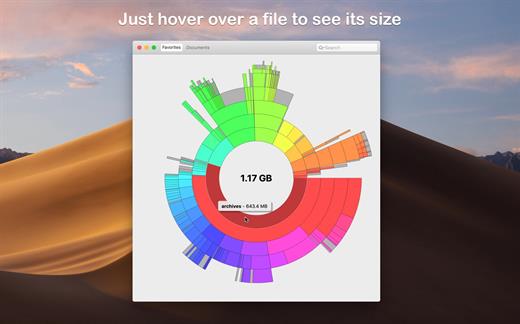
Disk Graph is a tool that allows you to inspect your disk and easily find the files that take away most of your disk space. With its beautiful interface and its pie-like graph, locating big files has never been easier.
Features:
- Any directory reachable in the Finder (i.e. on your local machine, on an external drive or even on a remote server) can be selected and immediately analyzed
- Freely navigate inside the subdirectories of an analyzed folder or device
- Smooth animations manage the transitions between selected directories
- Move the mouse over a file to see its name and size
- Use the context menu to trash selected files
- Quickly search for filenames
- Save your favorite locations and access them with one click from the main window
- Choose between two modes: File Size Mode (where section sizes are relative to the respective file size) and File Count Mode (where section sizes represent the number of contained files)
What’s New Version 3.3.1:
- Improved compatibility with macOS 26.
- Improved accessibility: the graph renders with increased contrast, reduced transparency, or reduced motion (by replacing animations with a fade transition) based on the Accessibility options in System Settings.
- Fixed a rendering issue that could happen when scanning a folder after enabling the option “Show Available Space”.
- Fixed an issue that caused directories containing search results to be collapsed.
Compatibility macOS 10.3 or later.
Apple Silicon or Intel Core processor
Release Name: Disk Graph 3.3.1
Size: 6.4 MB
Links: HOMEPAGE – NFO – Torrent Search
Download: UPLOADY – RAPiDGATOR
Disk Graph is a tool that allows you to inspect your disk and easily find the files that take away most of your disk space. With its beautiful interface and its pie-like graph, locating big files has never been easier.
Features:
- Any directory reachable in the Finder (i.e. on your local machine, on an external drive or even on a remote server) can be selected and immediately analyzed
- Freely navigate inside the subdirectories of an analyzed folder or device
- Smooth animations manage the transitions between selected directories
- Move the mouse over a file to see its name and size
- Use the context menu to trash selected files
- Quickly search for filenames
- Save your favorite locations and access them with one click from the main window
- Choose between two modes: File Size Mode (where section sizes are relative to the respective file size) and File Count Mode (where section sizes represent the number of contained files)
What’s New Version 3.2.1:
- Improved compatibility with macOS 26.
- Improved accessibility: the graph renders with increased contrast, reduced transparency, or reduced motion (by replacing animations with a fade transition) based on the Accessibility options in System Settings.
- Fixed a rendering issue that could happen when scanning a folder after enabling the option “Show Available Space”.
- Fixed an issue that caused directories containing search results to be collapsed.
Compatibility macOS 10.3 or later.
Apple Silicon or Intel Core processor
Release Name: Disk Graph 3.2.1
Size: 9.5 MB
Links: HOMEPAGE – NFO – Torrent Search
Download: RAPiDGATOR
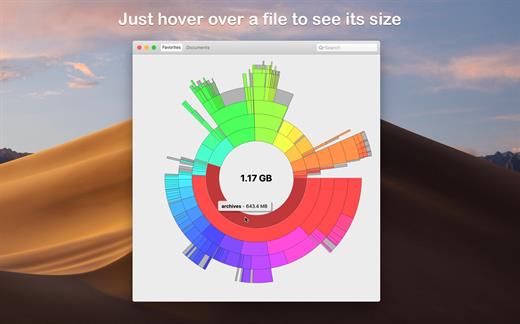
Disk Graph is a tool that allows you to inspect your disk and easily find the files that take away most of your disk space. With its beautiful interface and its pie-like graph, locating big files has never been easier.
Features:
- Any directory reachable in the Finder (i.e. on your local machine, on an external drive or even on a remote server) can be selected and immediately analyzed
- Freely navigate inside the subdirectories of an analyzed folder or device
- Smooth animations manage the transitions between selected directories
- Move the mouse over a file to see its name and size
- Use the context menu to trash selected files
- Quickly search for filenames
- Save your favorite locations and access them with one click from the main window
- Choose between two modes: File Size Mode (where section sizes are relative to the respective file size) and File Count Mode (where section sizes represent the number of contained files)
What’s New Version 2.4.2:
- Fixed an issue that caused the navigation control to disappear when navigating into a deeply nested folder.
- Search results are now listed in the outline view.
- The search function can now search by file name and file size.
- Favorites can now have a custom filter that excludes files from the scan based on their path.
Compatibility OS X 10.10 or later, 64-bit processor
Release Name: Disk Graph 2.4.2
Size: 9.1 MB
Links: HOMEPAGE – NFO – Torrent Search
Download: UPLOADGiG – NiTROFLARE – RAPiDGATOR
Disk Graph is a tool that allows you to inspect your disk and easily find the files that take away most of your disk space. With its beautiful interface and its pie-like graph, locating big files has never been easier.
Features:
- Any directory reachable in the Finder (i.e. on your local machine, on an external drive or even on a remote server) can be selected and immediately analyzed
- Freely navigate inside the subdirectories of an analyzed folder or device
- Smooth animations manage the transitions between selected directories
- Move the mouse over a file to see its name and size
- Use the context menu to trash selected files
- Quickly search for filenames
- Save your favorite locations and access them with one click from the main window
- Choose between two modes: File Size Mode (where section sizes are relative to the respective file size) and File Count Mode (where section sizes represent the number of contained files)
What’s New Version 2.4.1:
- Fixed an issue that caused the navigation control to disappear when navigating into a deeply nested folder.
- Search results are now listed in the outline view.
- The search function can now search by file name and file size.
- Favorites can now have a custom filter that excludes files from the scan based on their path.
Compatibility OS X 10.10 or later, 64-bit processor
Release Name: Disk Graph 2.4.1
Size: 9.1 MB
Links: HOMEPAGE – NFO – Torrent Search
Download: UPLOADGiG – NiTROFLARE – RAPiDGATOR



