

Please REGISTER or RENEW your account on RAPiDGATOR.net and support us by doing through all RAPiDGATOR working download links on main posts...
Jan 15

EasyUEFI Technician 6.2 + WinPE

Description: Hasleo EasyUEFI is a handy and useful software that allows you to manage (U)EFI boot options, BCD boot options and EFI System Partition (ESP), it can help you repair Windows boot issues caused by corrupted or missing (U)EFI boot option, BCD boot option or EFI System Partition.
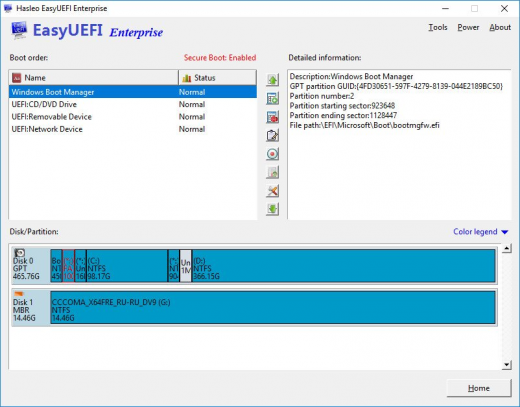
Hasleo EasyUEFI supports the creation of WinPE emergency disks, so you can boot from the WinPE emergency disks to fix issues caused by damaged or missing UEFI boot entries, BCD boot entries, or ESP when your Windows fails to boot.

Manage (U)EFI/BCD Boot Options & EFI System Partitions & Fix (U)EFI/BCD Boot Issues
- Comprehensive (U)EFI boot option management functions, such as create, delete, edit (U)EFI boot options, change (U)EFI boot sequence, etc.
- Comprehensive BCD boot option management functions, such as create, delete, edit BCD boot options, change default boot entry, etc.
- Backup, restore, rebuild, delete, explore, read and write EFI System Partition (ESP) or move EFI System Partition (ESP) to another drive.
- Creation of Windows PE emergency disk and command line support
- Supported OS: (U)EFI-based Windows 11/10/8/7/Vista/2022/2019/2016/2012/2008.

Key Features

(U)EFI boot option management
This feature allows you to easily manage (U)EFI boot options, such as create, delete, edit, clean up, backup and restore boot options, or change boot sequence, all these operations done under Windows without entering BIOS setup.

BCD boot option management
This feature allows you to easily manage BCD boot options, such as create, delete, edit, set default boot option, backup and restore boot options, or change display order.

EFI system partition (ESP) management
This feature allows you to effectively manage the EFI System Partitions, such as backup, restore, rebuild, delete, explore, read and write the EFI System Partition, or move EFI System Partition from one drive to another.

Release Name: EasyUEFI Technician 6.2 + WinPE
Size: 569.3 MB
Links: HOMEPAGE – NFO – Torrent Search

Download: RAPiDGATOR

5 Comments
May 10

EasyUEFI Technician v4.9.2 (x64) Portable Cracked

Description: EasyUEFI owns comprehensive EFI/UEFI boot option management functions, such as create, delete, edit, clean up, backup and restore EFI/UEFI boot options, specifies an one-time boot entry for the next restart, or change EFI/UEFI boot order, all these operations done under Windows without entering BIOS setup.


Features :


  • Create, Delete and Modify EFI/UEFI Boot Option
    Backup & Restore EFI/UEFI Boot Option
    Disable & Enable EFI/UEFI Boot Option
    Boot Into UEFI firmware settings (UEFI BIOS) From Inside Windows
    Specifies an One-time Boot Option
    Change EFI/UEFI Boot Sequence
    Command line support
  • EFI system partition management
    EasyUEFI also releases a feature which allows you to manage the EFI System Partitions, with this feature you can easily backup, restore, rebuild the EFI System Partition (ESP), or move EFI System Partition from one drive to another.
  • Backup EFI System Partition
    Restore EFI System Partition
    Recreate EFI System Partition
    Move EFI System Partition to Another Drive
    Manage EFI system Partitions
    Create Windows PE emergency disk
  • With EasyUEFI you can also build a bootable Windows PE image file. After building the image file, you can use it to create a bootable USB flash drives or use 3rd-party burner software to burn it to CD/DVD. With this Windows PE emergency disk you can easily fix EFI boot issues or repair efi system partition, such as missing or corrupt EFI boot option, missing or corrupt EFI System Partition.

How To Install?


  • Install the program.
  • Wait for it to get installed fully.
  • Boom! Now you can use the program without any interruptions. (It’s Pre-Cracked lol)
  • That’s it, Enjoy now
Release Name: EasyUEFI Technician v4.9.2 (x64) Portable Cracked
Size: 15 MB
Links: HOMEPAGE – NFO – Torrent Search

Download: UPLOADGiG – NiTROFLARE – RAPiDGATOR

7 Comments
Mar 28

EasyUEFI Technician v4.9.1 Portable Cracked

Description: EasyUEFI owns comprehensive EFI/UEFI boot option management functions, such as create, delete, edit, clean up, backup and restore EFI/UEFI boot options, specifies an one-time boot entry for the next restart, or change EFI/UEFI boot order, all these operations done under Windows without entering BIOS setup.


Features :


  • Create, Delete and Modify EFI/UEFI Boot Option
    Backup & Restore EFI/UEFI Boot Option
    Disable & Enable EFI/UEFI Boot Option
    Boot Into UEFI firmware settings (UEFI BIOS) From Inside Windows
    Specifies an One-time Boot Option
    Change EFI/UEFI Boot Sequence
    Command line support
  • EFI system partition management
    EasyUEFI also releases a feature which allows you to manage the EFI System Partitions, with this feature you can easily backup, restore, rebuild the EFI System Partition (ESP), or move EFI System Partition from one drive to another.
  • Backup EFI System Partition
    Restore EFI System Partition
    Recreate EFI System Partition
    Move EFI System Partition to Another Drive
    Manage EFI system Partitions
    Create Windows PE emergency disk
  • With EasyUEFI you can also build a bootable Windows PE image file. After building the image file, you can use it to create a bootable USB flash drives or use 3rd-party burner software to burn it to CD/DVD. With this Windows PE emergency disk you can easily fix EFI boot issues or repair efi system partition, such as missing or corrupt EFI boot option, missing or corrupt EFI System Partition.

How To Install?


  • Install the program.
  • Wait for it to get installed fully.
  • Boom! Now you can use the program without any interruptions. (It’s Pre-Cracked lol)
  • That’s it, Enjoy now
Release Name: EasyUEFI Technician v4.9.1 Portable Cracked
Size: 15 MB
Links: HOMEPAGE – NFO – Torrent Search

Download: UPLOADGiG – NiTROFLARE – RAPiDGATOR

5 Comments