
Please REGISTER or RENEW your account on RAPiDGATOR.net and support us by doing through all RAPiDGATOR working download links on main posts...
Feb 20

Find Any File (FAF) 2.4 b9

Find Any File searches your local disks for files by name, creation or modification date, size, or type and creator code (not by content, though).

As there are other tools with a similar search operation, here are the special features unique to Find Any File:
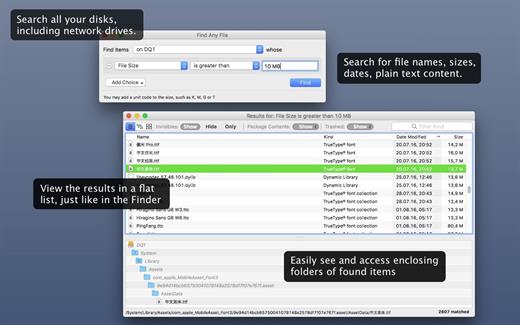

  • Has a new hierarchical view of the found items, making it much easier to browse 100s of items (see the screenshot).
  • Can run as root user, finding really any file on your disk, even those that are hidden from normal users.
  • Can save queries and run them again later.
Unlike Spotlight (i.e., the Finder’s Find command), it does not access a pre-built database but searches the chosen volume directly. This allows you to find any file, even those inside packages and others excluded from Spotlight search. Hence it is great for finding system files, for example.

On the other hand, it may take a little longer than Spotlight, and it is only fast on HFS(+) volumes. But even on mounted network volumes of a Mac OS X server it can still be surprisingly fast.

Hence, this is not an entire replacement for Spotlight but it can come handy in certain, if not many, situations.

What’s New

Version 2.4 b9:


  • Release notes were unavailable when this listing was updated.
Compatibility

macOS 10.12 or later, 64-bit processor


Release Name: Find Any File (FAF) 2.4 b9
Size: 15.5 MB
Links: HOMEPAGE – NFO – Torrent Search

Download: UPLOADGiGNiTROFLARERAPiDGATOR

5 Comments
Feb 15

Find Any File (FAF) 2.4 b8

Find Any File searches your local disks for files by name, creation or modification date, size, or type and creator code (not by content, though).

As there are other tools with a similar search operation, here are the special features unique to Find Any File:


  • Has a new hierarchical view of the found items, making it much easier to browse 100s of items (see the screenshot).
  • Can run as root user, finding really any file on your disk, even those that are hidden from normal users.
  • Can save queries and run them again later.
Unlike Spotlight (i.e., the Finder’s Find command), it does not access a pre-built database but searches the chosen volume directly. This allows you to find any file, even those inside packages and others excluded from Spotlight search. Hence it is great for finding system files, for example.

On the other hand, it may take a little longer than Spotlight, and it is only fast on HFS(+) volumes. But even on mounted network volumes of a Mac OS X server it can still be surprisingly fast.

Hence, this is not an entire replacement for Spotlight but it can come handy in certain, if not many, situations.

What’s New

Version 2.4 b8:


  • Release notes were unavailable when this listing was updated.
Compatibility

macOS 10.12 or later, 64-bit processor


Release Name: Find Any File (FAF) 2.4 b8
Size: 16.4 MB
Links: HOMEPAGE – NFO – Torrent Search

Download: UPLOADGiGNiTROFLARERAPiDGATOR

4 Comments
Feb 1

Find Any File (FAF) 2.4 b3

Find Any File searches your local disks for files by name, creation or modification date, size, or type and creator code (not by content, though).

As there are other tools with a similar search operation, here are the special features unique to Find Any File:


  • Has a new hierarchical view of the found items, making it much easier to browse 100s of items (see the screenshot).
  • Can run as root user, finding really any file on your disk, even those that are hidden from normal users.
  • Can save queries and run them again later.
Unlike Spotlight (i.e., the Finder’s Find command), it does not access a pre-built database but searches the chosen volume directly. This allows you to find any file, even those inside packages and others excluded from Spotlight search. Hence it is great for finding system files, for example.

On the other hand, it may take a little longer than Spotlight, and it is only fast on HFS(+) volumes. But even on mounted network volumes of a Mac OS X server it can still be surprisingly fast.

Hence, this is not an entire replacement for Spotlight but it can come handy in certain, if not many, situations.

What’s New

Version 2.4 b2:


  • Release notes were unavailable when this listing was updated.
Compatibility

macOS 10.12 or later, 64-bit processor


Release Name: Find Any File (FAF) 2.4 b3
Size: 15.5 MB
Links: HOMEPAGE – NFO – Torrent Search

Download: UPLOADGiGNiTROFLARERAPiDGATOR

5 Comments
Jan 23

Find Any File (FAF) 2.4 b2

Find Any File searches your local disks for files by name, creation or modification date, size, or type and creator code (not by content, though).

As there are other tools with a similar search operation, here are the special features unique to Find Any File:


  • Has a new hierarchical view of the found items, making it much easier to browse 100s of items (see the screenshot).
  • Can run as root user, finding really any file on your disk, even those that are hidden from normal users.
  • Can save queries and run them again later.
Unlike Spotlight (i.e., the Finder’s Find command), it does not access a pre-built database but searches the chosen volume directly. This allows you to find any file, even those inside packages and others excluded from Spotlight search. Hence it is great for finding system files, for example.

On the other hand, it may take a little longer than Spotlight, and it is only fast on HFS(+) volumes. But even on mounted network volumes of a Mac OS X server it can still be surprisingly fast.

Hence, this is not an entire replacement for Spotlight but it can come handy in certain, if not many, situations.

What’s New

Version 2.4 b2:


  • Release notes were unavailable when this listing was updated.
Compatibility

macOS 10.12 or later, 64-bit processor


Release Name: Find Any File (FAF) 2.4 b2
Size: 15.5 MB
Links: HOMEPAGE – NFO – Torrent Search

Download: UPLOADGiGNiTROFLARERAPiDGATOR

4 Comments
Dec 31

Find Any File (FAF) 2.4 b1

Find Any File searches your local disks for files by name, creation or modification date, size, or type and creator code (not by content, though).

As there are other tools with a similar search operation, here are the special features unique to Find Any File:


  • Has a new hierarchical view of the found items, making it much easier to browse 100s of items (see the screenshot).
  • Can run as root user, finding really any file on your disk, even those that are hidden from normal users.
  • Can save queries and run them again later.
Unlike Spotlight (i.e., the Finder’s Find command), it does not access a pre-built database but searches the chosen volume directly. This allows you to find any file, even those inside packages and others excluded from Spotlight search. Hence it is great for finding system files, for example.

On the other hand, it may take a little longer than Spotlight, and it is only fast on HFS(+) volumes. But even on mounted network volumes of a Mac OS X server it can still be surprisingly fast.

Hence, this is not an entire replacement for Spotlight but it can come handy in certain, if not many, situations.

What’s New

Version 2.4 b1:


  • Release notes were unavailable when this listing was updated.
Compatibility

macOS 10.12 or later, 64-bit processor


Release Name: Find Any File (FAF) 2.4 b1
Size: 16.3 MB
Links: HOMEPAGE – NFO – Torrent Search

Download: UPLOADGiGNiTROFLARERAPiDGATOR

5 Comments
Dec 1

Find Any File (FAF) 2.3.3 b20

Find Any File searches your local disks for files by name, creation or modification date, size, or type and creator code (not by content, though).

As there are other tools with a similar search operation, here are the special features unique to Find Any File:


  • Has a new hierarchical view of the found items, making it much easier to browse 100s of items (see the screenshot).
  • Can run as root user, finding really any file on your disk, even those that are hidden from normal users.
  • Can save queries and run them again later.
Unlike Spotlight (i.e., the Finder’s Find command), it does not access a pre-built database but searches the chosen volume directly. This allows you to find any file, even those inside packages and others excluded from Spotlight search. Hence it is great for finding system files, for example.

On the other hand, it may take a little longer than Spotlight, and it is only fast on HFS(+) volumes. But even on mounted network volumes of a Mac OS X server it can still be surprisingly fast.

Hence, this is not an entire replacement for Spotlight but it can come handy in certain, if not many, situations.

What’s New

Version 2.3.3 b20:


  • Release notes were unavailable when this listing was updated.
Compatibility

macOS 10.12 or later, 64-bit processor


Release Name: Find Any File (FAF) 2.3.3 b20
Size: 15.6 MB
Links: HOMEPAGE – NFO – Torrent Search

Download: UPLOADGiGNiTROFLARERAPiDGATOR

4 Comments
Nov 29

Find Any File (FAF) 2.3.3 b19

Find Any File searches your local disks for files by name, creation or modification date, size, or type and creator code (not by content, though).

As there are other tools with a similar search operation, here are the special features unique to Find Any File:


  • Has a new hierarchical view of the found items, making it much easier to browse 100s of items (see the screenshot).
  • Can run as root user, finding really any file on your disk, even those that are hidden from normal users.
  • Can save queries and run them again later.
Unlike Spotlight (i.e., the Finder’s Find command), it does not access a pre-built database but searches the chosen volume directly. This allows you to find any file, even those inside packages and others excluded from Spotlight search. Hence it is great for finding system files, for example.

On the other hand, it may take a little longer than Spotlight, and it is only fast on HFS(+) volumes. But even on mounted network volumes of a Mac OS X server it can still be surprisingly fast.

Hence, this is not an entire replacement for Spotlight but it can come handy in certain, if not many, situations.

What’s New

Version 2.3.3 b19:


  • Release notes were unavailable when this listing was updated.
Compatibility

macOS 10.12 or later, 64-bit processor


Release Name: Find Any File (FAF) 2.3.3 b19
Size: 15.6 MB
Links: HOMEPAGE – NFO – Torrent Search

Download: UPLOADGiGNiTROFLARERAPiDGATOR

6 Comments
Oct 25

Find Any File (FAF) 2.3.3 b18

Find Any File searches your local disks for files by name, creation or modification date, size, or type and creator code (not by content, though).

As there are other tools with a similar search operation, here are the special features unique to Find Any File:


  • Has a new hierarchical view of the found items, making it much easier to browse 100s of items (see the screenshot).
  • Can run as root user, finding really any file on your disk, even those that are hidden from normal users.
  • Can save queries and run them again later.
Unlike Spotlight (i.e., the Finder’s Find command), it does not access a pre-built database but searches the chosen volume directly. This allows you to find any file, even those inside packages and others excluded from Spotlight search. Hence it is great for finding system files, for example.

On the other hand, it may take a little longer than Spotlight, and it is only fast on HFS(+) volumes. But even on mounted network volumes of a Mac OS X server it can still be surprisingly fast.

Hence, this is not an entire replacement for Spotlight but it can come handy in certain, if not many, situations.

What’s New

Version 2.3.3 b18:


  • Release notes were unavailable when this listing was updated.
Compatibility

macOS 10.12 or later, 64-bit processor


Release Name: Find Any File (FAF) 2.3.3 b18
Size: 15.7 MB
Links: HOMEPAGE – NFO – Torrent Search

Download: UPLOADGiGNiTROFLARERAPiDGATOR

4 Comments
Aug 16

Find Any File (FAF) 2.3.3 b16

Find Any File searches your local disks for files by name, creation or modification date, size, or type and creator code (not by content, though).

As there are other tools with a similar search operation, here are the special features unique to Find Any File:


  • Has a new hierarchical view of the found items, making it much easier to browse 100s of items (see the screenshot).
  • Can run as root user, finding really any file on your disk, even those that are hidden from normal users.
  • Can save queries and run them again later.
Unlike Spotlight (i.e., the Finder’s Find command), it does not access a pre-built database but searches the chosen volume directly. This allows you to find any file, even those inside packages and others excluded from Spotlight search. Hence it is great for finding system files, for example.

On the other hand, it may take a little longer than Spotlight, and it is only fast on HFS(+) volumes. But even on mounted network volumes of a Mac OS X server it can still be surprisingly fast.

Hence, this is not an entire replacement for Spotlight but it can come handy in certain, if not many, situations.

What’s New

Version 2.3.3 b16:


  • Release notes were unavailable when this listing was updated.
Compatibility

macOS 10.12 or later, 64-bit processor


Release Name: Find Any File (FAF) 2.3.3 b16
Size: 12.8 MB
Links: HOMEPAGE – NFO – Torrent Search

Download: UPLOADGiGNiTROFLARERAPiDGATOR

5 Comments
July 26

Find Any File (FAF) 2.3.3b14

Find Any File searches your local disks for files by name, creation or modification date, size, or type and creator code (not by content, though).

As there are other tools with a similar search operation, here are the special features unique to Find Any File:


  • Has a new hierarchical view of the found items, making it much easier to browse 100s of items (see the screenshot).
  • Can run as root user, finding really any file on your disk, even those that are hidden from normal users.
  • Can save queries and run them again later.
Unlike Spotlight (i.e., the Finder’s Find command), it does not access a pre-built database but searches the chosen volume directly. This allows you to find any file, even those inside packages and others excluded from Spotlight search. Hence it is great for finding system files, for example.

On the other hand, it may take a little longer than Spotlight, and it is only fast on HFS(+) volumes. But even on mounted network volumes of a Mac OS X server it can still be surprisingly fast.

Hence, this is not an entire replacement for Spotlight but it can come handy in certain, if not many, situations.

What’s New

Version 2.3.3b14:


  • Release notes were unavailable when this listing was updated.
Compatibility

macOS 10.12 or later, 64-bit processor


Release Name: Find Any File (FAF) 2.3.3b14
Size: 12 MB
Links: HOMEPAGE – NFO – Torrent Search

Download: UPLOADGiGNiTROFLARERAPiDGATOR

5 Comments