Please REGISTER or RENEW your account on RAPiDGATOR.net and support us by doing through all RAPiDGATOR working download links on main posts...
July 20

IDM UltraFTP 25.0.0.14
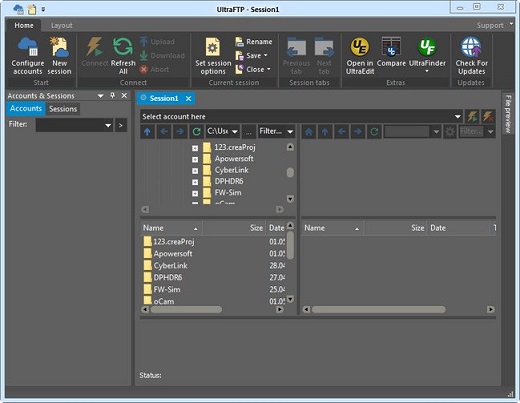
Description: UltraFTP is a personal, stand-alone FTP client built upon the framework of other IDM applications like UltraEdit and UltraCompare. Designed with maximum usability and performance in mind, UltraFTP offers full theme support, session support, an explorer interface, drag-and-drop transfers, and more.
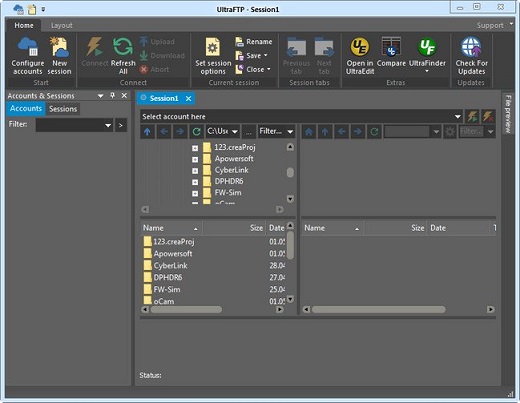
Even better, UltraFTP integrates with UltraEdit/UEStudio, UltraCompare, and UltraFinder to provide a seamless editing and publishing experience both on local and remote systems. UltraFTP supports FTP, SFTP, and FTPS protocols.

Threaded transfers for max speed
UltraFTP’s threaded transfer architecture is designed to perform 25% faster than industry average—even on large batches of files.

Sync local and FTP folders
Folder sync is a simple and fast way to sync a local folder to an FTP folder.
Set your sync rules, review sync actions, change sync actions on a per-file basis. Launch and let UltraFTP do the rest. Uploading and downloading will begin according to your sync rules.

Synchronized folder browsing
With synced browsing, UltraFTP automatically follows your local or remote navigation in the other pane. This is a very helpful feature if you’re working with the same folder structure on both your local system and FTP server.

Preview remote files
Preview source files or images on remote servers without downloading. UltraFTP’s integrated File Preview allows you to see your local and remote files without having to open them externally.

Configurable sessions and options
Set overwrite rules, configure double-click behavior, set whether to open files in UltraEdit or UEStudio, set your local and remote start paths…and more. Save your most-used FTP sessions for later use, restoring its settings and properties.

UE, UES, UC integration
UltraFTP integrates seamlessly with other UltraEdit applications. Launch a compare of two or three files or folders in UltraCompare. Edit an FTP file directly in UltraEdit or UEStudio. And best of all, with shared FTP accounts, your FTP sites are accessible in all your UltraEdit applications.

Flexible layout
Maximize your screen space with layout options. Go remote only or widescreen mode. Drag-and-drop files to upload them from the file explorer into the remote pane.

Release Name: IDM UltraFTP 25.0.0.14
Size: 57.5 MB
Links: HOMEPAGE – NFO – Torrent Search

Download: RAPiDGATOR
4 Comments
Jan 27

IDM UltraFTP 23.0.0.31 (x64)

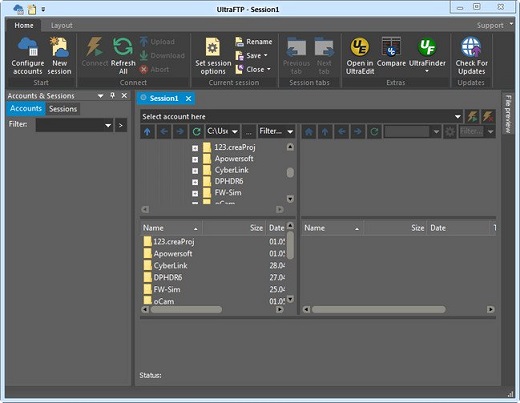
Description: UltraFTP is a personal, stand-alone FTP client built upon the framework of other IDM applications like UltraEdit and UltraCompare. Designed with maximum usability and performance in mind, UltraFTP offers full theme support, session support, an explorer interface, drag-and-drop transfers, and more. Even better, UltraFTP integrates with UltraEdit/UEStudio, UltraCompare, and UltraFinder to provide a seamless editing and publishing experience both on local and remote systems. UltraFTP supports FTP, SFTP, and FTPS protocols.

Features:


  • Tabbed sessions
  • Open multiple simultaneous connections in multiple tabs
  • Save and reload sessions
  • Set session to automatically connect, as well as initial starting directories
  • See connection/transfer status in session tab
  • Split local and remote view
  • Drag-and-drop transfers
  • Drag-and-drop files from desktop / Windows explorer to FTP server location
  • Drag-and-drop files from remote server to folders on desktop / Windows explorer
  • Drag-and-drop files from one remote server to another
  • Global overwrite rules
  • Define on a per-account basis under the Transfers tab for each account
  • Configured to Prompt, Skip, or Overwrite based on defined conditions
  • May be modified on a per-session basis in the Session Properties dialog
  • Transfers window
  • Monitor transfer progress and cancel transfers
  • Accounts & Sessions window
  • Create, save, and manage multiple accounts and sessions
  • Filter, group, and sort accounts and sessions
  • File preview window
  • Preview plain text and source files, Office docs, images, and more – on local or from remote server
  • FTP, SFTP, and FTPS support
  • UltraEdit / UEStudio / UltraCompare / UltraFinder integration
  • Open selected file(s) in UltraEdit or UEStudio
  • Modify and save remote files back to server
  • Compare selected files in UltraCompare
  • Search selected folder with UltraFinder
Release Name: IDM UltraFTP 23.0.0.31 (x64)
Size: 69 MB
Links: HOMEPAGE – NFO – Torrent Search

Download: FiKPERNiTROFLARERAPiDGATOR

7 Comments
Oct 6

IDM UltraFTP 23.0.0.29 (x64)

Description: UltraFTP is a personal, stand-alone FTP client built upon the framework of other IDM applications like UltraEdit and UltraCompare. Designed with maximum usability and performance in mind, UltraFTP offers full theme support, session support, an explorer interface, drag-and-drop transfers, and more. Even better, UltraFTP integrates with UltraEdit/UEStudio, UltraCompare, and UltraFinder to provide a seamless editing and publishing experience both on local and remote systems. UltraFTP supports FTP, SFTP, and FTPS protocols.

Features:


  • Tabbed sessions
  • Open multiple simultaneous connections in multiple tabs
  • Save and reload sessions
  • Set session to automatically connect, as well as initial starting directories
  • See connection/transfer status in session tab
  • Split local and remote view
  • Drag-and-drop transfers
  • Drag-and-drop files from desktop / Windows explorer to FTP server location
  • Drag-and-drop files from remote server to folders on desktop / Windows explorer
  • Drag-and-drop files from one remote server to another
  • Global overwrite rules
  • Define on a per-account basis under the Transfers tab for each account
  • Configured to Prompt, Skip, or Overwrite based on defined conditions
  • May be modified on a per-session basis in the Session Properties dialog
  • Transfers window
  • Monitor transfer progress and cancel transfers
  • Accounts & Sessions window
  • Create, save, and manage multiple accounts and sessions
  • Filter, group, and sort accounts and sessions
  • File preview window
  • Preview plain text and source files, Office docs, images, and more – on local or from remote server
  • FTP, SFTP, and FTPS support
  • UltraEdit / UEStudio / UltraCompare / UltraFinder integration
  • Open selected file(s) in UltraEdit or UEStudio
  • Modify and save remote files back to server
  • Compare selected files in UltraCompare
  • Search selected folder with UltraFinder
Release Name: IDM UltraFTP 23.0.0.29 (x64)
Size: 68.2 MB
Links: HOMEPAGE – NFO – Torrent Search

Download: FiKPERUPLOADGiGNiTROFLARERAPiDGATOR

8 Comments
Sept 19

IDM UltraFTP 22.0.0.14 (x64)

Description: UltraFTP is a personal, stand-alone FTP client built upon the framework of other IDM applications like UltraEdit and UltraCompare. Designed with maximum usability and performance in mind, UltraFTP offers full theme support, session support, an explorer interface, drag-and-drop transfers, and more. Even better, UltraFTP integrates with UltraEdit/UEStudio, UltraCompare, and UltraFinder to provide a seamless editing and publishing experience both on local and remote systems. UltraFTP supports FTP, SFTP, and FTPS protocols.

Features:


  • Tabbed sessions
  • Open multiple simultaneous connections in multiple tabs
  • Save and reload sessions
  • Set session to automatically connect, as well as initial starting directories
  • See connection/transfer status in session tab
  • Split local and remote view
  • Drag-and-drop transfers
  • Drag-and-drop files from desktop / Windows explorer to FTP server location
  • Drag-and-drop files from remote server to folders on desktop / Windows explorer
  • Drag-and-drop files from one remote server to another
  • Global overwrite rules
  • Define on a per-account basis under the Transfers tab for each account
  • Configured to Prompt, Skip, or Overwrite based on defined conditions
  • May be modified on a per-session basis in the Session Properties dialog
  • Transfers window
  • Monitor transfer progress and cancel transfers
  • Accounts & Sessions window
  • Create, save, and manage multiple accounts and sessions
  • Filter, group, and sort accounts and sessions
  • File preview window
  • Preview plain text and source files, Office docs, images, and more – on local or from remote server
  • FTP, SFTP, and FTPS support
  • UltraEdit / UEStudio / UltraCompare / UltraFinder integration
  • Open selected file(s) in UltraEdit or UEStudio
  • Modify and save remote files back to server
  • Compare selected files in UltraCompare
  • Search selected folder with UltraFinder
Release Name: IDM UltraFTP 22.0.0.14 (x64)
Size: 55.6 MB
Links: HOMEPAGE – NFO – Torrent Search

Download: FiKPERUPLOADGiGNiTROFLARERAPiDGATOR

7 Comments
Sept 4

IDM UltraFTP 21.10.0.1-P2P

Description: UltraFTP is a personal, stand-alone FTP client built upon the framework of other IDM applications like UltraEdit and UltraCompare. Designed with maximum usability and performance in mind, UltraFTP offers full theme support, session support, an explorer interface, drag-and-drop transfers, and more. Even better, UltraFTP integrates with UltraEdit/UEStudio, UltraCompare, and UltraFinder to provide a seamless editing and publishing experience both on local and remote systems. UltraFTP supports FTP, SFTP, and FTPS protocols.

Features:


  • Tabbed sessions
  • Open multiple simultaneous connections in multiple tabs
  • Save and reload sessions
  • Set session to automatically connect, as well as initial starting directories
  • See connection/transfer status in session tab
  • Split local and remote view
  • Drag-and-drop transfers
  • Drag-and-drop files from desktop / Windows explorer to FTP server location
  • Drag-and-drop files from remote server to folders on desktop / Windows explorer
  • Drag-and-drop files from one remote server to another
  • Global overwrite rules
  • Define on a per-account basis under the Transfers tab for each account
  • Configured to Prompt, Skip, or Overwrite based on defined conditions
  • May be modified on a per-session basis in the Session Properties dialog
  • Transfers window
  • Monitor transfer progress and cancel transfers
  • Accounts & Sessions window
  • Create, save, and manage multiple accounts and sessions
  • Filter, group, and sort accounts and sessions
  • File preview window
  • Preview plain text and source files, Office docs, images, and more – on local or from remote server
  • FTP, SFTP, and FTPS support
  • UltraEdit / UEStudio / UltraCompare / UltraFinder integration
  • Open selected file(s) in UltraEdit or UEStudio
  • Modify and save remote files back to server
  • Compare selected files in UltraCompare
  • Search selected folder with UltraFinder
Release Name: IDM UltraFTP 21.10.0.1-P2P
Size: 103.1 MB
Links: HOMEPAGE – NFO – Torrent Search

Download: UPLOADGiG – NiTROFLARE – RAPiDGATOR

4 Comments
Aug 7

IDM UltraFTP v20.10.0.20-P2P

Description: UltraFTP is a personal, stand-alone FTP client built upon the framework of other IDM applications like UltraEdit and UltraCompare. Designed with maximum usability and performance in mind, UltraFTP offers full theme support, session support, an explorer interface, drag-and-drop transfers, and more. Even better, UltraFTP integrates with UltraEdit/UEStudio, UltraCompare, and UltraFinder to provide a seamless editing and publishing experience both on local and remote systems. UltraFTP supports FTP, SFTP, and FTPS protocols.

Features:


  • Tabbed sessions
  • Open multiple simultaneous connections in multiple tabs
  • Save and reload sessions
  • Set session to automatically connect, as well as initial starting directories
  • See connection/transfer status in session tab
  • Split local and remote view
  • Drag-and-drop transfers
  • Drag-and-drop files from desktop / Windows explorer to FTP server location
  • Drag-and-drop files from remote server to folders on desktop / Windows explorer
  • Drag-and-drop files from one remote server to another
  • Global overwrite rules
  • Define on a per-account basis under the Transfers tab for each account
  • Configured to Prompt, Skip, or Overwrite based on defined conditions
  • May be modified on a per-session basis in the Session Properties dialog
  • Transfers window
  • Monitor transfer progress and cancel transfers
  • Accounts & Sessions window
  • Create, save, and manage multiple accounts and sessions
  • Filter, group, and sort accounts and sessions
  • File preview window
  • Preview plain text and source files, Office docs, images, and more – on local or from remote server
  • FTP, SFTP, and FTPS support
  • UltraEdit / UEStudio / UltraCompare / UltraFinder integration
  • Open selected file(s) in UltraEdit or UEStudio
  • Modify and save remote files back to server
  • Compare selected files in UltraCompare
  • Search selected folder with UltraFinder
Release Name: IDM UltraFTP v20.10.0.20-P2P
Size: 91.1 MB
Links: HOMEPAGE – NFO – Torrent Search

Download: UPLOADGiG – NiTROFLARE – RAPiDGATOR

10 Comments
Sept 18

IDM UltraFTP v17.10.0.15 x64-x86 Incl Keymaker-CORE

Description: UltraFTP is a personal, stand-alone FTP client built upon the framework of other IDM applications like UltraEdit and UltraCompare. Designed with maximum usability and performance in mind, UltraFTP offers full theme support, session support, an explorer interface, drag-and-drop transfers, and more. Even better, UltraFTP integrates with UltraEdit/UEStudio, UltraCompare, and UltraFinder to provide a seamless editing and publishing experience both on local and remote systems. UltraFTP supports FTP, SFTP, and FTPS protocols.

Features:


  • Tabbed sessions
  • Open multiple simultaneous connections in multiple tabs
  • Save and reload sessions
  • Set session to automatically connect, as well as initial starting directories
  • See connection/transfer status in session tab
  • Split local and remote view
  • Drag-and-drop transfers
  • Drag-and-drop files from desktop / Windows explorer to FTP server location
  • Drag-and-drop files from remote server to folders on desktop / Windows explorer
  • Drag-and-drop files from one remote server to another
  • Global overwrite rules
  • Define on a per-account basis under the Transfers tab for each account
  • Configured to Prompt, Skip, or Overwrite based on defined conditions
  • May be modified on a per-session basis in the Session Properties dialog
  • Transfers window
  • Monitor transfer progress and cancel transfers
  • Accounts & Sessions window
  • Create, save, and manage multiple accounts and sessions
  • Filter, group, and sort accounts and sessions
  • File preview window
  • Preview plain text and source files, Office docs, images, and more – on local or from remote server
  • FTP, SFTP, and FTPS support
  • UltraEdit / UEStudio / UltraCompare / UltraFinder integration
  • Open selected file(s) in UltraEdit or UEStudio
  • Modify and save remote files back to server
  • Compare selected files in UltraCompare
  • Search selected folder with UltraFinder
Release Name: IDM.UltraFTP.v17.10.0.15.x64-x86.Incl.Keymaker-CORE
Size: 32.7 MB / 36.7 MB
Links: HOMEPAGENFOTorrent Search

Download x86: UPLOADGiGNiTROFLARERAPiDGATOR

Download x64: UPLOADGiGNiTROFLARERAPiDGATOR

6 Comments