Please REGISTER or RENEW your account on RAPiDGATOR.net and support us by doing through all RAPiDGATOR working download links on main posts...
Apr 13

Macrium Reflect 8.1.8854

Description: Macrium Reflect - backup and recovery for individual PCs and servers. Reflect Workstation - Designed for endpoint backup of business-critical PCs and workstations. Peace of mind for organisations when backing up Windows PCs.

Solution highlights:
- New Backup Engine: Incremental and differential images up to 60 times faster
- Instant virtual booting of backup images: instantly create, start and manage Microsoft Hyper-V virtual machines
- Ultra-fast Live imaging of windows systems, physical and virtual
- Restore images to dissimilar hardware using Macrium ReDeploy
- Greatly simplified administration including pre-defined Backup Plans for popular backup strategies
- Fully featured file and folder level backup and recovery
- Updated support for all the latest Windows Operating Systems and disk formats

Macrium Reflect Features:
- Backup your entire PC to a single compressed image file.
- Backup files and folders to a single compressed archive file.
- Recover partitions and entire disk images with just a few clicks of your mouse
- Dynamic disk support
- MBR and GPT disk support
- Restore images to dissimilar hardware using Macrium ReDeploy

Release Name: Macrium Reflect 8.1.8854
Size: 732.5 MB
Links: HOMEPAGE – NFO – Torrent Search

Download: RAPiDGATOR

9 Comments
Apr 11

Macrium Reflect 8.1.8851

Description: Macrium Reflect - backup and recovery for individual PCs and servers. Reflect Workstation - Designed for endpoint backup of business-critical PCs and workstations. Peace of mind for organisations when backing up Windows PCs.

Solution highlights:
- New Backup Engine: Incremental and differential images up to 60 times faster
- Instant virtual booting of backup images: instantly create, start and manage Microsoft Hyper-V virtual machines
- Ultra-fast Live imaging of windows systems, physical and virtual
- Restore images to dissimilar hardware using Macrium ReDeploy
- Greatly simplified administration including pre-defined Backup Plans for popular backup strategies
- Fully featured file and folder level backup and recovery
- Updated support for all the latest Windows Operating Systems and disk formats

Macrium Reflect Features:
- Backup your entire PC to a single compressed image file.
- Backup files and folders to a single compressed archive file.
- Recover partitions and entire disk images with just a few clicks of your mouse
- Dynamic disk support
- MBR and GPT disk support
- Restore images to dissimilar hardware using Macrium ReDeploy

Release Name: Macrium Reflect 8.1.8851
Size: 732.2 MB
Links: HOMEPAGE – NFO – Torrent Search

Download: RAPiDGATOR

4 Comments
Apr 10

Macrium Reflect 8.1.8846

Description: Macrium Reflect - backup and recovery for individual PCs and servers. Reflect Workstation - Designed for endpoint backup of business-critical PCs and workstations. Peace of mind for organisations when backing up Windows PCs.

Solution highlights:
- New Backup Engine: Incremental and differential images up to 60 times faster
- Instant virtual booting of backup images: instantly create, start and manage Microsoft Hyper-V virtual machines
- Ultra-fast Live imaging of windows systems, physical and virtual
- Restore images to dissimilar hardware using Macrium ReDeploy
- Greatly simplified administration including pre-defined Backup Plans for popular backup strategies
- Fully featured file and folder level backup and recovery
- Updated support for all the latest Windows Operating Systems and disk formats

Macrium Reflect Features:
- Backup your entire PC to a single compressed image file.
- Backup files and folders to a single compressed archive file.
- Recover partitions and entire disk images with just a few clicks of your mouse
- Dynamic disk support
- MBR and GPT disk support
- Restore images to dissimilar hardware using Macrium ReDeploy

Release Name: Macrium Reflect 8.1.8846
Size: 732.5 MB
Links: HOMEPAGE – NFO – Torrent Search

Download: RAPiDGATOR

5 Comments
Feb 10

Macrium Reflect 8.1.8773

Description: Macrium Reflect X is a fully featured and sophisticated tool for backing up the most critical of servers running applications such as Microsoft Exchange email, and SQL databases. IT professionals will be able to very quickly install and run backups using Server Plus. You can rely on it to protect your critical systems and provide rapid and trouble free recovery.

Designed for endpoint backup of business-critical servers, running Microsoft Exchange email or SQL databases, in a commercial environment. Macrium Reflect Server Plus is a reliable recovery solution for everything from individual files to entire Windows Operating Systems.

The Power of X
2X Faster Performance
Experience backup, imaging, and recovery operations twice as fast as Reflect 8.x, minimizing downtime and boosting efficiency.

Resumable Imaging
Never worry about interruptions again. Image creation seamlessly continues from where it left off, ensuring continuous protection.

Open-Source Accessibility
Our image file formats are now open source, offering full transparency and flexibility for your data recovery and system deployment.

Comprehensive Device Support
From traditional x86 systems to the latest ARM-based devices, we've got your entire fleet covered with optimized performance across all platforms.

Enhanced Backup Filtering
Tailor your backups and system images with precision, enhancing performance and optimizing storage utilization.

Air-Gapped Activation for Business
Streamlined offline license activation for all business license types, perfect for high-security and air-gapped environments.

Release Name: Macrium Reflect 8.1.8773
Size: 732.3 MB
Links: HOMEPAGE – NFO – Torrent Search

Download: RAPiDGATOR

9 Comments
Sept 4

Macrium Reflect 8.1.7638 (x64) Multilingual

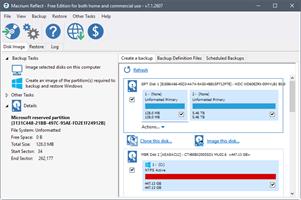
Macrium Reflect is a complete backup and disaster recovery solution. Reflect can backup files and folders into a compressed mountable archive file or your entire PC into a single image. Using this image you can restore the entire disk, partition or individual files and folders. You can create full, differential and incremental images to optimize backup speed and disk space requirements.
Backup & Restore Features

File Backup
- Create a single backup file of one or more folders on your hard disk
- Include and exclude filter ensures that you only backup relevant files.
- Browse the backup file as a virtual FAT32 hard drive in Windows Explorer.
- Files in use by Windows (such as Outlook .pst files) are backed up even when locked!
- Multiple compression levels.
- Backup files can be saved to local or network drives or optical storage (CD, DVD)
- Optionally exclude system and hidden files.
- Supports Incremental and Differential backups.
- Password protect backups to prevent unauthorized access.
- Restore specific files or the entire backup.
- Restore to any location.

Disk Imaging
- Create a single backup file of a complete hard disk
- Create a single backup file of one or many partitions
- Restore a partition to a different type. e.g. a logical partition can be restored as a bootable primary partition
- Resize the restored partition. A hard disk upgrade can easily be performed by increasing the partition to fill the new disk.
- Track 0 (The Master Boot Record) is saved with all backups.
- Backup files can be saved to local or network drives or optical storage (CD, DVD).
- Disk image can be created whilst Windows is in use. A special driver ensures that the disk image represents an exact point in time and will not be affected by disk access that may occur during the backup process.
- Verify images. Images (Backup files) can be separately verified or automatically verified before restore.
- System files such as 'pagefile.sys' and 'hiberfil.sys' are not included in the image. This reduces the final backup file size.
- Three compression levels can be selected to optimize between file size and speed.
- Password protect images to prevent unauthorized access.
- AES 256 bit encryption for ultimate security.
- Set image filenames automatically.

XML
- Save your backup definitions as XML files and execute them with a single click from your desktop.
- Includes VBScript integration and a VBScript generator for unparalleled control of the backup process.

Scheduling Features
- Schedule daily, weekly or monthly.
- Unattended completion.
- Automatic incremental / differential images.
- Automatic disk space management for local / remote hard drives.
- Full logging of all backup operations. HTML log reports are generated and can be viewed using Reflect's built in browser.

Drives Supported
- IDE
- SATA
- SCSI
- USB
- IEEE 1394 (FireWire)

Filesystems supported
- NTFS (All versions)
- FAT16
- FAT32
- Ext2/3FS

CD DVD Formats
- CD-R
- CD-RW
- DVD-R
- DVD-RW
- DVD+R
- DVD+RW
- DVD-R DL
- DVD+R DL

Release Name: Macrium Reflect 8.1.7638 (x64) Multilingual
Size: 617.6 MB
Links: HOMEPAGE – NFO – Torrent Search

Download: FiKPERUPLOADGiGNiTROFLARERAPiDGATOR

9 Comments
Feb 22

Macrium Reflect 8.1.7387 (x64) Multilingual + WinPE / WinRE

Macrium Reflect is a complete backup and disaster recovery solution. Reflect can backup files and folders into a compressed mountable archive file or your entire PC into a single image. Using this image you can restore the entire disk, partition or individual files and folders. You can create full, differential and incremental images to optimize backup speed and disk space requirements.

Backup & Restore Features

File Backup
- Create a single backup file of one or more folders on your hard disk
- Include and exclude filter ensures that you only backup relevant files.
- Browse the backup file as a virtual FAT32 hard drive in Windows Explorer.
- Files in use by Windows (such as Outlook .pst files) are backed up even when locked!
- Multiple compression levels.
- Backup files can be saved to local or network drives or optical storage (CD, DVD)
- Optionally exclude system and hidden files.
- Supports Incremental and Differential backups.
- Password protect backups to prevent unauthorized access.
- Restore specific files or the entire backup.
- Restore to any location.

Disk Imaging
- Create a single backup file of a complete hard disk
- Create a single backup file of one or many partitions
- Restore a partition to a different type. e.g. a logical partition can be restored as a bootable primary partition
- Resize the restored partition. A hard disk upgrade can easily be performed by increasing the partition to fill the new disk.
- Track 0 (The Master Boot Record) is saved with all backups.
- Backup files can be saved to local or network drives or optical storage (CD, DVD).
- Disk image can be created whilst Windows is in use. A special driver ensures that the disk image represents an exact point in time and will not be affected by disk access that may occur during the backup process.
- Verify images. Images (Backup files) can be separately verified or automatically verified before restore.
- System files such as 'pagefile.sys' and 'hiberfil.sys' are not included in the image. This reduces the final backup file size.
- Three compression levels can be selected to optimize between file size and speed.
- Password protect images to prevent unauthorized access.
- AES 256 bit encryption for ultimate security.
- Set image filenames automatically.

XML
- Save your backup definitions as XML files and execute them with a single click from your desktop.
- Includes VBScript integration and a VBScript generator for unparalleled control of the backup process.

Scheduling Features
- Schedule daily, weekly or monthly.
- Unattended completion.
- Automatic incremental / differential images.
- Automatic disk space management for local / remote hard drives.
- Full logging of all backup operations. HTML log reports are generated and can be viewed using Reflect's built in browser.

Drives Supported
- IDE
- SATA
- SCSI
- USB
- IEEE 1394 (FireWire)

Filesystems supported
- NTFS (All versions)
- FAT16
- FAT32
- Ext2/3FS

CD DVD Formats
- CD-R
- CD-RW
- DVD-R
- DVD-RW
- DVD+R
- DVD+RW
- DVD-R DL
- DVD+R DL

Release Name: Macrium Reflect 8.1.7387 (x64) Multilingual + WinPE / WinRE
Size: 1.4 GB
Links: HOMEPAGE – NFO – Torrent Search

Download: UPLOADGiGNiTROFLARERAPiDGATOR

5 Comments
Feb 21

Macrium Reflect 8.1.7387 (x64) Multilingual

Macrium Reflect is a complete backup and disaster recovery solution. Reflect can backup files and folders into a compressed mountable archive file or your entire PC into a single image. Using this image you can restore the entire disk, partition or individual files and folders. You can create full, differential and incremental images to optimize backup speed and disk space requirements.

Backup & Restore Features

File Backup
- Create a single backup file of one or more folders on your hard disk
- Include and exclude filter ensures that you only backup relevant files.
- Browse the backup file as a virtual FAT32 hard drive in Windows Explorer.
- Files in use by Windows (such as Outlook .pst files) are backed up even when locked!
- Multiple compression levels.
- Backup files can be saved to local or network drives or optical storage (CD, DVD)
- Optionally exclude system and hidden files.
- Supports Incremental and Differential backups.
- Password protect backups to prevent unauthorized access.
- Restore specific files or the entire backup.
- Restore to any location.

Disk Imaging
- Create a single backup file of a complete hard disk
- Create a single backup file of one or many partitions
- Restore a partition to a different type. e.g. a logical partition can be restored as a bootable primary partition
- Resize the restored partition. A hard disk upgrade can easily be performed by increasing the partition to fill the new disk.
- Track 0 (The Master Boot Record) is saved with all backups.
- Backup files can be saved to local or network drives or optical storage (CD, DVD).
- Disk image can be created whilst Windows is in use. A special driver ensures that the disk image represents an exact point in time and will not be affected by disk access that may occur during the backup process.
- Verify images. Images (Backup files) can be separately verified or automatically verified before restore.
- System files such as 'pagefile.sys' and 'hiberfil.sys' are not included in the image. This reduces the final backup file size.
- Three compression levels can be selected to optimize between file size and speed.
- Password protect images to prevent unauthorized access.
- AES 256 bit encryption for ultimate security.
- Set image filenames automatically.

XML
- Save your backup definitions as XML files and execute them with a single click from your desktop.
- Includes VBScript integration and a VBScript generator for unparalleled control of the backup process.

Scheduling Features
- Schedule daily, weekly or monthly.
- Unattended completion.
- Automatic incremental / differential images.
- Automatic disk space management for local / remote hard drives.
- Full logging of all backup operations. HTML log reports are generated and can be viewed using Reflect's built in browser.

Drives Supported
- IDE
- SATA
- SCSI
- USB
- IEEE 1394 (FireWire)

Filesystems supported
- NTFS (All versions)
- FAT16
- FAT32
- Ext2/3FS

CD DVD Formats
- CD-R
- CD-RW
- DVD-R
- DVD-RW
- DVD+R
- DVD+RW
- DVD-R DL
- DVD+R DL

Release Name: Macrium Reflect 8.1.7387 (x64) Multilingual
Size: 600.4 MB
Links: HOMEPAGE – NFO – Torrent Search

Download: UPLOADGiGNiTROFLARERAPiDGATOR

6 Comments
Feb 16

Macrium Reflect 8.1.7378 (x64) Multilingual + WinPE / WinRE

Macrium Reflect is a complete backup and disaster recovery solution. Reflect can backup files and folders into a compressed mountable archive file or your entire PC into a single image. Using this image you can restore the entire disk, partition or individual files and folders. You can create full, differential and incremental images to optimize backup speed and disk space requirements.

Backup & Restore Features

File Backup
- Create a single backup file of one or more folders on your hard disk
- Include and exclude filter ensures that you only backup relevant files.
- Browse the backup file as a virtual FAT32 hard drive in Windows Explorer.
- Files in use by Windows (such as Outlook .pst files) are backed up even when locked!
- Multiple compression levels.
- Backup files can be saved to local or network drives or optical storage (CD, DVD)
- Optionally exclude system and hidden files.
- Supports Incremental and Differential backups.
- Password protect backups to prevent unauthorized access.
- Restore specific files or the entire backup.
- Restore to any location.

Disk Imaging
- Create a single backup file of a complete hard disk
- Create a single backup file of one or many partitions
- Restore a partition to a different type. e.g. a logical partition can be restored as a bootable primary partition
- Resize the restored partition. A hard disk upgrade can easily be performed by increasing the partition to fill the new disk.
- Track 0 (The Master Boot Record) is saved with all backups.
- Backup files can be saved to local or network drives or optical storage (CD, DVD).
- Disk image can be created whilst Windows is in use. A special driver ensures that the disk image represents an exact point in time and will not be affected by disk access that may occur during the backup process.
- Verify images. Images (Backup files) can be separately verified or automatically verified before restore.
- System files such as 'pagefile.sys' and 'hiberfil.sys' are not included in the image. This reduces the final backup file size.
- Three compression levels can be selected to optimize between file size and speed.
- Password protect images to prevent unauthorized access.
- AES 256 bit encryption for ultimate security.
- Set image filenames automatically.

XML
- Save your backup definitions as XML files and execute them with a single click from your desktop.
- Includes VBScript integration and a VBScript generator for unparalleled control of the backup process.

Scheduling Features
- Schedule daily, weekly or monthly.
- Unattended completion.
- Automatic incremental / differential images.
- Automatic disk space management for local / remote hard drives.
- Full logging of all backup operations. HTML log reports are generated and can be viewed using Reflect's built in browser.

Drives Supported
- IDE
- SATA
- SCSI
- USB
- IEEE 1394 (FireWire)

Filesystems supported
- NTFS (All versions)
- FAT16
- FAT32
- Ext2/3FS

CD DVD Formats
- CD-R
- CD-RW
- DVD-R
- DVD-RW
- DVD+R
- DVD+RW
- DVD-R DL
- DVD+R DL

Release Name: Macrium Reflect 8.1.7378 (x64) Multilingual + WinPE / WinRE
Size: 1.4 GB
Links: HOMEPAGE – NFO – Torrent Search

Download: UPLOADGiGNiTROFLARERAPiDGATOR

7 Comments
Feb 14

Macrium Reflect 8.1.7378 (x64) Multilingual

Macrium Reflect is a complete backup and disaster recovery solution. Reflect can backup files and folders into a compressed mountable archive file or your entire PC into a single image. Using this image you can restore the entire disk, partition or individual files and folders. You can create full, differential and incremental images to optimize backup speed and disk space requirements.

Backup & Restore Features

File Backup
- Create a single backup file of one or more folders on your hard disk
- Include and exclude filter ensures that you only backup relevant files.
- Browse the backup file as a virtual FAT32 hard drive in Windows Explorer.
- Files in use by Windows (such as Outlook .pst files) are backed up even when locked!
- Multiple compression levels.
- Backup files can be saved to local or network drives or optical storage (CD, DVD)
- Optionally exclude system and hidden files.
- Supports Incremental and Differential backups.
- Password protect backups to prevent unauthorized access.
- Restore specific files or the entire backup.
- Restore to any location.

Disk Imaging
- Create a single backup file of a complete hard disk
- Create a single backup file of one or many partitions
- Restore a partition to a different type. e.g. a logical partition can be restored as a bootable primary partition
- Resize the restored partition. A hard disk upgrade can easily be performed by increasing the partition to fill the new disk.
- Track 0 (The Master Boot Record) is saved with all backups.
- Backup files can be saved to local or network drives or optical storage (CD, DVD).
- Disk image can be created whilst Windows is in use. A special driver ensures that the disk image represents an exact point in time and will not be affected by disk access that may occur during the backup process.
- Verify images. Images (Backup files) can be separately verified or automatically verified before restore.
- System files such as 'pagefile.sys' and 'hiberfil.sys' are not included in the image. This reduces the final backup file size.
- Three compression levels can be selected to optimize between file size and speed.
- Password protect images to prevent unauthorized access.
- AES 256 bit encryption for ultimate security.
- Set image filenames automatically.

XML
- Save your backup definitions as XML files and execute them with a single click from your desktop.
- Includes VBScript integration and a VBScript generator for unparalleled control of the backup process.

Scheduling Features
- Schedule daily, weekly or monthly.
- Unattended completion.
- Automatic incremental / differential images.
- Automatic disk space management for local / remote hard drives.
- Full logging of all backup operations. HTML log reports are generated and can be viewed using Reflect's built in browser.

Drives Supported
- IDE
- SATA
- SCSI
- USB
- IEEE 1394 (FireWire)

Filesystems supported
- NTFS (All versions)
- FAT16
- FAT32
- Ext2/3FS

CD DVD Formats
- CD-R
- CD-RW
- DVD-R
- DVD-RW
- DVD+R
- DVD+RW
- DVD-R DL
- DVD+R DL


Release Name: Macrium Reflect 8.1.7378 (x64) Multilingual
Size: 602.2 MB
Links: HOMEPAGE – NFO – Torrent Search

Download: UPLOADGiGNiTROFLARERAPiDGATOR

5 Comments
Feb 9

Macrium Reflect 8.1.7367 (x64) Multilingual + WinPE / WinRE

Macrium Reflect is a complete backup and disaster recovery solution. Reflect can backup files and folders into a compressed mountable archive file or your entire PC into a single image. Using this image you can restore the entire disk, partition or individual files and folders. You can create full, differential and incremental images to optimize backup speed and disk space requirements.

Backup & Restore Features

File Backup
- Create a single backup file of one or more folders on your hard disk
- Include and exclude filter ensures that you only backup relevant files.
- Browse the backup file as a virtual FAT32 hard drive in Windows Explorer.
- Files in use by Windows (such as Outlook .pst files) are backed up even when locked!
- Multiple compression levels.
- Backup files can be saved to local or network drives or optical storage (CD, DVD)
- Optionally exclude system and hidden files.
- Supports Incremental and Differential backups.
- Password protect backups to prevent unauthorized access.
- Restore specific files or the entire backup.
- Restore to any location.

Disk Imaging
- Create a single backup file of a complete hard disk
- Create a single backup file of one or many partitions
- Restore a partition to a different type. e.g. a logical partition can be restored as a bootable primary partition
- Resize the restored partition. A hard disk upgrade can easily be performed by increasing the partition to fill the new disk.
- Track 0 (The Master Boot Record) is saved with all backups.
- Backup files can be saved to local or network drives or optical storage (CD, DVD).
- Disk image can be created whilst Windows is in use. A special driver ensures that the disk image represents an exact point in time and will not be affected by disk access that may occur during the backup process.
- Verify images. Images (Backup files) can be separately verified or automatically verified before restore.
- System files such as 'pagefile.sys' and 'hiberfil.sys' are not included in the image. This reduces the final backup file size.
- Three compression levels can be selected to optimize between file size and speed.
- Password protect images to prevent unauthorized access.
- AES 256 bit encryption for ultimate security.
- Set image filenames automatically.

XML
- Save your backup definitions as XML files and execute them with a single click from your desktop.
- Includes VBScript integration and a VBScript generator for unparalleled control of the backup process.

Scheduling Features
- Schedule daily, weekly or monthly.
- Unattended completion.
- Automatic incremental / differential images.
- Automatic disk space management for local / remote hard drives.
- Full logging of all backup operations. HTML log reports are generated and can be viewed using Reflect's built in browser.

Drives Supported
- IDE
- SATA
- SCSI
- USB
- IEEE 1394 (FireWire)

Filesystems supported
- NTFS (All versions)
- FAT16
- FAT32
- Ext2/3FS

CD DVD Formats
- CD-R
- CD-RW
- DVD-R
- DVD-RW
- DVD+R
- DVD+RW
- DVD-R DL
- DVD+R DL


Release Name: Macrium Reflect 8.1.7367 (x64) Multilingual + WinPE / WinRE
Size: 1.4 GB
Links: HOMEPAGE – NFO – Torrent Search

Download: UPLOADGiGNiTROFLARERAPiDGATOR

6 Comments