Please REGISTER or RENEW your account on RAPiDGATOR.net and support us by doing through all RAPiDGATOR working download links on main posts...
June 3

Metasequoia 4.9.1

Description: Metasequoia 4 is the 3DCG modeling software for Windows. You can use it in much the same way on different platforms. All GUI components are displayed by vector drawings. Buttons and icons are displayed beautifully, in high resolution monitors (like as IGZO or Retina display).
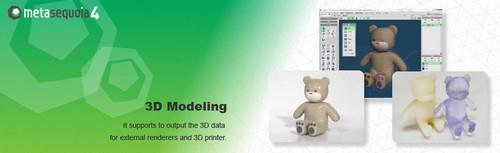
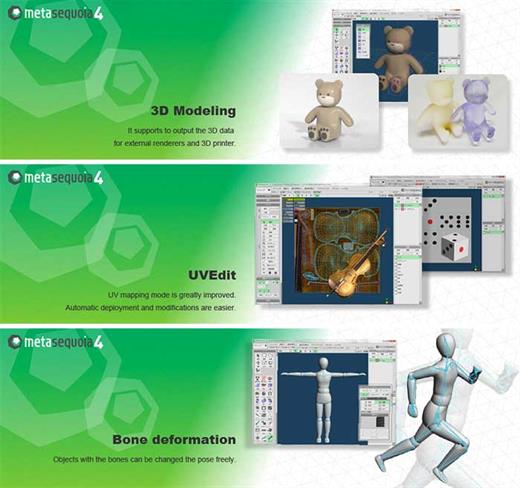
Powerful modeling functions
Metasequoia has basic polygon editing functions. And it also has functions to assist in the finer processing.
The following features have been added and improved, in ver.4.0 or later.
Fill up a hole - It automatically fills in the holes on the surface.
Bridge - It creates a pipe-shaped polygon in between holes.
Bevel - creating a fillet surface (a rounded corner) is added
...etc.

N-gon (5 or more points in a face)
You can make a polygon with 5 or more points. And you can easily add edges (divide a face) or erase edges (merge faces).

Armature
By [Armature], you can create an object shape along the center line.
You can create an object by specifying only the center line and the line width. This feature will reduce the time to create the object. And you can edit the generated object in more detail by modeling capabilities.

Bone and Morph
Setting the [Bone], the object can be linked to the deformation of bones.
And [Morph] is a function to slide the vertex. You can create such as facial expressions.
Bone and Morph settings can be exported to the corresponding file format, FBX or PMD.

Measure (Metasequoia 4 EX only)
You can measure the size of the object. This function is for business use or 3D printer output.

View Unit
You can display units such as millimeters or inches on the screen. And, it is possible to make the input of numerical value with the unit.

Measure a length, an angle and a thickness
You can measure the distance, angle, thickness of any position. Changes in the numerical values associated with the movement or deformation of the object are displayed immediately.

Release Name: Metasequoia 4.9.1
Size: 163.3 MB
Links: HOMEPAGE – NFO – Torrent Search

Download: RAPiDGATOR

4 Comments
Feb 16

Metasequoia 4.9.0f

Description: Three-dimensional model design, especially the creation of human or animal-like characters, requires some knowledge in this area and, most importantly, a set of suitable tools for the job. For those who made some 3D creations using various specialized software solutions and need to work on them without having to install each program again, a utility like Metasequoia can be the right choice. This application manages to provide a strong set of features and make them available from a really friendly interface. There are several modes to operate Metasequoia, namely Beginner, Modeling (string), Modeling (icon) and Mapping.

Each of these styles comes with its commands for editing the loaded model, setting the appropriate lighting and more. There is a wide variety of objects that you can select and insert in the design, as well as some tools that are meant for modifying the model you are working on.

The editing function that Metasequoia is equipped with are rather basic, but, nonetheless, cover all the necessary actions for handling objects, material faces and vertices. Each selected portion of the design can be fixed, stored or restored when needed, as well as fit to view or set as center of rotation.

There are many customizations that can be made to the application from the 'Configuration' area, so you can assign, for instance, various actions to mouse buttons and key combinations. Texture rendering imperfections and some glitches that may occur can be avoided by adjusting the Direct3D and OpenGL preview options.

All things considered, Metasequoia seems to be a worthy alternative to more complex utilities of its kind, especially thanks to the ease of use coupled with a good support for a variety of formats this software is able to work with.

Release Name: Metasequoia 4.9.0f
Size: 163.3 MB
Links: HOMEPAGE – NFO – Torrent Search

Download: RAPiDGATOR

10 Comments
Feb 10

Metasequoia 4.9.0e

Description: Three-dimensional model design, especially the creation of human or animal-like characters, requires some knowledge in this area and, most importantly, a set of suitable tools for the job. For those who made some 3D creations using various specialized software solutions and need to work on them without having to install each program again, a utility like Metasequoia can be the right choice. This application manages to provide a strong set of features and make them available from a really friendly interface. There are several modes to operate Metasequoia, namely Beginner, Modeling (string), Modeling (icon) and Mapping.

Each of these styles comes with its commands for editing the loaded model, setting the appropriate lighting and more. There is a wide variety of objects that you can select and insert in the design, as well as some tools that are meant for modifying the model you are working on.

The editing function that Metasequoia is equipped with are rather basic, but, nonetheless, cover all the necessary actions for handling objects, material faces and vertices. Each selected portion of the design can be fixed, stored or restored when needed, as well as fit to view or set as center of rotation.

There are many customizations that can be made to the application from the 'Configuration' area, so you can assign, for instance, various actions to mouse buttons and key combinations. Texture rendering imperfections and some glitches that may occur can be avoided by adjusting the Direct3D and OpenGL preview options.

All things considered, Metasequoia seems to be a worthy alternative to more complex utilities of its kind, especially thanks to the ease of use coupled with a good support for a variety of formats this software is able to work with.

Release Name: Metasequoia 4.9.0e
Size: 163.2 MB
Links: HOMEPAGE – NFO – Torrent Search

Download: RAPiDGATOR

9 Comments
Dec 29

Metasequoia 4.8.4b

Design three-dimensional model, especially the creation of human characters or animals, requires some knowledge in this area and, most importantly, a set of appropriate tools for the job. For those who did some 3D creations using various specialized software solutions and need to work on them without having to install each program again, a utility such as Metasequoia can be the right choice. This application manages to provide a strong set of features and make them available from a truly friendly interface. There are several ways to operate Metasequoia, namely beginner, Modeling (rope), Modeling (icon) and Mapping.

Each of these styles comes with its commands to edit the loaded model, set the right lighting and more. There is a wide variety of objects that you can select and insert into the design as well as some tools that are intended to modify the model you are working.

The editing function is equipped with Metasequoia is pretty basic, but nonetheless covers all necessary measures to handle objects, faces and vertices material actions. Each selected portion of the design can be repaired, stored or restored as necessary, and set to be displayed or set as a rotation center.

There are many customizations that can be performed on the application from the area ‘Settings’, so you can assign, for example, several actions to mouse buttons and key combinations. Imperfections can be avoided textures and some failures that may occur by adjusting the options Direct3D and OpenGL preview.

Taking everything into account, Metasequoia seems to be a worthy alternative to more complex utilities of this sort, especially thanks to the ease of use with good support for a variety of formats that this software can work.

What’s New

Version 4.8.4b:


  • Main

    • The split position of the view is retained after switching layouts or restarting, and can be reset in the menu.
    • Items to be recorded when recording a view information can now be selected from the view angle and the edit option.
  • Import/Export

    • A .vrm file can be loaded as glTF.
  • Bug fixes

    • The glTF exporter may output an error data when the Constant shader is included.
Compatibility

macOS 10.12 or later


Release Name: Metasequoia 4.8.4b
Size: 137.2 MB
Links: HOMEPAGE – NFO – Torrent Search

Download: UPLOADGiGNiTROFLARERAPiDGATOR

6 Comments