
Mimestream 1.10.0

Mimestream combines your favorite Gmail features with the power of a native macOS app so you can move through your email effortlessly
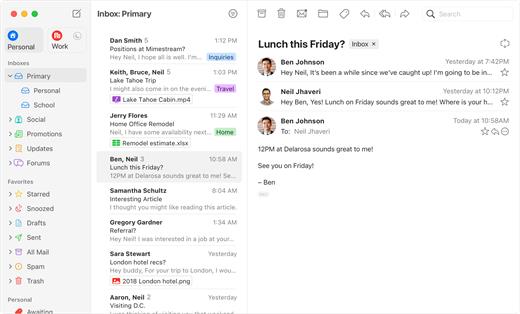
Made for Mac, optimized for Gmail
As a native app written in Swift, Mimestream leverages the full power of macOS to deliver a lightning-fast and instantly familiar experience. Instead of using the IMAP protocol, Mimestream utilizes the Gmail API to enable an enhanced set of features that let you work with ease.
Work smarter, email faster- Rise above the noise and focus on the work that matters most. Mimestream makes it easy to keep your inbox organized with confidence.
- Categorized Inbox – with support for Gmail’s categories, focus on what matters most and triage the rest at your leisure.
- Multiple Accounts
- Label Management
Your data and credentials are stored only on your device, and the app only makes direct connections to Gmail. There are no intermediary servers, and Mimestream does not collect or sell your email.
Key Features- Lightweight and Fast – Mimestream is built for speed, and only uses a minimal amount of disk space to cache recent messages
- Offline Access – Fully functional when offline and on the slowest connections-perfect for business travelers and whenever you’re on the go
- System Notifications – Receive macOS system notifications when you receive new messages, so you never fall behind on important threads
- Aliases – Your email aliases are automatically synced from Gmail without any setup and are used for replies when appropriate
- Signatures – Signatures set up in Gmail are automatically synced with Mimestream
- Robust Search – Enter any Gmail search query into Mimestream and get consistent results. Search while offline, too
- Swipe Gestures – Use familiar macOS swipe gestures to quickly triage and archive your email
- Tracking Prevention – Read your email privately – Mimestream blocks tracking pixels from 50+ of the most common tracking services
- Keyboard Shortcuts – Triage your email quickly using keyboard shortcuts, including the option to use familiar Gmail or Apple Mail shortcut sets
Version 1.10.0:
? New
- Mimestream Private Push is now on by default for users on macOS 26+. Upgrade your account in settings, if needed.
- Unknown senders now display their full email address
- A new "All" profile that can be enabled to view all accounts unified together
- Setting for "Notification Action" -- choose options like Archive, Trash, or a Menu.
- Added a "What's New" sheet to inform users about improvements
- New top-level settings tab for Notifications
- New top-level settings tab for Profiles
- The text size setting can now go larger than before
- Tracking prevention improved to pass all emailprivacytester.com tests
- Accounts can now have "None" as a profile selection
- Each label now maintains a separate sync window, solving longstanding message list consistency issues (when "Adaptive Cache Management" is enabled in Advanced settings)
- High CPU utilization when refreshing the message list with a large cache
- High CPU utilization when doing a Select-all in the message list
- The "Insert before quoted text" setting doesn't work correctly
- Disabled account services get automatically enabled after relaunch
- Unnecessary padding above the profile tabs in full screen
- Replying to a sent message should omit account aliases from the To recipient list
- Can't add new recipients to new templates after changing selection
- Automatic saving of account details runs one keystroke behind
- Accounts aren't shown in the Account list if they don't have a linked profile
- Invalid characters like "^" should not be allowed in label names
- Search does not initially fetch enough messages
- The settings window's button to subscribe is missing after the trial expires
- Left/right arrow keys sometimes stop working to move between split view panes
- Settings shows that a Trial on its last day is already expired, even though it still has a few hours of validity left
- Rare 100% CPU Utilization loop in background when Adaptive Cache Management is enabled
- Rare crash after choosing "Add to Contacts"
- The "Insert from Photos" sheet doesn't show videos
- The "Insert from Photos" sheet doesn't insert with the original filename intact
- Replying to a message sent to a plus-aliased identity doesn't preselect the correct reply identity
- Single-character searches trigger categorized inbox count updates
- Search results temporarily show non-sequential results after switching scope
- (macOS 26) Layout issues in the "Create Filter" screen
- Skip syncing of categorized inbox unread counts if categorized inbox isnt enabled
- Layout tweaks to the Account-added view
- Clean up expired licenses for returning users eligible to restart a trial.
- Improved chevron in message header address tokens
- Preserve constant conversation view margins at larger text sizes
- Cleaned up alignment issues in the sidebar profile tabs
- The Profile settings view now has an improved account list view
- Mimestream now uses provisional notification permissions to always appear in the system notification settings list
- Eliminate the Mimestream-level notification sound preference in favor of the system-level one
macOS 10.15.0 or later
Release Name: Mimestream 1.10.0
Size: 11.6 MB
Links: HOMEPAGE – NFO – Torrent Search
Download: RAPiDGATOR