Please REGISTER or RENEW your account on RAPiDGATOR.net and support us by doing through all RAPiDGATOR working download links on main posts...
Apr 10

MobaXterm 26.3

Description: Enhanced terminal for Windows with X11 server, tabbed SSH client, network tools and much more. MobaXterm is your ultimate toolbox for remote computing. In a single Windows application, it provides loads of functions that are tailored for programmers, webmasters, IT administrators and pretty much all users who need to handle their remote jobs in a more simple fashion.
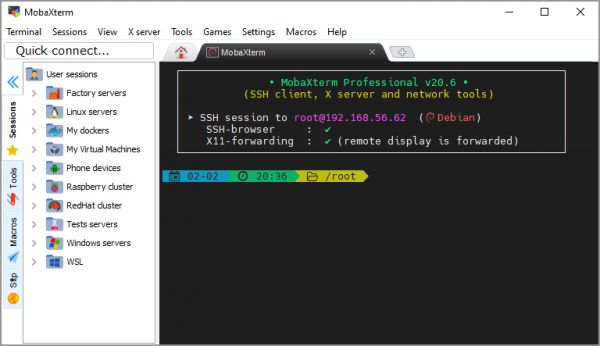
MobaXterm provides all the important remote network tools (SSH, X11, RDP, VNC, FTP, MOSH, ...) and Unix commands (bash, ls, cat, sed, grep, awk, rsync, ...) to Windows desktop, in a single portable exe file which works out of the box.

There are many advantages of having an All-In-One network application for your remote tasks, e.g. when you use SSH to connect to a remote server, a graphical SFTP browser will automatically pop up in order to directly edit your remote files. Your remote applications will also display seamlessly on your Windows desktop using the embedded X server.

You can download and use MobaXterm Home Edition for free. If you want to use it inside your company, you should consider subscribing to MobaXterm Professional Edition: this will give you access to much more features and the "Customizer" software.

When developing MobaXterm, we focused on a simple aim: proposing an intuitive user interface in order for you to efficiently access remote servers through different networks or systems.

Embedded X server
Fully configured Xserver based on X.org

Easy DISPLAY exportation
DISPLAY is exported from remote Unix to local Windows

X11-Forwarding capability
Your remote display uses SSH for secure transport

Tabbed terminal with SSH
Based on PuTTY with antialiased fonts and macro support

Many Unix/Linux commands on Windows
Basic Cygwin commands (bash, grep, awk, sed, rsync,...)

Add-ons and plugins
You can extend MobaXterm capabilities with plugins

Versatile session manager
All your network tools in one app: Rdp, Vnc, Ssh, Mosh, X11, ...

Portable and light application
MobaXterm has been packaged as a single executable which does not require admin rights and which you can start from an USB stick

Professional application
MobaXterm Professional has been designed for security and stability

Release Name: MobaXterm 26.3
Size: 42.8 MB
Links: HOMEPAGE – NFO – Torrent Search

Download: RAPiDGATOR

5 Comments
Mar 6

MobaXterm 26.1

Description: Enhanced terminal for Windows with X11 server, tabbed SSH client, network tools and much more. MobaXterm is your ultimate toolbox for remote computing. In a single Windows application, it provides loads of functions that are tailored for programmers, webmasters, IT administrators and pretty much all users who need to handle their remote jobs in a more simple fashion.

MobaXterm provides all the important remote network tools (SSH, X11, RDP, VNC, FTP, MOSH, ...) and Unix commands (bash, ls, cat, sed, grep, awk, rsync, ...) to Windows desktop, in a single portable exe file which works out of the box.

There are many advantages of having an All-In-One network application for your remote tasks, e.g. when you use SSH to connect to a remote server, a graphical SFTP browser will automatically pop up in order to directly edit your remote files. Your remote applications will also display seamlessly on your Windows desktop using the embedded X server.

You can download and use MobaXterm Home Edition for free. If you want to use it inside your company, you should consider subscribing to MobaXterm Professional Edition: this will give you access to much more features and the "Customizer" software.

When developing MobaXterm, we focused on a simple aim: proposing an intuitive user interface in order for you to efficiently access remote servers through different networks or systems.

Embedded X server
Fully configured Xserver based on X.org

Easy DISPLAY exportation
DISPLAY is exported from remote Unix to local Windows

X11-Forwarding capability
Your remote display uses SSH for secure transport

Tabbed terminal with SSH
Based on PuTTY with antialiased fonts and macro support

Many Unix/Linux commands on Windows
Basic Cygwin commands (bash, grep, awk, sed, rsync,...)

Add-ons and plugins
You can extend MobaXterm capabilities with plugins

Versatile session manager
All your network tools in one app: Rdp, Vnc, Ssh, Mosh, X11, ...

Portable and light application
MobaXterm has been packaged as a single executable which does not require admin rights and which you can start from an USB stick

Professional application
MobaXterm Professional has been designed for security and stability

Release Name: MobaXterm 26.1
Size: 41.8 MB
Links: HOMEPAGE – NFO – Torrent Search

Download: RAPiDGATOR

9 Comments
Feb 7

MobaXterm 26.0

Description: Enhanced terminal for Windows with X11 server, tabbed SSH client, network tools and much more. MobaXterm is your ultimate toolbox for remote computing. In a single Windows application, it provides loads of functions that are tailored for programmers, webmasters, IT administrators and pretty much all users who need to handle their remote jobs in a more simple fashion.

MobaXterm provides all the important remote network tools (SSH, X11, RDP, VNC, FTP, MOSH, ...) and Unix commands (bash, ls, cat, sed, grep, awk, rsync, ...) to Windows desktop, in a single portable exe file which works out of the box.

There are many advantages of having an All-In-One network application for your remote tasks, e.g. when you use SSH to connect to a remote server, a graphical SFTP browser will automatically pop up in order to directly edit your remote files. Your remote applications will also display seamlessly on your Windows desktop using the embedded X server.

You can download and use MobaXterm Home Edition for free. If you want to use it inside your company, you should consider subscribing to MobaXterm Professional Edition: this will give you access to much more features and the "Customizer" software.

When developing MobaXterm, we focused on a simple aim: proposing an intuitive user interface in order for you to efficiently access remote servers through different networks or systems.

Embedded X server
Fully configured Xserver based on X.org

Easy DISPLAY exportation
DISPLAY is exported from remote Unix to local Windows

X11-Forwarding capability
Your remote display uses SSH for secure transport

Tabbed terminal with SSH
Based on PuTTY with antialiased fonts and macro support

Many Unix/Linux commands on Windows
Basic Cygwin commands (bash, grep, awk, sed, rsync,...)

Add-ons and plugins
You can extend MobaXterm capabilities with plugins

Versatile session manager
All your network tools in one app: Rdp, Vnc, Ssh, Mosh, X11, ...

Portable and light application
MobaXterm has been packaged as a single executable which does not require admin rights and which you can start from an USB stick

Professional application
MobaXterm Professional has been designed for security and stability

Release Name: MobaXterm 26.0
Size: 41.8 MB
Links: HOMEPAGE – NFO – Torrent Search

Download: RAPiDGATOR

12 Comments
Apr 3

MobaXterm 23.1

Description: Managing and administering several computers connected to the same network often involves complex tasks, most of them necessitating remote connectivity. Administrators and professionals use various tools to carry out specific actions, but, when everything is available from the same place, things can turn from tedious to productive.
One of the specialized software solutions that aims to provide all the needed utilities for such activities is MobaXterm. This package offers loads of functions and applications that aretailored for programmers, web designers, administrators and pretty much all users who need to handle lots of remote jobs in a more simple fashion.

Through a nice looking and neatly organized interface, you will have access to all the features and commands. First of all, MobaXterm attracts many users thanks to its built-in X11 server and multi-tabbed interface that makes it possible to execute several tasks concurrently, on more than one remote device.

Here are some key features of "MobaXterm":

- Free X server fully configured (based on Xorg)
- Tab-based terminal with antialiased fonts and macro support
- Easy DISPLAY exportation from any remote host
- X11-Forwarding capability in OpenSSH

Release Name: MobaXterm 23.1
Size: 28.7 MB
Links: HOMEPAGE – NFO – Torrent Search

Download: FiKPERUPLOADGiGNiTROFLARERAPiDGATOR

6 Comments
Jan 28

MobaXterm 23.0

Description: Managing and administering several computers connected to the same network often involves complex tasks, most of them necessitating remote connectivity. Administrators and professionals use various tools to carry out specific actions, but, when everything is available from the same place, things can turn from tedious to productive.
One of the specialized software solutions that aims to provide all the needed utilities for such activities is MobaXterm. This package offers loads of functions and applications that aretailored for programmers, web designers, administrators and pretty much all users who need to handle lots of remote jobs in a more simple fashion.

Through a nice looking and neatly organized interface, you will have access to all the features and commands. First of all, MobaXterm attracts many users thanks to its built-in X11 server and multi-tabbed interface that makes it possible to execute several tasks concurrently, on more than one remote device.

Here are some key features of "MobaXterm":

- Free X server fully configured (based on Xorg)
- Tab-based terminal with antialiased fonts and macro support
- Easy DISPLAY exportation from any remote host
- X11-Forwarding capability in OpenSSH

Release Name: MobaXterm 23.0
Size: 28.7 MB
Links: HOMEPAGE – NFO – Torrent Search

Download: UPLOADGiGNiTROFLARERAPiDGATOR

6 Comments