Please REGISTER or RENEW your account on RAPiDGATOR.net and support us by doing through all RAPiDGATOR working download links on main posts...
Apr 12

Motion 6.2

Motion is now part of Apple Creator Studio, an amazing collection of Apple’s most powerful creative apps designed to help you bring your ideas to life. The suite includes Final Cut Pro, Logic Pro, Pixelmator Pro, Motion, Compressor, and MainStage — plus premium content and intelligence features in Keynote, Pages, Numbers, and Freeform*, all in one simple plan.
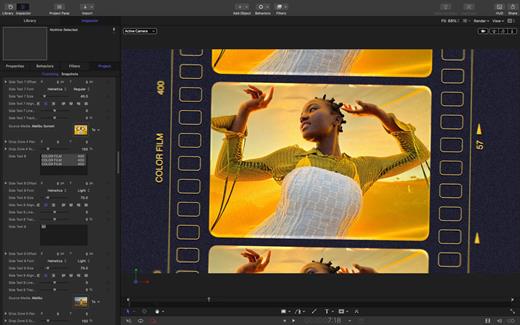
New Features
AI-powered Magnetic Mask automatically tracks and isolates people, objects, and shapes in any footage
3D text is now dramatically faster on Apple silicon, with Metal-powered improvements to playback and rendering

Overview

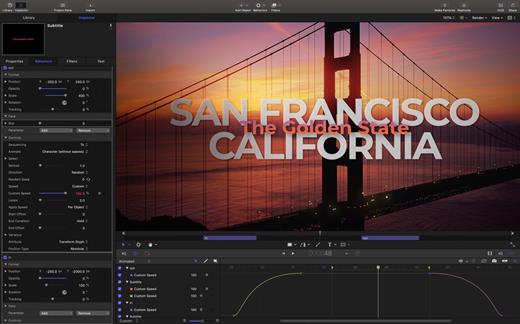
Designed for video editors, Motion is a powerful motion graphics tool that makes it easy to create cinematic 2D and 3D titles, fluid transitions, and realistic effects in real time.

2D and 3D Titles


  • Import 360° media and design 360° titles, generators, and effects
  • Build 3D titles from scratch, design them with easy-to-use templates, or instantly convert any existing 2D title to 3D
  • Easily create beautiful titles that you can animate using more than 100 drag-and-drop behaviors and intuitive text animation tools
  • Customize 3D titles to create endless looks with over 90 Apple-designed 3D materials including metal, wood, and stone surfaces
Motion Graphics for Final Cut Pro

  • Save any title, effect, transition, or generator and access it directly in Final Cut Pro
  • Customize Final Cut Pro titles, effects, and transitions by opening them in Motion
  • Create Motion Templates with any combination of single parameters and rigs that let you control a group of parameters with a slider, pop-up menu, or checkbox in Final Cut Pro
  • Use Display Aspect Ratio snapshots to create templates that support multiple aspect ratios
Stunning Effects

  • Choose from more than 230 behaviors for natural animation without keyframes
  • Change focus points or the depth effect for video shot in Cinematic mode on iPhone
  • Design your own particle emitters or choose from 200 presets for real-world effects like smoke and sparkles
  • Use professional masking tools to quickly draw and adjust control points for rotoscoping
  • Automatically detect, track, and match the movement of faces or objects using machine learning
  • Choose between different tracking analysis types
  • Add the Neon filter to easily add a neon glow to text, shapes, video, stills, and more
  • Harness an ecosystem of third-party FxPlug plug-ins for tasks like advanced tracking, advanced motion graphics, and more
Effortless 3D

  • Transition from 2D to 3D space by adding cameras
  • Create 3D scenes within a 360° project for ultra-realistic 360° environments
  • Set up realistic shadows that animate dynamically with the movement of cameras and lights
  • Turn any shape, video plane, or paint stroke into a reflective surface in 3D space
  • Import third-party USDZ objects or use one of 60 premade objects in the Motion Library
Breakthrough Speed, Quality, and Output

  • Import wide color HDR images, view them on supported Mac computers, and export in standard Rec. 709 or wide Rec. 2020 color space
  • Unrivaled speed and efficiency with optimizations for the latest generation of Apple silicon
System Requirements: macOS 15.6 or later, 8 GB of memory (16 GB recommended), Metal-capable graphics card (Intel-based Mac computers only), 4.7 GB of available disk space. Some features require internet access; fees may apply.

  • Premium content and features in Freeform are not currently available and are expected to be included in the Apple Creator Studio subscription later this year.
What’s New

Version 6.2:


  • Motion is now part of Apple Creator Studio.
Compatibility

macOS 15.6 or later.


Release Name: Motion 6.2
Size: 2.5 GB
Links: HOMEPAGE – NFO – Torrent Search

Download: RAPiDGATOR

6 Comments
Feb 13

Motion 6.0 fix

Motion is now part of Apple Creator Studio, an amazing collection of Apple’s most powerful creative apps designed to help you bring your ideas to life. The suite includes Final Cut Pro, Logic Pro, Pixelmator Pro, Motion, Compressor, and MainStage — plus premium content and intelligence features in Keynote, Pages, Numbers, and Freeform*, all in one simple plan.

New Features
AI-powered Magnetic Mask automatically tracks and isolates people, objects, and shapes in any footage
3D text is now dramatically faster on Apple silicon, with Metal-powered improvements to playback and rendering

Overview

Designed for video editors, Motion is a powerful motion graphics tool that makes it easy to create cinematic 2D and 3D titles, fluid transitions, and realistic effects in real time.

2D and 3D Titles


  • Import 360° media and design 360° titles, generators, and effects
  • Build 3D titles from scratch, design them with easy-to-use templates, or instantly convert any existing 2D title to 3D
  • Easily create beautiful titles that you can animate using more than 100 drag-and-drop behaviors and intuitive text animation tools
  • Customize 3D titles to create endless looks with over 90 Apple-designed 3D materials including metal, wood, and stone surfaces
Motion Graphics for Final Cut Pro

  • Save any title, effect, transition, or generator and access it directly in Final Cut Pro
  • Customize Final Cut Pro titles, effects, and transitions by opening them in Motion
  • Create Motion Templates with any combination of single parameters and rigs that let you control a group of parameters with a slider, pop-up menu, or checkbox in Final Cut Pro
  • Use Display Aspect Ratio snapshots to create templates that support multiple aspect ratios
Stunning Effects

  • Choose from more than 230 behaviors for natural animation without keyframes
  • Change focus points or the depth effect for video shot in Cinematic mode on iPhone
  • Design your own particle emitters or choose from 200 presets for real-world effects like smoke and sparkles
  • Use professional masking tools to quickly draw and adjust control points for rotoscoping
  • Automatically detect, track, and match the movement of faces or objects using machine learning
  • Choose between different tracking analysis types
  • Add the Neon filter to easily add a neon glow to text, shapes, video, stills, and more
  • Harness an ecosystem of third-party FxPlug plug-ins for tasks like advanced tracking, advanced motion graphics, and more
Effortless 3D

  • Transition from 2D to 3D space by adding cameras
  • Create 3D scenes within a 360° project for ultra-realistic 360° environments
  • Set up realistic shadows that animate dynamically with the movement of cameras and lights
  • Turn any shape, video plane, or paint stroke into a reflective surface in 3D space
  • Import third-party USDZ objects or use one of 60 premade objects in the Motion Library
Breakthrough Speed, Quality, and Output

  • Import wide color HDR images, view them on supported Mac computers, and export in standard Rec. 709 or wide Rec. 2020 color space
  • Unrivaled speed and efficiency with optimizations for the latest generation of Apple silicon
System Requirements: macOS 15.6 or later, 8 GB of memory (16 GB recommended), Metal-capable graphics card (Intel-based Mac computers only), 4.7 GB of available disk space. Some features require internet access; fees may apply.

  • Premium content and features in Freeform are not currently available and are expected to be included in the Apple Creator Studio subscription later this year.
What’s New

Version 6.0:


  • Motion is now part of Apple Creator Studio.
Compatibility

macOS 15.6 or later.


Release Name: Motion 6.0 fix
Size: 2.5 GB
Links: HOMEPAGE – NFO – Torrent Search

Download: RAPiDGATOR
8 Comments
Sept 22

Motion 5.11.0

Motion is designed for video editors, Motion 5 lets you customize Final Cut Pro titles, transitions, and effects. Or create your own dazzling animations in 2D or 3D space, with real-time feedback as you work.

Features:


  • Breakthrough Speed and Quality

    • New 64-bit architecture supports deeper, multilayered effects for use in Final Cut Pro.
    • ColorSync-managed color pipeline produces accurate, consistent color across applications.
    • Shared Render Engine provides consistent quality with Final Cut Pro and Compressor.
    • Rendering uses floating-point, linear-light color space for exceptionally realistic results.
    • Motion taps the GPU on the graphics card for high-speed rendering and exporting.
  • Editor-Friendly Design Tools

    • Work fast using a single-window interface with a familiar look and feel.
    • Customize Final Cut Pro titles, effects, and transitions by opening them in Motion.
    • Create Smart Motion Templates with simple controls for making changes as you edit.
    • Build stunning 2D and 3D compositions with more than 1900 Apple-designed elements.
    • Make adjustments to any parameter during playback and instantly see results.
  • Easy Animated Text and Titles

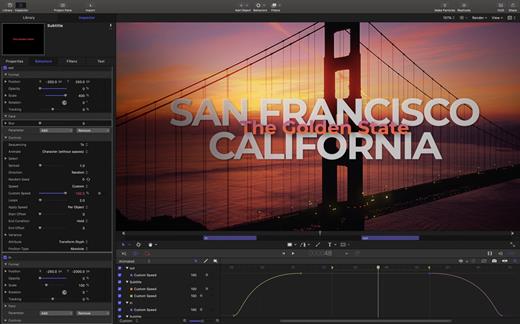
    • Design dramatic text effects with complete control over position, opacity, rotation, and more.
    • Animate text instantly by choosing from more than 200 text behaviors such as Type On.
    • Build a credit roll by importing a text file; the Scroll behavior optimizes the speed for you.
    • Move, scale, or rotate a single character with the Adjust Glyph tool.
    • Ripple text one character, word, or line at a time with the Sequence Text behavior.
  • Stunning Effects

    • Choose from more than 230 behaviors for natural-looking motion without programming.
    • Enhance your 2D or 3D animations with more than 130 filters using the FxPlug 2 standard.
    • Track a moving object in a video clip with the point tracking and match move feature.
    • Create an accurate chroma key in a single step with the new Keying filter.
    • Apply the Linking behavior to make parameters for one object animate related objects.
    • Use SmoothCam to eliminate camera jitters, and image stabilization to smooth bumpy shots.
  • Effortless 3D

    • Transition from 2D to 3D space by adding a camera or cameras to any 2D project.
    • Set up realistic shadows that animate dynamically with the movement of cameras and lights.
    • Turn any shape, video plane, or paint stroke into a reflective surface.
    • Highlight or de-emphasize various objects by defining a range of focus.
    • Track objects or groups of objects with the Camera Framing behavior.
  • Quick, High-Quality Output

    • Export projects to Apple devices and popular websites such as Vimeo and YouTube.
    • Choose to output the ProRes 4444 format for uncompressed quality at small file sizes.
What’s New

Version 5.11.0:


  • Release notes were unavailable when this listing was updated.
Compatibility

macOS 15.6 or later


Release Name: Motion 5.11.0
Size: 2.8 GB
Links: HOMEPAGE – NFO – Torrent Search

Download: RAPiDGATOR
8 Comments
Dec 1

Motion 5.7.0

Motion is designed for video editors, Motion 5 lets you customize Final Cut Pro titles, transitions, and effects. Or create your own dazzling animations in 2D or 3D space, with real-time feedback as you work.

Features


  • Breakthrough Speed and Quality

    • New 64-bit architecture supports deeper, multilayered effects for use in Final Cut Pro.
    • ColorSync-managed color pipeline produces accurate, consistent color across applications.
    • Shared Render Engine provides consistent quality with Final Cut Pro and Compressor.
    • Rendering uses floating-point, linear-light color space for exceptionally realistic results.
    • Motion taps the GPU on the graphics card for high-speed rendering and exporting.
  • Editor-Friendly Design Tools

    • Work fast using a single-window interface with a familiar look and feel.
    • Customize Final Cut Pro titles, effects, and transitions by opening them in Motion.
    • Create Smart Motion Templates with simple controls for making changes as you edit.
    • Build stunning 2D and 3D compositions with more than 1900 Apple-designed elements.
    • Make adjustments to any parameter during playback and instantly see results.
  • Easy Animated Text and Titles

    • Design dramatic text effects with complete control over position, opacity, rotation, and more.
    • Animate text instantly by choosing from more than 200 text behaviors such as Type On.
    • Build a credit roll by importing a text file; the Scroll behavior optimizes the speed for you.
    • Move, scale, or rotate a single character with the Adjust Glyph tool.
    • Ripple text one character, word, or line at a time with the Sequence Text behavior.
  • Stunning Effects

    • Choose from more than 230 behaviors for natural-looking motion without programming.
    • Enhance your 2D or 3D animations with more than 130 filters using the FxPlug 2 standard.
    • Track a moving object in a video clip with the point tracking and match move feature.
    • Create an accurate chroma key in a single step with the new Keying filter.
    • Apply the Linking behavior to make parameters for one object animate related objects.
    • Use SmoothCam to eliminate camera jitters, and image stabilization to smooth bumpy shots.
  • Effortless 3D

    • Transition from 2D to 3D space by adding a camera or cameras to any 2D project.
    • Set up realistic shadows that animate dynamically with the movement of cameras and lights.
    • Turn any shape, video plane, or paint stroke into a reflective surface.
    • Highlight or de-emphasize various objects by defining a range of focus.
    • Track objects or groups of objects with the Camera Framing behavior.
  • Quick, High-Quality Output

    • Export projects to Apple devices and popular websites such as Vimeo and YouTube.
    • Choose to output the ProRes 4444 format for uncompressed quality at small file sizes.
What’s New

Version 5.7.0:


  • See improved results when using the Object Tracker’s all-new machine-learning model to analyze the movement of faces and other objects on Mac computers with Apple silicon.
  • Title template backgrounds are now disabled by default.
  • Fixes an issue that caused FxPlug-based plug-ins to stop responding when you cancel an analysis.
Compatibility

macOS 13.5 or later.
Apple Silicon or Intel Core processor


Release Name: Motion 5.7.0
Size: 2.4 GB
Links: HOMEPAGE – NFO – Torrent Search

Download: FiKPERUPLOADGiGNiTROFLARERAPiDGATOR

4 Comments
Sept 20

Motion 5.6.6

Motion is designed for video editors, Motion 5 lets you customize Final Cut Pro titles, transitions, and effects. Or create your own dazzling animations in 2D or 3D space, with real-time feedback as you work.

Features


  • Breakthrough Speed and Quality

    • New 64-bit architecture supports deeper, multilayered effects for use in Final Cut Pro.
    • ColorSync-managed color pipeline produces accurate, consistent color across applications.
    • Shared Render Engine provides consistent quality with Final Cut Pro and Compressor.
    • Rendering uses floating-point, linear-light color space for exceptionally realistic results.
    • Motion taps the GPU on the graphics card for high-speed rendering and exporting.
  • Editor-Friendly Design Tools

    • Work fast using a single-window interface with a familiar look and feel.
    • Customize Final Cut Pro titles, effects, and transitions by opening them in Motion.
    • Create Smart Motion Templates with simple controls for making changes as you edit.
    • Build stunning 2D and 3D compositions with more than 1900 Apple-designed elements.
    • Make adjustments to any parameter during playback and instantly see results.
  • Easy Animated Text and Titles

    • Design dramatic text effects with complete control over position, opacity, rotation, and more.
    • Animate text instantly by choosing from more than 200 text behaviors such as Type On.
    • Build a credit roll by importing a text file; the Scroll behavior optimizes the speed for you.
    • Move, scale, or rotate a single character with the Adjust Glyph tool.
    • Ripple text one character, word, or line at a time with the Sequence Text behavior.
  • Stunning Effects

    • Choose from more than 230 behaviors for natural-looking motion without programming.
    • Enhance your 2D or 3D animations with more than 130 filters using the FxPlug 2 standard.
    • Track a moving object in a video clip with the point tracking and match move feature.
    • Create an accurate chroma key in a single step with the new Keying filter.
    • Apply the Linking behavior to make parameters for one object animate related objects.
    • Use SmoothCam to eliminate camera jitters, and image stabilization to smooth bumpy shots.
  • Effortless 3D

    • Transition from 2D to 3D space by adding a camera or cameras to any 2D project.
    • Set up realistic shadows that animate dynamically with the movement of cameras and lights.
    • Turn any shape, video plane, or paint stroke into a reflective surface.
    • Highlight or de-emphasize various objects by defining a range of focus.
    • Track objects or groups of objects with the Camera Framing behavior.
  • Quick, High-Quality Output

    • Export projects to Apple devices and popular websites such as Vimeo and YouTube.
    • Choose to output the ProRes 4444 format for uncompressed quality at small file sizes.
What’s New

Version 5.6.6:


  • Take advantage of the flexibility and dynamic range of log-encoded video shot on iPhone 15 Pro.
  • Improves performance when using the Align behavior.
  • Fixes an issue where Motion could hang when playing back 3D titles at high quality.
Compatibility

macOS 11.5.1 or later.
Apple Silicon or Intel Core processor


Release Name: Motion 5.6.6
Size: 2.2 GB
Links: HOMEPAGE – NFO – Torrent Search

Download: FiKPERUPLOADGiGNiTROFLARERAPiDGATOR

4 Comments
July 20

Motion 5.6.5

Motion is designed for video editors, Motion 5 lets you customize Final Cut Pro titles, transitions, and effects. Or create your own dazzling animations in 2D or 3D space, with real-time feedback as you work.

Features


  • Breakthrough Speed and Quality

    • New 64-bit architecture supports deeper, multilayered effects for use in Final Cut Pro.
    • ColorSync-managed color pipeline produces accurate, consistent color across applications.
    • Shared Render Engine provides consistent quality with Final Cut Pro and Compressor.
    • Rendering uses floating-point, linear-light color space for exceptionally realistic results.
    • Motion taps the GPU on the graphics card for high-speed rendering and exporting.
  • Editor-Friendly Design Tools

    • Work fast using a single-window interface with a familiar look and feel.
    • Customize Final Cut Pro titles, effects, and transitions by opening them in Motion.
    • Create Smart Motion Templates with simple controls for making changes as you edit.
    • Build stunning 2D and 3D compositions with more than 1900 Apple-designed elements.
    • Make adjustments to any parameter during playback and instantly see results.
  • Easy Animated Text and Titles

    • Design dramatic text effects with complete control over position, opacity, rotation, and more.
    • Animate text instantly by choosing from more than 200 text behaviors such as Type On.
    • Build a credit roll by importing a text file; the Scroll behavior optimizes the speed for you.
    • Move, scale, or rotate a single character with the Adjust Glyph tool.
    • Ripple text one character, word, or line at a time with the Sequence Text behavior.
  • Stunning Effects

    • Choose from more than 230 behaviors for natural-looking motion without programming.
    • Enhance your 2D or 3D animations with more than 130 filters using the FxPlug 2 standard.
    • Track a moving object in a video clip with the point tracking and match move feature.
    • Create an accurate chroma key in a single step with the new Keying filter.
    • Apply the Linking behavior to make parameters for one object animate related objects.
    • Use SmoothCam to eliminate camera jitters, and image stabilization to smooth bumpy shots.
  • Effortless 3D

    • Transition from 2D to 3D space by adding a camera or cameras to any 2D project.
    • Set up realistic shadows that animate dynamically with the movement of cameras and lights.
    • Turn any shape, video plane, or paint stroke into a reflective surface.
    • Highlight or de-emphasize various objects by defining a range of focus.
    • Track objects or groups of objects with the Camera Framing behavior.
  • Quick, High-Quality Output

    • Export projects to Apple devices and popular websites such as Vimeo and YouTube.
    • Choose to output the ProRes 4444 format for uncompressed quality at small file sizes.
What’s New

Version 5.6.5:


  • Improves stability with FxPlug 4 plug-ins.
  • Improves stability when dragging a group that contains an FxPlug plug-in to the Favorites folder.
  • Improves performance when using the Sequence Text behavior with Anchor Point set to Line (in the Layout pane of the Text Inspector).
Compatibility

macOS 11.5.1 or later.
Apple Silicon or Intel Core processor


Release Name: Motion 5.6.5
Size: 2.2 GB
Links: HOMEPAGE – NFO – Torrent Search

Download: FiKPERUPLOADGiGNiTROFLARERAPiDGATOR

3 Comments
Oct 29

Motion 5.6.3

Motion is designed for video editors, Motion 5 lets you customize Final Cut Pro titles, transitions, and effects. Or create your own dazzling animations in 2D or 3D space, with real-time feedback as you work.

Features


  • Breakthrough Speed and Quality

    • New 64-bit architecture supports deeper, multilayered effects for use in Final Cut Pro.
    • ColorSync-managed color pipeline produces accurate, consistent color across applications.
    • Shared Render Engine provides consistent quality with Final Cut Pro and Compressor.
    • Rendering uses floating-point, linear-light color space for exceptionally realistic results.
    • Motion taps the GPU on the graphics card for high-speed rendering and exporting.
  • Editor-Friendly Design Tools

    • Work fast using a single-window interface with a familiar look and feel.
    • Customize Final Cut Pro titles, effects, and transitions by opening them in Motion.
    • Create Smart Motion Templates with simple controls for making changes as you edit.
    • Build stunning 2D and 3D compositions with more than 1900 Apple-designed elements.
    • Make adjustments to any parameter during playback and instantly see results.
  • Easy Animated Text and Titles

    • Design dramatic text effects with complete control over position, opacity, rotation, and more.
    • Animate text instantly by choosing from more than 200 text behaviors such as Type On.
    • Build a credit roll by importing a text file; the Scroll behavior optimizes the speed for you.
    • Move, scale, or rotate a single character with the Adjust Glyph tool.
    • Ripple text one character, word, or line at a time with the Sequence Text behavior.
  • Stunning Effects

    • Choose from more than 230 behaviors for natural-looking motion without programming.
    • Enhance your 2D or 3D animations with more than 130 filters using the FxPlug 2 standard.
    • Track a moving object in a video clip with the point tracking and match move feature.
    • Create an accurate chroma key in a single step with the new Keying filter.
    • Apply the Linking behavior to make parameters for one object animate related objects.
    • Use SmoothCam to eliminate camera jitters, and image stabilization to smooth bumpy shots.
  • Effortless 3D

    • Transition from 2D to 3D space by adding a camera or cameras to any 2D project.
    • Set up realistic shadows that animate dynamically with the movement of cameras and lights.
    • Turn any shape, video plane, or paint stroke into a reflective surface.
    • Highlight or de-emphasize various objects by defining a range of focus.
    • Track objects or groups of objects with the Camera Framing behavior.
  • Quick, High-Quality Output

    • Export projects to Apple devices and popular websites such as Vimeo and YouTube.
    • Choose to output the ProRes 4444 format for uncompressed quality at small file sizes.
What’s New

Version 5.6.3:


  • Includes stability and performance improvements
Compatibility

macOS 11.5.1 or later.
Apple Silicon or Intel Core processor


Release Name: Motion 5.6.3
Size: 2.2 GB
Links: HOMEPAGE – NFO – Torrent Search

Download: UPLOADGiGNiTROFLARERAPiDGATOR

2 Comments
Oct 25

Motion 5.6.3

Motion is designed for video editors, Motion 5 lets you customize Final Cut Pro titles, transitions, and effects. Or create your own dazzling animations in 2D or 3D space, with real-time feedback as you work.

Features


  • Breakthrough Speed and Quality

    • New 64-bit architecture supports deeper, multilayered effects for use in Final Cut Pro.
    • ColorSync-managed color pipeline produces accurate, consistent color across applications.
    • Shared Render Engine provides consistent quality with Final Cut Pro and Compressor.
    • Rendering uses floating-point, linear-light color space for exceptionally realistic results.
    • Motion taps the GPU on the graphics card for high-speed rendering and exporting.
  • Editor-Friendly Design Tools

    • Work fast using a single-window interface with a familiar look and feel.
    • Customize Final Cut Pro titles, effects, and transitions by opening them in Motion.
    • Create Smart Motion Templates with simple controls for making changes as you edit.
    • Build stunning 2D and 3D compositions with more than 1900 Apple-designed elements.
    • Make adjustments to any parameter during playback and instantly see results.
  • Easy Animated Text and Titles

    • Design dramatic text effects with complete control over position, opacity, rotation, and more.
    • Animate text instantly by choosing from more than 200 text behaviors such as Type On.
    • Build a credit roll by importing a text file; the Scroll behavior optimizes the speed for you.
    • Move, scale, or rotate a single character with the Adjust Glyph tool.
    • Ripple text one character, word, or line at a time with the Sequence Text behavior.
  • Stunning Effects

    • Choose from more than 230 behaviors for natural-looking motion without programming.
    • Enhance your 2D or 3D animations with more than 130 filters using the FxPlug 2 standard.
    • Track a moving object in a video clip with the point tracking and match move feature.
    • Create an accurate chroma key in a single step with the new Keying filter.
    • Apply the Linking behavior to make parameters for one object animate related objects.
    • Use SmoothCam to eliminate camera jitters, and image stabilization to smooth bumpy shots.
  • Effortless 3D

    • Transition from 2D to 3D space by adding a camera or cameras to any 2D project.
    • Set up realistic shadows that animate dynamically with the movement of cameras and lights.
    • Turn any shape, video plane, or paint stroke into a reflective surface.
    • Highlight or de-emphasize various objects by defining a range of focus.
    • Track objects or groups of objects with the Camera Framing behavior.
  • Quick, High-Quality Output

    • Export projects to Apple devices and popular websites such as Vimeo and YouTube.
    • Choose to output the ProRes 4444 format for uncompressed quality at small file sizes.
What’s New

Version 5.6.3:


  • Includes stability and performance improvements
Compatibility

macOS 11.5.1 or later.
Apple Silicon or Intel Core processor


Release Name: Motion 5.6.3
Size: 2.2 GB
Links: HOMEPAGE – NFO – Torrent Search

Download: UPLOADGiGNiTROFLARERAPiDGATOR

1 Comments
Aug 11

Motion 5.6.2

Motion is designed for video editors, Motion 5 lets you customize Final Cut Pro titles, transitions, and effects. Or create your own dazzling animations in 2D or 3D space, with real-time feedback as you work.

Features


  • Breakthrough Speed and Quality

    • New 64-bit architecture supports deeper, multilayered effects for use in Final Cut Pro.
    • ColorSync-managed color pipeline produces accurate, consistent color across applications.
    • Shared Render Engine provides consistent quality with Final Cut Pro and Compressor.
    • Rendering uses floating-point, linear-light color space for exceptionally realistic results.
    • Motion taps the GPU on the graphics card for high-speed rendering and exporting.
  • Editor-Friendly Design Tools

    • Work fast using a single-window interface with a familiar look and feel.
    • Customize Final Cut Pro titles, effects, and transitions by opening them in Motion.
    • Create Smart Motion Templates with simple controls for making changes as you edit.
    • Build stunning 2D and 3D compositions with more than 1900 Apple-designed elements.
    • Make adjustments to any parameter during playback and instantly see results.
  • Easy Animated Text and Titles

    • Design dramatic text effects with complete control over position, opacity, rotation, and more.
    • Animate text instantly by choosing from more than 200 text behaviors such as Type On.
    • Build a credit roll by importing a text file; the Scroll behavior optimizes the speed for you.
    • Move, scale, or rotate a single character with the Adjust Glyph tool.
    • Ripple text one character, word, or line at a time with the Sequence Text behavior.
  • Stunning Effects

    • Choose from more than 230 behaviors for natural-looking motion without programming.
    • Enhance your 2D or 3D animations with more than 130 filters using the FxPlug 2 standard.
    • Track a moving object in a video clip with the point tracking and match move feature.
    • Create an accurate chroma key in a single step with the new Keying filter.
    • Apply the Linking behavior to make parameters for one object animate related objects.
    • Use SmoothCam to eliminate camera jitters, and image stabilization to smooth bumpy shots.
  • Effortless 3D

    • Transition from 2D to 3D space by adding a camera or cameras to any 2D project.
    • Set up realistic shadows that animate dynamically with the movement of cameras and lights.
    • Turn any shape, video plane, or paint stroke into a reflective surface.
    • Highlight or de-emphasize various objects by defining a range of focus.
    • Track objects or groups of objects with the Camera Framing behavior.
  • Quick, High-Quality Output

    • Export projects to Apple devices and popular websites such as Vimeo and YouTube.
    • Choose to output the ProRes 4444 format for uncompressed quality at small file sizes.
What’s New

Version 5.6.2:


  • Use the new Sliced Scale filter to divide an image into slices to prevent distortion when scaling
  • Optimized playback and graphics performance for M1 Max and M1 Ultra on the new Mac Studio
  • Adds Korean language support
  • Includes stability improvements and bug fixes
Compatibility

macOS 11.5.1 or later.


Release Name: Motion 5.6.2
Size: 2.2 GB
Links: HOMEPAGE – NFO – Torrent Search

Download: UPLOADGiGNiTROFLARERAPiDGATOR

2 Comments
Mar 13

MOTION-DARKSiDERS

Release Description:
MOTION is a fast-paced first-person physics shooter. Thanks to a high-tech gun known as the Impulser, you have the ability to grab objects from a distance and repel them with force. You must survive against waves of enemies armed with only this gun and the weapons of the environment. Stay on the move as you burn, electrocute, and explode your enemies using various explosives, slice them in half with a sawblade, and paint the level red with their blood. See how long you can last!


Enemies are frequently exploded or sliced, sending blood and limbs flying.
This game was developed as a side project by a team of 4 people. We hope you enjoy it!

Genre: Action, Indie
Developer: Aviv Edery, Serban Matei, Dahmani Abelmadjid, Nicholas Zhuravel
Publisher: Aviv Edery

Release Name: MOTION-DARKSiDERS
Size: 623.5 MB
Links: STEAM | NFO | Torrent Search

Download: UPLOADGiGNiTROFLARERAPiDGATOR

13 Comments