Please REGISTER or RENEW your account on RAPiDGATOR.net and support us by doing through all RAPiDGATOR working download links on main posts...
Oct 23

PDF Combine 3.7.3

PDF Combine Full Version Free Download

PDF Combine Full Crack Download You may have a few burst PDF document pages or pieces on your work, and need a tool to combine those PDF pages and files to a single PDF document. PDF Combine kEY is a windows application to combine PDF pieces and files to a single one.

Features PDF Combine Software Crack:


  • Combine PDF files feature NOT Required Adobe Acrobat
  • Support 50+ Languages PDF Files
  • Combine 100+ of PDF Files in Few Seconds
  • Support All Windows Platforms
  • Auto-Remove Owner Password Protection
Release Name: PDF Combine 3.7.3
Size: 14.4 MB
Links: HOMEPAGE – NFO – Torrent Search

Download: UPLOADGiGNiTROFLARERAPiDGATOR

4 Comments
Apr 30

PDF Combine 3.7.2

Description: You may have a lot of PDF files while working on your computer and need a software program to combine PDF files into a single PDF document. PDF Combine is a windows PDF combiner program to combine your PDF files to a single one. You can download PDF Combine from

How to Combine PDF Files in 3 Steps - Quick Guide

Step 1 - Add PDF Documents into the File List
Before starting the merging, you need to add your PDF files into the file list first. There are 3 ways to do that:
Method 1: Click on the "Add" button to select a PDF document from your disk and add it.
Method 2: Select and drag all your PDF files need to be combined onto the file list and drop them.
Method 3: Click on the "Add Folder" button to choose a folder contains PDF files and click on "OK" button. PDF Combine would immediately extract all PDF files from the folder and add to the file list.
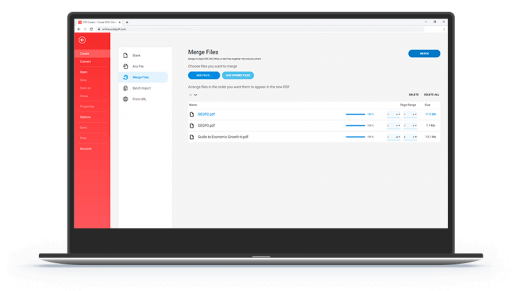
Step 2 - Reorder the PDF Files

Now all PDF files to be combined are in the file list. If you want to adjust the order of PDF files in the file list, you can click the UP and DOWN arrow buttons next to the progress bar. These two buttons enable you to move up and down the selected PDF file a row.

Step 3 - Combine PDF Files

The last step is to click on the "Combine Now!" button, and then the program will combine all PDF files instantly. Once the combining complete, you should see the output folder opening and the combined PDF file "combinedPDF.pdf" has been created successfully.

13 PDF Combine Features: Why Do You Need PDF Combine Software

No Required Adobe Acrobat
Keep PDF Layout Keep the Original PDF Content Layout and Page Size for Every New PDF Page
Auto Remove Restriction Support Owner Password Protected/Restricted PDF Files
All PDF Languages Support Support 50+ Languages PDF Files
Batch Combine Combine 100+ of PDF Files in Few Seconds
Support All Windows versions Support All Windows Platforms
Small File size Handy & Easy to Use, Small Installer Package Size
Auto save settings Auto Save Settings
reorder PDF combine order Adjust the Combining PDF Order
portable Portable Version without Installation
merge PDF files offline Secure Merging PDFs Offline, No Need Upload and Storing Files Online
Keep Original Links Keep Original Links in PDF Files Alive
Concatenate PDF files Concatenate PDF Files Fast

PDF is a popular document format in daily office work because it stores data in various types such as text, images, tables and more. The most important feature is PDF documents cannot be edited or modified easily, and this allows users to exchange data and files with confidence. So when you need to send documents to someone or prepare new contracts for your partners, converting your documents to the PDF format is a brilliant choice.

Release Name: PDF Combine 3.7.2
Size: 14.4 MB
Links: HOMEPAGE – NFO – Torrent Search

Download: UPLOADGiGNiTROFLARERAPiDGATOR

Download Portable: UPLOADGiGNiTROFLARERAPiDGATOR

6 Comments
Apr 26

PDF Combine 3.7.2

Description: You may have a lot of PDF files while working on your computer and need a software program to combine PDF files into a single PDF document. PDF Combine is a windows PDF combiner program to combine your PDF files to a single one. You can download PDF Combine from

How to Combine PDF Files in 3 Steps - Quick Guide

Step 1 - Add PDF Documents into the File List
Before starting the merging, you need to add your PDF files into the file list first. There are 3 ways to do that:
Method 1: Click on the "Add" button to select a PDF document from your disk and add it.
Method 2: Select and drag all your PDF files need to be combined onto the file list and drop them.
Method 3: Click on the "Add Folder" button to choose a folder contains PDF files and click on "OK" button. PDF Combine would immediately extract all PDF files from the folder and add to the file list.

Step 2 - Reorder the PDF Files

Now all PDF files to be combined are in the file list. If you want to adjust the order of PDF files in the file list, you can click the UP and DOWN arrow buttons next to the progress bar. These two buttons enable you to move up and down the selected PDF file a row.

Step 3 - Combine PDF Files

The last step is to click on the "Combine Now!" button, and then the program will combine all PDF files instantly. Once the combining complete, you should see the output folder opening and the combined PDF file "combinedPDF.pdf" has been created successfully.

13 PDF Combine Features: Why Do You Need PDF Combine Software

No Required Adobe Acrobat
Keep PDF Layout Keep the Original PDF Content Layout and Page Size for Every New PDF Page
Auto Remove Restriction Support Owner Password Protected/Restricted PDF Files
All PDF Languages Support Support 50+ Languages PDF Files
Batch Combine Combine 100+ of PDF Files in Few Seconds
Support All Windows versions Support All Windows Platforms
Small File size Handy & Easy to Use, Small Installer Package Size
Auto save settings Auto Save Settings
reorder PDF combine order Adjust the Combining PDF Order
portable Portable Version without Installation
merge PDF files offline Secure Merging PDFs Offline, No Need Upload and Storing Files Online
Keep Original Links Keep Original Links in PDF Files Alive
Concatenate PDF files Concatenate PDF Files Fast

PDF is a popular document format in daily office work because it stores data in various types such as text, images, tables and more. The most important feature is PDF documents cannot be edited or modified easily, and this allows users to exchange data and files with confidence. So when you need to send documents to someone or prepare new contracts for your partners, converting your documents to the PDF format is a brilliant choice.

Release Name: PDF Combine 3.7.2
Size: 14.4 MB
Links: HOMEPAGE – NFO – Torrent Search

Download: UPLOADGiGNiTROFLARERAPiDGATOR

5 Comments