

Please REGISTER or RENEW your account on RAPiDGATOR.net and support us by doing through all RAPiDGATOR working download links on main posts...
Apr 12

Pixelmator Pro 4.2

Pixelmator Pro is now part of Apple Creator Studio, an amazing collection of Apple’s most powerful creative apps designed to help you bring your ideas to life. The suite includes Final Cut Pro, Logic Pro, Pixelmator Pro, Motion, Compressor, and MainStage — plus premium content and intelligence features in Keynote, Pages, Numbers, and Freeform*, all in one simple plan.
New Features

Pixelmator Pro for iPad


  • Enjoy a completely reimagined editing experience, with Pixelmator Pro tools for design, photography, painting, and illustration now fully optimized for touch
  • Design and paint with pixel-perfect precision using Apple Pencil, with full support for hover, squeeze, double-tap, and palm rejection
  • Insert photos to your compositions directly from your iPad camera as new layers
  • Easily roundtrip between Pixelmator Pro for iPad and Mac, syncing edits through iCloud, and pick up projects wherever you left off
Warp Tool and Mockups

  • Use the all-new Warp tool to twist and bend images, shapes, text, and even video layers by pushing and pulling individual points on a warp grid
  • Automatically warp layers into common shapes like cylinder, arc, flag, and more with 12 smart warp presets, or quickly split layers into 3×3, 4×4, or 5×5 warp grids
  • Explore 2 new collections of premium product and apparel mockups that make the most of the new warp functionality to quickly showcase your designs on t-shirts, mugs, and more
Overview
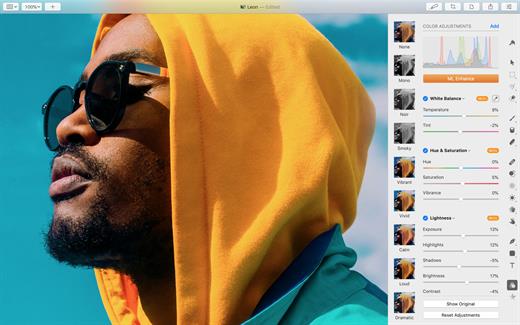
Pixelmator Pro has everything you need to create designs, edit photos, draw illustrations, paint digital art, and be creative in just about any way you can imagine.

Edit and Enhance


  • Adjust the colors in your photos and even videos in any way you want using a powerful collection of pro-grade color adjustments
  • Use machine learning-powered tools to automatically remove image background, enhance colors, increase resolution, and more
  • Quickly make good-looking shots spectacular with over 40 color adjustment presets and combine any of over 70 versatile effects to develop any artistic or special looks you can imagine
  • Enjoy full support for RAW photos from over 750 of the most popular digital cameras
Create Stunning Designs

  • Harness the full power of layer-based editing with support for vector shapes, typography features, and even video to design posters, webpages, or apps from scratch
  • Customize the look of layers using layer styles, such as Fill, Stroke, Drop Shadow, and Inner Shadow
  • Create beautiful designs in moments with a vast collection of beautiful templates and premium, fully customizable mockups
Draw and Illustrate

  • Design vector graphics using a full set of vector tools, including Pen and Freeform Pen tools
  • Speed up creating illustrations with stunning shapes including categories like arches, plants, and organic shapes
  • Add customizable Smart Shapes to quickly create your custom shapes
Sketch and Paint

  • Paint naturally with a collection of beautiful, handcrafted dual-texture brushes
  • Take advantage of full support for Apple Pencil on iPad and graphics tablets on Mac to paint with pressure and tilt sensitivity
  • Enjoy incredibly fast and responsive painting thanks to a cutting-edge painting engine powered by Metal graphics technology
Compatibility

  • Open files in popular image and video formats, including JPEG, TIFF, PNG, PSD, HEIF, SVG, AI, Illustrator EPS, PDF, GIF, BMP, TGA, WebP, JPEG-2000, AVIF, MP4, MOV, HDR images, videos, and more
  • Share your images or videos to Photos, Mail, AirDrop, and other locations
  • Premium content and features in Freeform are not currently available and are expected to be included in the Apple Creator Studio subscription later this year.
What’s New

Version 4.2:


  • Release notes were unavailable when this listing was updated.
Compatibility

macOS 26.0 or later.


Release Name: Pixelmator Pro 4.2
Size: 587.7 MB
Links: HOMEPAGE – NFO – Torrent Search

Download: RAPiDGATOR
9 Comments
Apr 10

Pixelmator Pro 3.8.0

Pixelmator Pro is an incredibly powerful, beautiful, and easy to use image editor designed exclusively for Mac.

With a wide range of professional-grade, nondestructive image editing tools, Pixelmator Pro lets you bring out the best in your photos, create gorgeous compositions and designs, draw, paint, apply stunning effects, design beautiful text, and edit images in just about any way you can imagine. And thanks to its intuitive and accessible design, Pixelmator Pro is delightfully easy to use – whether you’re just starting out with image editing or you’re a seasoned pro.

The modern, single-window interface is designed exclusively for working with images on a Mac. An intuitive and accessible design makes it easy for anyone to edit images – from complete beginners to design professionals.

What’s New

Version 3.8.0:


  • Release notes were unavailable when this listing was updated.
Compatibility

macOS 11.0 or later
Apple Silicon or Intel Core processor


Release Name: Pixelmator Pro 3.8.0
Size: 615.6 MB
Links: HOMEPAGE – NFO – Torrent Search

Download: RAPiDGATOR

6 Comments
Feb 13

Pixelmator Pro 4.0 fix

Pixelmator Pro is now part of Apple Creator Studio, an amazing collection of Apple’s most powerful creative apps designed to help you bring your ideas to life. The suite includes Final Cut Pro, Logic Pro, Pixelmator Pro, Motion, Compressor, and MainStage — plus premium content and intelligence features in Keynote, Pages, Numbers, and Freeform*, all in one simple plan.

New Features

Pixelmator Pro for iPad


  • Enjoy a completely reimagined editing experience, with Pixelmator Pro tools for design, photography, painting, and illustration now fully optimized for touch
  • Design and paint with pixel-perfect precision using Apple Pencil, with full support for hover, squeeze, double-tap, and palm rejection
  • Insert photos to your compositions directly from your iPad camera as new layers
  • Easily roundtrip between Pixelmator Pro for iPad and Mac, syncing edits through iCloud, and pick up projects wherever you left off
Warp Tool and Mockups

  • Use the all-new Warp tool to twist and bend images, shapes, text, and even video layers by pushing and pulling individual points on a warp grid
  • Automatically warp layers into common shapes like cylinder, arc, flag, and more with 12 smart warp presets, or quickly split layers into 3×3, 4×4, or 5×5 warp grids
  • Explore 2 new collections of premium product and apparel mockups that make the most of the new warp functionality to quickly showcase your designs on t-shirts, mugs, and more
Overview
Pixelmator Pro has everything you need to create designs, edit photos, draw illustrations, paint digital art, and be creative in just about any way you can imagine.

Edit and Enhance


  • Adjust the colors in your photos and even videos in any way you want using a powerful collection of pro-grade color adjustments
  • Use machine learning-powered tools to automatically remove image background, enhance colors, increase resolution, and more
  • Quickly make good-looking shots spectacular with over 40 color adjustment presets and combine any of over 70 versatile effects to develop any artistic or special looks you can imagine
  • Enjoy full support for RAW photos from over 750 of the most popular digital cameras
Create Stunning Designs

  • Harness the full power of layer-based editing with support for vector shapes, typography features, and even video to design posters, webpages, or apps from scratch
  • Customize the look of layers using layer styles, such as Fill, Stroke, Drop Shadow, and Inner Shadow
  • Create beautiful designs in moments with a vast collection of beautiful templates and premium, fully customizable mockups
Draw and Illustrate

  • Design vector graphics using a full set of vector tools, including Pen and Freeform Pen tools
  • Speed up creating illustrations with stunning shapes including categories like arches, plants, and organic shapes
  • Add customizable Smart Shapes to quickly create your custom shapes
Sketch and Paint

  • Paint naturally with a collection of beautiful, handcrafted dual-texture brushes
  • Take advantage of full support for Apple Pencil on iPad and graphics tablets on Mac to paint with pressure and tilt sensitivity
  • Enjoy incredibly fast and responsive painting thanks to a cutting-edge painting engine powered by Metal graphics technology
Compatibility

  • Open files in popular image and video formats, including JPEG, TIFF, PNG, PSD, HEIF, SVG, AI, Illustrator EPS, PDF, GIF, BMP, TGA, WebP, JPEG-2000, AVIF, MP4, MOV, HDR images, videos, and more
  • Share your images or videos to Photos, Mail, AirDrop, and other locations
  • Premium content and features in Freeform are not currently available and are expected to be included in the Apple Creator Studio subscription later this year.
What’s New

Version 4.0:


  • Pixelmator Pro is now part of Apple Creator Studio
Compatibility

macOS 26.0 or later.


Release Name: Pixelmator Pro 4.0 fix
Size: 594.3 MB
Links: HOMEPAGE – NFO – Torrent Search

Download: RAPiDGATOR
12 Comments
Feb 3

Pixelmator Pro 4.0

Pixelmator Pro is now part of Apple Creator Studio, an amazing collection of Apple’s most powerful creative apps designed to help you bring your ideas to life. The suite includes Final Cut Pro, Logic Pro, Pixelmator Pro, Motion, Compressor, and MainStage — plus premium content and intelligence features in Keynote, Pages, Numbers, and Freeform*, all in one simple plan.

New Features

Pixelmator Pro for iPad


  • Enjoy a completely reimagined editing experience, with Pixelmator Pro tools for design, photography, painting, and illustration now fully optimized for touch
  • Design and paint with pixel-perfect precision using Apple Pencil, with full support for hover, squeeze, double-tap, and palm rejection
  • Insert photos to your compositions directly from your iPad camera as new layers
  • Easily roundtrip between Pixelmator Pro for iPad and Mac, syncing edits through iCloud, and pick up projects wherever you left off
Warp Tool and Mockups

  • Use the all-new Warp tool to twist and bend images, shapes, text, and even video layers by pushing and pulling individual points on a warp grid
  • Automatically warp layers into common shapes like cylinder, arc, flag, and more with 12 smart warp presets, or quickly split layers into 3×3, 4×4, or 5×5 warp grids
  • Explore 2 new collections of premium product and apparel mockups that make the most of the new warp functionality to quickly showcase your designs on t-shirts, mugs, and more
Overview
Pixelmator Pro has everything you need to create designs, edit photos, draw illustrations, paint digital art, and be creative in just about any way you can imagine.

Edit and Enhance


  • Adjust the colors in your photos and even videos in any way you want using a powerful collection of pro-grade color adjustments
  • Use machine learning-powered tools to automatically remove image background, enhance colors, increase resolution, and more
  • Quickly make good-looking shots spectacular with over 40 color adjustment presets and combine any of over 70 versatile effects to develop any artistic or special looks you can imagine
  • Enjoy full support for RAW photos from over 750 of the most popular digital cameras
Create Stunning Designs

  • Harness the full power of layer-based editing with support for vector shapes, typography features, and even video to design posters, webpages, or apps from scratch
  • Customize the look of layers using layer styles, such as Fill, Stroke, Drop Shadow, and Inner Shadow
  • Create beautiful designs in moments with a vast collection of beautiful templates and premium, fully customizable mockups
Draw and Illustrate

  • Design vector graphics using a full set of vector tools, including Pen and Freeform Pen tools
  • Speed up creating illustrations with stunning shapes including categories like arches, plants, and organic shapes
  • Add customizable Smart Shapes to quickly create your custom shapes
Sketch and Paint

  • Paint naturally with a collection of beautiful, handcrafted dual-texture brushes
  • Take advantage of full support for Apple Pencil on iPad and graphics tablets on Mac to paint with pressure and tilt sensitivity
  • Enjoy incredibly fast and responsive painting thanks to a cutting-edge painting engine powered by Metal graphics technology
Compatibility

  • Open files in popular image and video formats, including JPEG, TIFF, PNG, PSD, HEIF, SVG, AI, Illustrator EPS, PDF, GIF, BMP, TGA, WebP, JPEG-2000, AVIF, MP4, MOV, HDR images, videos, and more
  • Share your images or videos to Photos, Mail, AirDrop, and other locations
  • Premium content and features in Freeform are not currently available and are expected to be included in the Apple Creator Studio subscription later this year.
What’s New

Version 4.0:


  • Pixelmator Pro is now part of Apple Creator Studio
Compatibility

macOS 26.0 or later.


Release Name: Pixelmator Pro 4.0
Size: 606.4 MB
Links: HOMEPAGE – NFO – Torrent Search

Download: RAPiDGATOR

10 Comments
Nov 3

Pixelmator Pro 3.6.12

Pixelmator Pro is an incredibly powerful, beautiful, and easy to use image editor designed exclusively for Mac.

With a wide range of professional-grade, nondestructive image editing tools, Pixelmator Pro lets you bring out the best in your photos, create gorgeous compositions and designs, draw, paint, apply stunning effects, design beautiful text, and edit images in just about any way you can imagine. And thanks to its intuitive and accessible design, Pixelmator Pro is delightfully easy to use – whether you’re just starting out with image editing or you’re a seasoned pro.

The modern, single-window interface is designed exclusively for working with images on a Mac. An intuitive and accessible design makes it easy for anyone to edit images – from complete beginners to design professionals.

The new ML Super Resolution feature lets you increase the resolution of images without blurriness or reduced quality using state-of-the-art machine learning.

What’s New

Version 3.6.12:
Pixelmator Pro 3.6.12 changes the in-app user guide links to open our all-new guide and includes a few minor fixes.

Compatibility

macOS 11.0 or later
Apple Silicon or Intel Core processor


Release Name: Pixelmator Pro 3.6.12
Size: 677.5 MB
Links: HOMEPAGE – NFO – Torrent Search

Download: FiKPERNiTROFLARERAPiDGATOR

8 Comments
Oct 24

Pixelmator Pro 3.6.11

Pixelmator Pro is an incredibly powerful, beautiful, and easy to use image editor designed exclusively for Mac.

With a wide range of professional-grade, nondestructive image editing tools, Pixelmator Pro lets you bring out the best in your photos, create gorgeous compositions and designs, draw, paint, apply stunning effects, design beautiful text, and edit images in just about any way you can imagine. And thanks to its intuitive and accessible design, Pixelmator Pro is delightfully easy to use – whether you’re just starting out with image editing or you’re a seasoned pro.

The modern, single-window interface is designed exclusively for working with images on a Mac. An intuitive and accessible design makes it easy for anyone to edit images – from complete beginners to design professionals.

The new ML Super Resolution feature lets you increase the resolution of images without blurriness or reduced quality using state-of-the-art machine learning.

What’s New

Version 3.6.11:
Pixelmator Pro 3.6.1 changes the in-app user guide links to open our all-new guide and includes a few minor fixes.

Compatibility

macOS 11.0 or later
Apple Silicon or Intel Core processor


Release Name: Pixelmator Pro 3.6.11
Size: 3.9 GB
Links: HOMEPAGE – NFO – Torrent Search

Download: FiKPERNiTROFLARERAPiDGATOR

4 Comments
Oct 16

Pixelmator Pro 3.6.10

Pixelmator Pro is an incredibly powerful, beautiful, and easy to use image editor designed exclusively for Mac.

With a wide range of professional-grade, nondestructive image editing tools, Pixelmator Pro lets you bring out the best in your photos, create gorgeous compositions and designs, draw, paint, apply stunning effects, design beautiful text, and edit images in just about any way you can imagine. And thanks to its intuitive and accessible design, Pixelmator Pro is delightfully easy to use – whether you’re just starting out with image editing or you’re a seasoned pro.

The modern, single-window interface is designed exclusively for working with images on a Mac. An intuitive and accessible design makes it easy for anyone to edit images – from complete beginners to design professionals.

The new ML Super Resolution feature lets you increase the resolution of images without blurriness or reduced quality using state-of-the-art machine learning.

What’s New

Version 3.6.10:
Pixelmator Pro 3.6.10 is a minor update that adds a Utilities group in the Photos browser which displays the new Flagged, Rejected, and star rating albums from Photomator as well as your Hidden album.

Compatibility

macOS 11.0 or later
Apple Silicon or Intel Core processor


Release Name: Pixelmator Pro 3.6.10
Size: 3.3 GB
Links: HOMEPAGE – NFO – Torrent Search

Download: FiKPERNiTROFLARERAPiDGATOR

4 Comments
Sept 2

Pixelmator Pro 3.6.8

Pixelmator Pro is an incredibly powerful, beautiful, and easy to use image editor designed exclusively for Mac.

With a wide range of professional-grade, nondestructive image editing tools, Pixelmator Pro lets you bring out the best in your photos, create gorgeous compositions and designs, draw, paint, apply stunning effects, design beautiful text, and edit images in just about any way you can imagine. And thanks to its intuitive and accessible design, Pixelmator Pro is delightfully easy to use – whether you’re just starting out with image editing or you’re a seasoned pro.

The modern, single-window interface is designed exclusively for working with images on a Mac. An intuitive and accessible design makes it easy for anyone to edit images – from complete beginners to design professionals.

The new ML Super Resolution feature lets you increase the resolution of images without blurriness or reduced quality using state-of-the-art machine learning.

What’s New

Version 3.6.8:
Pixelmator Pro 3.6.8 introduces a 5x more precise Auto Straighten feature, and includes several other improvements and fixes.
Auto Straighten


  • The Auto Straighten algorithm has been completely redesigned, now offering 5x more precision, particularly in images with unclear horizons and low-quality images.
Other Improvements and Fixes

  • RAW files from Nikon Z 8 cameras are now supported in DX-format, as well as in 1:1 and 16:9 crop modes.
  • Improved stability when working with SVG and PSD documents.
  • When exporting text with inside or outside strokes to SVG or PDF, the strokes would not be displayed correctly in the exported file. Fixed.
  • Sometimes, when working with RAW files from certain Olympus cameras, the app would quit unexpectedly. Fixed.
Compatibility

macOS 11.0 or later
Apple Silicon or Intel Core processor


Release Name: Pixelmator Pro 3.6.8
Size: 2 GB
Links: HOMEPAGE – NFO – Torrent Search

Download: FiKPERNiTROFLARERAPiDGATOR

5 Comments
Aug 22

Pixelmator Pro 3.6.7

Pixelmator Pro is an incredibly powerful, beautiful, and easy to use image editor designed exclusively for Mac.

With a wide range of professional-grade, nondestructive image editing tools, Pixelmator Pro lets you bring out the best in your photos, create gorgeous compositions and designs, draw, paint, apply stunning effects, design beautiful text, and edit images in just about any way you can imagine. And thanks to its intuitive and accessible design, Pixelmator Pro is delightfully easy to use – whether you’re just starting out with image editing or you’re a seasoned pro.

The modern, single-window interface is designed exclusively for working with images on a Mac. An intuitive and accessible design makes it easy for anyone to edit images – from complete beginners to design professionals.

The new ML Super Resolution feature lets you increase the resolution of images without blurriness or reduced quality using state-of-the-art machine learning.

What’s New

Version 3.6.7:
Pixelmator Pro 3.6.7 introduces a 5x more precise Auto Straighten feature, and includes several other improvements and fixes.
Auto Straighten


  • The Auto Straighten algorithm has been completely redesigned, now offering 5x more precision, particularly in images with unclear horizons and low-quality images.
Other Improvements and Fixes

  • RAW files from Nikon Z 8 cameras are now supported in DX-format, as well as in 1:1 and 16:9 crop modes.
  • Improved stability when working with SVG and PSD documents.
  • When exporting text with inside or outside strokes to SVG or PDF, the strokes would not be displayed correctly in the exported file. Fixed.
  • Sometimes, when working with RAW files from certain Olympus cameras, the app would quit unexpectedly. Fixed.
Compatibility

macOS 11.0 or later
Apple Silicon or Intel Core processor


Release Name: Pixelmator Pro 3.6.7
Size: 2 GB
Links: HOMEPAGE – NFO – Torrent Search

Download: FiKPERNiTROFLARERAPiDGATOR

5 Comments
June 4

Pixelmator Pro 3.6.2

Pixelmator Pro is an incredibly powerful, beautiful, and easy to use image editor designed exclusively for Mac.

With a wide range of professional-grade, nondestructive image editing tools, Pixelmator Pro lets you bring out the best in your photos, create gorgeous compositions and designs, draw, paint, apply stunning effects, design beautiful text, and edit images in just about any way you can imagine. And thanks to its intuitive and accessible design, Pixelmator Pro is delightfully easy to use – whether you’re just starting out with image editing or you’re a seasoned pro.

The modern, single-window interface is designed exclusively for working with images on a Mac. An intuitive and accessible design makes it easy for anyone to edit images – from complete beginners to design professionals.

The new ML Super Resolution feature lets you increase the resolution of images without blurriness or reduced quality using state-of-the-art machine learning.

What’s New

Version 3.6.2:
Pixelmator Pro 3.6 introduces powerful new masking features, including the ability to add masks with a double-click, an AI-powered background masking feature, intuitive on-canvas controls, vector mask support, and a whole lot more.

All-New Masking Experience


  • Enjoy faster and easier ways to work with masks, thanks to the new and improved masking framework.
  • Easily add masks by simply double-clicking a layer or selection.
  • Conveniently access all mask editing tools right on your screen with the new, intuitive on-canvas controls.
  • Instantly hide backgrounds behind subjects with the power of AI.
  • Use the new vector masks to quickly shape layers and easily create gradient masks.
On-Canvas Mask Controls

  • Whenever you select or create a new mask, access all mask editing and refining features directly at the bottom of the canvas.
  • Quickly perform basic mask editing tasks, such as inverting, copying, pasting, or adding new masks, or use advanced features to refine mask opacity, density, or edge softness.
  • The on-canvas controls seamlessly switch between bitmap and vector mask editing modes, allowing you to paint on bitmap masks with brushes and quickly access the Shapes browser to swap between different vector shapes.
AI Background Masking

  • Easily hide the background of a subject in an image with a precise background mask using the powerful AI-powered Hide Background feature.
  • The smart Hide Background algorithm automatically detects a subject and hides the background, carefully preserving fine details like hair or fur.
  • Turn on Hide Background from the new Mask menu at the top of the layers sidebar or choose Format > Mask > Hide Background from the menu bar.
  • Reveal or hide additional areas of the background mask at any time using the handy Paint and Erase brushes at the bottom of the screen.
Compatibility

macOS 11.0 or later
Apple Silicon or Intel Core processor


Release Name: Pixelmator Pro 3.6.2
Size: 655.7 MB
Links: HOMEPAGE – NFO – Torrent Search

Download: FiKPERNiTROFLARERAPiDGATOR

5 Comments