Please REGISTER or RENEW your account on RAPiDGATOR.net and support us by doing through all RAPiDGATOR working download links on main posts...
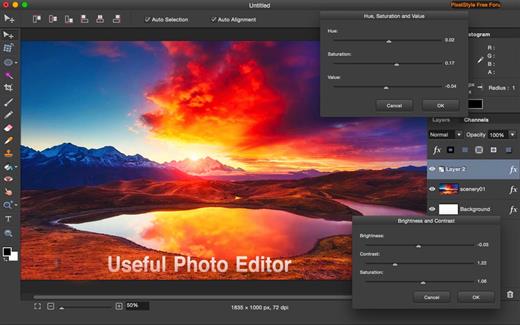
PixelStyle, full-featured graphic-design app, offers an alternative to PhotoShop. It includes all the essential tools you need for professional photo editing. It is painstakingly engineered for professionals with a large array of intuitive tools: filters, layers, special effects, editing, retouching, and photo enhancement. 100 brushes are built-in to offer an unparalleled drawing experience. With the state-of-art image-editing technology and fast, precise working capability, PixelStyle has become an indispensable tool for all photographic designers.
Features:
- Professional Image Processing
- Intuitive multifunction interface: A set of sophisticated but easy-to-use tools
- Professional adjustments: Adjust exposure, hue, vibrance, white balance, shadows, highlights, brightness, contrast and much more
- Photo retouching and correction tools: Immediately delete unwanted elements and retouch the images
- Cutout tools: 1 min cut-out of an object from a photo and change its background
- Precise Control: quickly and easily select any part of an image; edit and apply special effects to any portion of your pictures
- Multi-panel: open multiple interfaces at the same time
- Top Mac Drawing Tools: – More than 100 built-in drawing brushes (pencil, airbrush, watercolor brush, chalk, charcoal, neon pens…) for oil painting, sketch, texture painting… Create custom brushes and use different brush sizes, shapes, hardness, and blending modes
- Support pixel-drawing
- Fill in the object with texture and color – support for a variety of gradient modes including symmetrical, rotate, clockwise and counterclockwise
- Powerful Layer Capabilities
- Full support for unlimited layers and layer groups
- Easily add non-destructive layer effects like shadows, fills, inner glow, outer glow, or strokes
- Support over 50 different filter effects and blending mode options
- Resize layers without any loss of quality–hide, duplicate, and merge layers easily
- Select several layers at one time and freely align, flip, and transform (move, rotate, skew, affine) the layers
- Support channel selection and alpha channel editing
- Your file could be saved as a project – you can edit them next time
- Work with all popular formats like TIFF, JPEG, PNG, GIF, BMP, etc.
- Excellent Font Design Tools
- Add text layer effects like shadows, strokes, inner glow, outer glow, or fills
- Reshape the text to irregular shape such as fan-shaped
- Freely transform the text, including moving, rotating, skewing, and affine
- Convert type layers into raster layers
- Enjoy a full set of advanced typography features like kerning, bold, italic, underline, strikethrough, and much more
- Designed exclusively for Mac
- Takes full advantage of the latest OS X technologies including OpenGL, Grand Central Dispatch, and Core Graphics
- Use the Touch trackpad to paint with pressure sensitivity
- Fully optimized for 64-bit and multi-core processors
- Supports standard, Retina, and multi-monitor set ups
What’s New Version 4.5.1:
- Release notes were unavailable when this listing was updated.
Compatibility macOS 10.9 or later.
Release Name: Pixelstyle Photo Editor 4.5.1
Size: 120.6 MB
Links: HOMEPAGE – NFO – Torrent Search
Download: RAPiDGATOR
PixelStyle, full-featured graphic-design app, offers an alternative to PhotoShop. It includes all the essential tools you need for professional photo editing. It is painstakingly engineered for professionals with a large array of intuitive tools: filters, layers, special effects, editing, retouching, and photo enhancement. 100 brushes are built-in to offer an unparalleled drawing experience. With the state-of-art image-editing technology and fast, precise working capability, PixelStyle has become an indispensable tool for all photographic designers.
Features:
- Professional Image Processing
- Intuitive multifunction interface: A set of sophisticated but easy-to-use tools
- Professional adjustments: Adjust exposure, hue, vibrance, white balance, shadows, highlights, brightness, contrast and much more
- Photo retouching and correction tools: Immediately delete unwanted elements and retouch the images
- Cutout tools: 1 min cut-out of an object from a photo and change its background
- Precise Control: quickly and easily select any part of an image; edit and apply special effects to any portion of your pictures
- Multi-panel: open multiple interfaces at the same time
- Top Mac Drawing Tools: – More than 100 built-in drawing brushes (pencil, airbrush, watercolor brush, chalk, charcoal, neon pens…) for oil painting, sketch, texture painting… Create custom brushes and use different brush sizes, shapes, hardness, and blending modes
- Support pixel-drawing
- Fill in the object with texture and color – support for a variety of gradient modes including symmetrical, rotate, clockwise and counterclockwise
- Powerful Layer Capabilities
- Full support for unlimited layers and layer groups
- Easily add non-destructive layer effects like shadows, fills, inner glow, outer glow, or strokes
- Support over 50 different filter effects and blending mode options
- Resize layers without any loss of quality–hide, duplicate, and merge layers easily
- Select several layers at one time and freely align, flip, and transform (move, rotate, skew, affine) the layers
- Support channel selection and alpha channel editing
- Your file could be saved as a project – you can edit them next time
- Work with all popular formats like TIFF, JPEG, PNG, GIF, BMP, etc.
- Excellent Font Design Tools
- Add text layer effects like shadows, strokes, inner glow, outer glow, or fills
- Reshape the text to irregular shape such as fan-shaped
- Freely transform the text, including moving, rotating, skewing, and affine
- Convert type layers into raster layers
- Enjoy a full set of advanced typography features like kerning, bold, italic, underline, strikethrough, and much more
- Designed exclusively for Mac
- Takes full advantage of the latest OS X technologies including OpenGL, Grand Central Dispatch, and Core Graphics
- Use the Touch trackpad to paint with pressure sensitivity
- Fully optimized for 64-bit and multi-core processors
- Supports standard, Retina, and multi-monitor set ups
What’s New Version 4.5.0:
- Release notes were unavailable when this listing was updated.
Compatibility macOS 10.9 or later.
Release Name: Pixelstyle Photo Editor 4.5.0
Size: 122.8 MB
Links: HOMEPAGE – NFO – Torrent Search
Download: RAPiDGATOR
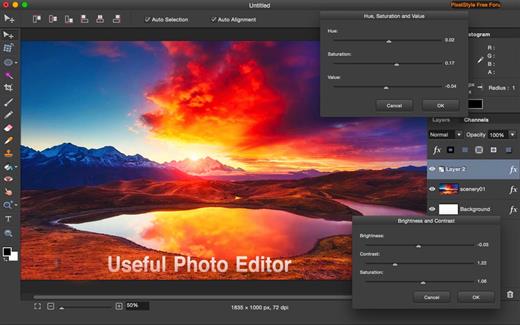
PixelStyle, full-featured graphic-design app, offers an alternative to PhotoShop. It includes all the essential tools you need for professional photo editing. It is painstakingly engineered for professionals with a large array of intuitive tools: filters, layers, special effects, editing, retouching, and photo enhancement. 100 brushes are built-in to offer an unparalleled drawing experience. With the state-of-art image-editing technology and fast, precise working capability, PixelStyle has become an indispensable tool for all photographic designers.
Features:
- Professional Image Processing
- Intuitive multifunction interface: A set of sophisticated but easy-to-use tools
- Professional adjustments: Adjust exposure, hue, vibrance, white balance, shadows, highlights, brightness, contrast and much more
- Photo retouching and correction tools: Immediately delete unwanted elements and retouch the images
- Cutout tools: 1 min cut-out of an object from a photo and change its background
- Precise Control: quickly and easily select any part of an image; edit and apply special effects to any portion of your pictures
- Multi-panel: open multiple interfaces at the same time
- Top Mac Drawing Tools: – More than 100 built-in drawing brushes (pencil, airbrush, watercolor brush, chalk, charcoal, neon pens…) for oil painting, sketch, texture painting… Create custom brushes and use different brush sizes, shapes, hardness, and blending modes
- Support pixel-drawing
- Fill in the object with texture and color – support for a variety of gradient modes including symmetrical, rotate, clockwise and counterclockwise
- Powerful Layer Capabilities
- Full support for unlimited layers and layer groups
- Easily add non-destructive layer effects like shadows, fills, inner glow, outer glow, or strokes
- Support over 50 different filter effects and blending mode options
- Resize layers without any loss of quality–hide, duplicate, and merge layers easily
- Select several layers at one time and freely align, flip, and transform (move, rotate, skew, affine) the layers
- Support channel selection and alpha channel editing
- Your file could be saved as a project – you can edit them next time
- Work with all popular formats like TIFF, JPEG, PNG, GIF, BMP, etc.
- Excellent Font Design Tools
- Add text layer effects like shadows, strokes, inner glow, outer glow, or fills
- Reshape the text to irregular shape such as fan-shaped
- Freely transform the text, including moving, rotating, skewing, and affine
- Convert type layers into raster layers
- Enjoy a full set of advanced typography features like kerning, bold, italic, underline, strikethrough, and much more
- Designed exclusively for Mac
- Takes full advantage of the latest OS X technologies including OpenGL, Grand Central Dispatch, and Core Graphics
- Use the Touch trackpad to paint with pressure sensitivity
- Fully optimized for 64-bit and multi-core processors
- Supports standard, Retina, and multi-monitor set ups
What’s New Version 3.8.2:
- Release notes were unavailable when this listing was updated.
Compatibility macOS 10.9 or later.
Release Name: Pixelstyle Photo Editor 3.8.2
Size: 42.8 MB
Links: HOMEPAGE – NFO – Torrent Search
Download: UPLOADGiG – NiTROFLARE – RAPiDGATOR
Description: PixelStyle, full-featured graphic-design app, offers an alternative to PhotoShop. It includes all the essential tools you need for professional photo editing. It is painstakingly engineered for professionals with a large array of intuitive tools: filters, layers, special effects, editing, retouching, and photo enhancement. 100 brushes are built-in to offer an unparalleled drawing experience. With the state-of-art image-editing technology and fast, precise working capability, PixelStyle has become an indispensable tool for all photographic designers.
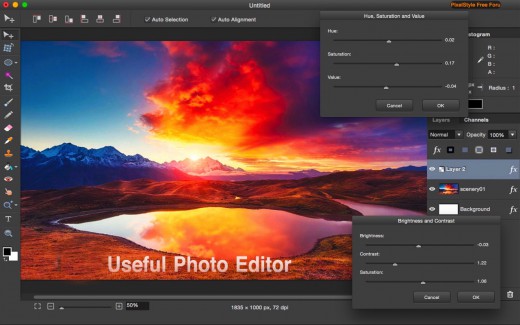
Features:
- Professional Image Processing
- Intuitive multifunction interface: A set of sophisticated but easy-to-use tools
- Professional adjustments: Adjust exposure, hue, vibrance, white balance, shadows, highlights, brightness, contrast and much more
- Photo retouching and correction tools: Immediately delete unwanted elements and retouch the images
- Cutout tools: 1 min cut-out of an object from a photo and change its background
- Precise Control: quickly and easily select any part of an image; edit and apply special effects to any portion of your pictures
- Multi-panel: open multiple interfaces at the same time
- Top Mac Drawing Tools: – More than 100 built-in drawing brushes (pencil, airbrush, watercolor brush, chalk, charcoal, neon pens…) for oil painting, sketch, texture painting… Create custom brushes and use different brush sizes, shapes, hardness, and blending modes
- Support pixel-drawing
- Fill in the object with texture and color – support for a variety of gradient modes including symmetrical, rotate, clockwise and counterclockwise
- Powerful Layer Capabilities
- Full support for unlimited layers and layer groups
- Easily add non-destructive layer effects like shadows, fills, inner glow, outer glow, or strokes
- Support over 50 different filter effects and blending mode options
- Resize layers without any loss of quality–hide, duplicate, and merge layers easily
- Select several layers at one time and freely align, flip, and transform (move, rotate, skew, affine) the layers
- Support channel selection and alpha channel editing
- Your file could be saved as a project – you can edit them next time
- Work with all popular formats like TIFF, JPEG, PNG, GIF, BMP, etc.
- Excellent Font Design Tools
- Add text layer effects like shadows, strokes, inner glow, outer glow, or fills
- Reshape the text to irregular shape such as fan-shaped
- Freely transform the text, including moving, rotating, skewing, and affine
- Convert type layers into raster layers
- Enjoy a full set of advanced typography features like kerning, bold, italic, underline, strikethrough, and much more
- Designed exclusively for Mac
- Takes full advantage of the latest OS X technologies including OpenGL, Grand Central Dispatch, and Core Graphics
- Use the Touch trackpad to paint with pressure sensitivity
- Fully optimized for 64-bit and multi-core processors
- Supports standard, Retina, and multi-monitor set ups
What’s New Version 3.8.1:
- Release notes were unavailable when this listing was updated.
Release Names: Pixelstyle Photo Editor 3.8.1
Size: 43.45 MB
Links: HOMEPAGE – NFO –
Torrent Search Download: UPLOADGiG – NiTROFLARE – RAPiDGATOR



