Please REGISTER or RENEW your account on RAPiDGATOR.net and support us by doing through all RAPiDGATOR working download links on main posts...
Dec 17

Posterino 3.11.13

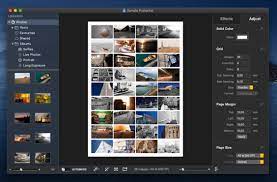
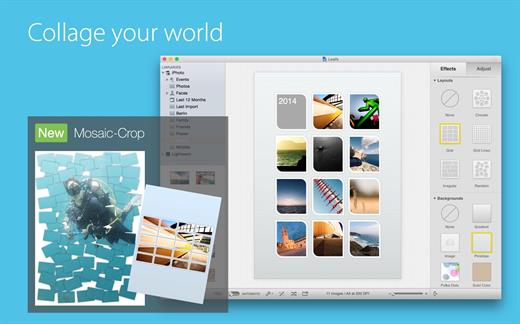
Posterino offers enhanced customization and flexibility including a variety of new, stylish templates featuring grids of identical or odd-sized image boxes. You can customize the size and shape of these boxes at any time. And with a single click, the application will automatically fill those boxes with random images drawn from the photos you uploaded. If you prefer to manually select images, you can simply drag and drop images into the template.
Sharing your photos is quick and simple as well. You can directly upload your completed collages to your Facebook, Twitter or Flickr account from inside the app, and export photos to iPhoto and your email. Posterino also lets you create and send custom e-cards with your very own stamps and postmarks.

The new features of Posterino 3 are:


  • Improved workflow throughout: Adding, removing or creating image objects now results in an instant re-layout of your document.
  • New and improved content: Expect new templates, new frames, new backgrounds and more. For example, you can now add individual text captions to any image on your document.
  • New layout options: We advanced the existing templates to include a “Circular” option and added Grid Lines to ease manual image placement.
  • Automatic styling: The look of your images can now be changed and aligned automatically.
  • A whole new crop editor: The enhanced version improves crop workflow and creates a persistent crop state.
  • We added a bunch of new sharing services: Post on Facebook, Twitter or Flickr. Send your creation as Message or via AirDrop.
  • A sleek new user interface: The redesigned interface has a larger workspace, especially handy if you are working on a MacBook.
  • Posterino is now sandboxed and supports Retina display.
  • Additional requested improvements: We implemented a large number of popular user requests, resulting in a myriad of large and small improvements in many areas of the application.
What’s New

Version 3.11.13:


  • Release notes were unavailable when this listing was updated.
Compatibility

macOS 10.10 or later


Release Name: Posterino 3.11.13
Size: 92.4 MB
Links: HOMEPAGE – NFO – Torrent Search

Download: UPLOADGiGNiTROFLARERAPiDGATOR

5 Comments
Nov 24

Posterino 3.11.12

Posterino offers enhanced customization and flexibility including a variety of new, stylish templates featuring grids of identical or odd-sized image boxes. You can customize the size and shape of these boxes at any time. And with a single click, the application will automatically fill those boxes with random images drawn from the photos you uploaded. If you prefer to manually select images, you can simply drag and drop images into the template.

Sharing your photos is quick and simple as well. You can directly upload your completed collages to your Facebook, Twitter or Flickr account from inside the app, and export photos to iPhoto and your email. Posterino also lets you create and send custom e-cards with your very own stamps and postmarks.

The new features of Posterino 3 are:


  • Improved workflow throughout: Adding, removing or creating image objects now results in an instant re-layout of your document.
  • New and improved content: Expect new templates, new frames, new backgrounds and more. For example, you can now add individual text captions to any image on your document.
  • New layout options: We advanced the existing templates to include a “Circular” option and added Grid Lines to ease manual image placement.
  • Automatic styling: The look of your images can now be changed and aligned automatically.
  • A whole new crop editor: The enhanced version improves crop workflow and creates a persistent crop state.
  • We added a bunch of new sharing services: Post on Facebook, Twitter or Flickr. Send your creation as Message or via AirDrop.
  • A sleek new user interface: The redesigned interface has a larger workspace, especially handy if you are working on a MacBook.
  • Posterino is now sandboxed and supports Retina display.
  • Additional requested improvements: We implemented a large number of popular user requests, resulting in a myriad of large and small improvements in many areas of the application.
What’s New

Version 3.11.12:


  • Release notes were unavailable when this listing was updated.
Compatibility

macOS 10.10 or later


Release Name: Posterino 3.11.12
Size: 92.4 MB
Links: HOMEPAGE – NFO – Torrent Search

Download: UPLOADGiGNiTROFLARERAPiDGATOR

5 Comments
Aug 2

Posterino 3.11.11

Posterino offers enhanced customization and flexibility including a variety of new, stylish templates featuring grids of identical or odd-sized image boxes. You can customize the size and shape of these boxes at any time. And with a single click, the application will automatically fill those boxes with random images drawn from the photos you uploaded. If you prefer to manually select images, you can simply drag and drop images into the template.

Sharing your photos is quick and simple as well. You can directly upload your completed collages to your Facebook, Twitter or Flickr account from inside the app, and export photos to iPhoto and your email. Posterino also lets you create and send custom e-cards with your very own stamps and postmarks.

The new features of Posterino 3 are:


  • Improved workflow throughout: Adding, removing or creating image objects now results in an instant re-layout of your document.
  • New and improved content: Expect new templates, new frames, new backgrounds and more. For example, you can now add individual text captions to any image on your document.
  • New layout options: We advanced the existing templates to include a “Circular” option and added Grid Lines to ease manual image placement.
  • Automatic styling: The look of your images can now be changed and aligned automatically.
  • A whole new crop editor: The enhanced version improves crop workflow and creates a persistent crop state.
  • We added a bunch of new sharing services: Post on Facebook, Twitter or Flickr. Send your creation as Message or via AirDrop.
  • A sleek new user interface: The redesigned interface has a larger workspace, especially handy if you are working on a MacBook.
  • Posterino is now sandboxed and supports Retina display.
  • Additional requested improvements: We implemented a large number of popular user requests, resulting in a myriad of large and small improvements in many areas of the application.
What’s New

Version 3.11.11:


  • Changed: Improved some paragraphs of UI text.
  • Fixed: Improved code to handle edge case when calculating number of available images.
Compatibility

macOS 10.10 or later


Release Name: Posterino 3.11.11
Size: 91.4 MB
Links: HOMEPAGE – NFO – Torrent Search

Download: UPLOADGiG – NiTROFLARE – RAPiDGATOR

5 Comments
July 29

Posterino 3.11.10

Posterino offers enhanced customization and flexibility including a variety of new, stylish templates featuring grids of identical or odd-sized image boxes. You can customize the size and shape of these boxes at any time. And with a single click, the application will automatically fill those boxes with random images drawn from the photos you uploaded. If you prefer to manually select images, you can simply drag and drop images into the template.

Sharing your photos is quick and simple as well. You can directly upload your completed collages to your Facebook, Twitter or Flickr account from inside the app, and export photos to iPhoto and your email. Posterino also lets you create and send custom e-cards with your very own stamps and postmarks.

The new features of Posterino 3 are:


  • Improved workflow throughout: Adding, removing or creating image objects now results in an instant re-layout of your document.
  • New and improved content: Expect new templates, new frames, new backgrounds and more. For example, you can now add individual text captions to any image on your document.
  • New layout options: We advanced the existing templates to include a “Circular” option and added Grid Lines to ease manual image placement.
  • Automatic styling: The look of your images can now be changed and aligned automatically.
  • A whole new crop editor: The enhanced version improves crop workflow and creates a persistent crop state.
  • We added a bunch of new sharing services: Post on Facebook, Twitter or Flickr. Send your creation as Message or via AirDrop.
  • A sleek new user interface: The redesigned interface has a larger workspace, especially handy if you are working on a MacBook.
  • Posterino is now sandboxed and supports Retina display.
  • Additional requested improvements: We implemented a large number of popular user requests, resulting in a myriad of large and small improvements in many areas of the application.
What’s New

Version 3.11.10:


  • Changed: Improved some paragraphs of UI text.
  • Fixed: Improved code to handle edge case when calculating number of available images.
Compatibility

macOS 10.10 or later


Release Name: Posterino 3.11.10
Size: 90.6 MB
Links: HOMEPAGE – NFO – Torrent Search

Download: UPLOADGiG – NiTROFLARE – RAPiDGATOR

2 Comments
July 2

Posterino 3.11.9

Posterino offers enhanced customization and flexibility including a variety of new, stylish templates featuring grids of identical or odd-sized image boxes. You can customize the size and shape of these boxes at any time. And with a single click, the application will automatically fill those boxes with random images drawn from the photos you uploaded. If you prefer to manually select images, you can simply drag and drop images into the template.

Sharing your photos is quick and simple as well. You can directly upload your completed collages to your Facebook, Twitter or Flickr account from inside the app, and export photos to iPhoto and your email. Posterino also lets you create and send custom e-cards with your very own stamps and postmarks.

The new features of Posterino 3 are:


  • Improved workflow throughout: Adding, removing or creating image objects now results in an instant re-layout of your document.
  • New and improved content: Expect new templates, new frames, new backgrounds and more. For example, you can now add individual text captions to any image on your document.
  • New layout options: We advanced the existing templates to include a “Circular” option and added Grid Lines to ease manual image placement.
  • Automatic styling: The look of your images can now be changed and aligned automatically.
  • A whole new crop editor: The enhanced version improves crop workflow and creates a persistent crop state.
  • We added a bunch of new sharing services: Post on Facebook, Twitter or Flickr. Send your creation as Message or via AirDrop.
  • A sleek new user interface: The redesigned interface has a larger workspace, especially handy if you are working on a MacBook.
  • Posterino is now sandboxed and supports Retina display.
  • Additional requested improvements: We implemented a large number of popular user requests, resulting in a myriad of large and small improvements in many areas of the application.
What’s New

Version 3.11.9:


  • Changed: Improved some paragraphs of UI text.
  • Fixed: Improved code to handle edge case when calculating number of available images.
Compatibility

macOS 10.10 or later

Release Name: Posterino 3.11.9
Size: 90.6 MB
Links: HOMEPAGE – NFO – Torrent Search

Download: UPLOADGiGNiTROFLARERAPiDGATOR

5 Comments
Mar 23

Posterino 3.11.7 macOS

Description: Posterino lets causal users and professional photographers create beautiful photo collages from postcard to poster size. The only limit of this ideal photo app is your imagination.

COLLAGE YOUR MEMORIES WITH POSTERINO

Design collages in minutes. Our innovative interface enables a large degree of customization through a variety of templates featuring grid, tiled, circular and random layouts. Adjust frames, filters and backgrounds to your liking. The result is a beautiful collage ready to be printed and displayed.

* Create posters, calendars, postcards, photo frames or contact sheets
* Enjoy a variety of gorgeous templates, frames, backgrounds, and caption styles
* Get creative with easy custom calendars
* Sleek user interface with large workspace is especially suited for MacBook
* Edit your document in full-screen mod

Supported Operation Systems
macOS 10.10 or later (Apple Silicon compatible)

Release Name: Posterino 3.11.7 macOS
Size: 96 MB
Links: HOMEPAGE – NFO – Torrent Search

Download: UPLOADGiG – NiTROFLARE – RAPiDGATOR

7 Comments