
Please REGISTER or RENEW your account on RAPiDGATOR.net and support us by doing through all RAPiDGATOR working download links on main posts...
Feb 11

rcmd • App Switcher 2.3.6

Refund available within 14 days, no questions asked. To do that, click on “Report a Problem” on the app page in the App Store and select “Request a refund”.
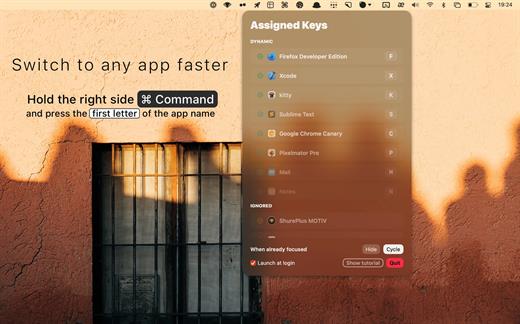
Re-imagined Command-Tab.

Switch apps instantly just by their first letter!

• Hold down the right side |⌘ command| and press the first letter of the app name to focus apps instantly

• The Dynamic algorithm will choose the most useful app for each letter


  • The algorithm will adapt in real time to your workflow
• If apps live on separate spaces, rcmd will switch to the relevant space

  • Switching spaces needs the following setting enabled:
  • System Preferences –> Mission Control –> “When switching to an application, switch to a Space with open windows for the application”
• When pressing the key while the app is already focused, you can use one of 2 useful functions

  • HIDE: Show/Hide the app instantly
  • CYCLE: Focus other apps with the same first letter
Assign custom keys for your favorite apps

• Hold down |⌘ command| + |⌥ option| and press any letter to assign that letter permanently to the currently focused app

• When an app is in the STATIC list:


  • the assigned key can launch the app when it isn’t running
  • the HIDE/CYCLE setting can be adjusted on a per-app basis
Customize the app to your liking

• the Trigger setting allows you to change the Right Command trigger to any combination of modifiers


  • this will come in handy if you have a keyboard without a Right Command key
• disable specific letters from being registered by rcmd

  • click on the Settings button to find the Enabled Keys setting
What’s New

Version 2.3.6:


  • Fix "Ignore"/"Unignore" button size being squished.
Compatibility

macOS 11.0 or later.


Release Name: rcmd • App Switcher 2.3.6
Size: 13.4 MB
Links: HOMEPAGE – NFO – Torrent Search

Download: UPLOADGiGNiTROFLARERAPiDGATOR

4 Comments
Jan 22

rcmd • App Switcher 2.3.5

Refund available within 14 days, no questions asked. To do that, click on “Report a Problem” on the app page in the App Store and select “Request a refund”.

Re-imagined Command-Tab.

Switch apps instantly just by their first letter!

• Hold down the right side |⌘ command| and press the first letter of the app name to focus apps instantly

• The Dynamic algorithm will choose the most useful app for each letter


  • The algorithm will adapt in real time to your workflow
• If apps live on separate spaces, rcmd will switch to the relevant space

  • Switching spaces needs the following setting enabled:
  • System Preferences –> Mission Control –> “When switching to an application, switch to a Space with open windows for the application”
• When pressing the key while the app is already focused, you can use one of 2 useful functions

  • HIDE: Show/Hide the app instantly
  • CYCLE: Focus other apps with the same first letter
Assign custom keys for your favorite apps

• Hold down |⌘ command| + |⌥ option| and press any letter to assign that letter permanently to the currently focused app

• When an app is in the STATIC list:


  • the assigned key can launch the app when it isn’t running
  • the HIDE/CYCLE setting can be adjusted on a per-app basis
Customize the app to your liking

• the Trigger setting allows you to change the Right Command trigger to any combination of modifiers


  • this will come in handy if you have a keyboard without a Right Command key
• disable specific letters from being registered by rcmd

  • click on the Settings button to find the Enabled Keys setting
What’s New

Version 2.3.5:


  • macOS Ventura and Stage Manager ready
  • Allow choosing Switcher UI screen placement
  • Open "Switcher" settings and scroll below the switcher preview to find the setting
  • Fix focusing some apps that launch helpers in the background
  • Add possibility to configure "=" and "-" keys to different symbol keys
  • Add "Command-," to open Settings
  • Add "Command-Shift-," to open Switcher settings
Compatibility

macOS 11.0 or later.


Release Name: rcmd • App Switcher 2.3.5
Size: 13.5 MB
Links: HOMEPAGE – NFO – Torrent Search

Download: UPLOADGiGNiTROFLARERAPiDGATOR

4 Comments
Jan 13

rcmd • App Switcher 2.3.4

Refund available within 14 days, no questions asked. To do that, click on “Report a Problem” on the app page in the App Store and select “Request a refund”.

Re-imagined Command-Tab.

Switch apps instantly just by their first letter!

• Hold down the right side |⌘ command| and press the first letter of the app name to focus apps instantly

• The Dynamic algorithm will choose the most useful app for each letter


  • The algorithm will adapt in real time to your workflow
• If apps live on separate spaces, rcmd will switch to the relevant space

  • Switching spaces needs the following setting enabled:
  • System Preferences –> Mission Control –> “When switching to an application, switch to a Space with open windows for the application”
• When pressing the key while the app is already focused, you can use one of 2 useful functions

  • HIDE: Show/Hide the app instantly
  • CYCLE: Focus other apps with the same first letter
Assign custom keys for your favorite apps

• Hold down |⌘ command| + |⌥ option| and press any letter to assign that letter permanently to the currently focused app

• When an app is in the STATIC list:


  • the assigned key can launch the app when it isn’t running
  • the HIDE/CYCLE setting can be adjusted on a per-app basis
Customize the app to your liking

• the Trigger setting allows you to change the Right Command trigger to any combination of modifiers


  • this will come in handy if you have a keyboard without a Right Command key
• disable specific letters from being registered by rcmd

  • click on the Settings button to find the Enabled Keys setting
What’s New

Version 2.3.4:


  • macOS Ventura and Stage Manager ready
  • Allow choosing Switcher UI screen placement
  • Open "Switcher" settings and scroll below the switcher preview to find the setting
  • Fix focusing some apps that launch helpers in the background
  • Add possibility to configure "=" and "-" keys to different symbol keys
  • Add "Command-," to open Settings
  • Add "Command-Shift-," to open Switcher settings
Compatibility

macOS 11.0 or later.


Release Name: rcmd • App Switcher 2.3.4
Size: 13.5 MB
Links: HOMEPAGE – NFO – Torrent Search

Download: UPLOADGiGNiTROFLARERAPiDGATOR

4 Comments
Nov 24

rcmd • App Switcher 2.3.3

Refund available within 14 days, no questions asked. To do that, click on “Report a Problem” on the app page in the App Store and select “Request a refund”.

Re-imagined Command-Tab.

Switch apps instantly just by their first letter!

• Hold down the right side |⌘ command| and press the first letter of the app name to focus apps instantly

• The Dynamic algorithm will choose the most useful app for each letter


  • The algorithm will adapt in real time to your workflow
• If apps live on separate spaces, rcmd will switch to the relevant space

  • Switching spaces needs the following setting enabled:
  • System Preferences –> Mission Control –> “When switching to an application, switch to a Space with open windows for the application”
• When pressing the key while the app is already focused, you can use one of 2 useful functions

  • HIDE: Show/Hide the app instantly
  • CYCLE: Focus other apps with the same first letter
Assign custom keys for your favorite apps

• Hold down |⌘ command| + |⌥ option| and press any letter to assign that letter permanently to the currently focused app

• When an app is in the STATIC list:


  • the assigned key can launch the app when it isn’t running
  • the HIDE/CYCLE setting can be adjusted on a per-app basis
Customize the app to your liking

• the Trigger setting allows you to change the Right Command trigger to any combination of modifiers


  • this will come in handy if you have a keyboard without a Right Command key
• disable specific letters from being registered by rcmd

  • click on the Settings button to find the Enabled Keys setting
What’s New

Version 2.3.3:


  • macOS Ventura and Stage Manager ready
  • Allow choosing Switcher UI screen placement
  • Open "Switcher" settings and scroll below the switcher preview to find the setting
  • Fix focusing some apps that launch helpers in the background
  • Add possibility to configure "=" and "-" keys to different symbol keys
  • Add "Command-," to open Settings
  • Add "Command-Shift-," to open Switcher settings
Compatibility

macOS 11.0 or later.


Release Name: rcmd • App Switcher 2.3.3
Size: 13.5 MB
Links: HOMEPAGE – NFO – Torrent Search

Download: UPLOADGiGNiTROFLARERAPiDGATOR

5 Comments
Nov 20

rcmd • App Switcher 2.3.2

Refund available within 14 days, no questions asked. To do that, click on “Report a Problem” on the app page in the App Store and select “Request a refund”.

Re-imagined Command-Tab.

Switch apps instantly just by their first letter!

• Hold down the right side |⌘ command| and press the first letter of the app name to focus apps instantly

• The Dynamic algorithm will choose the most useful app for each letter


  • The algorithm will adapt in real time to your workflow
• If apps live on separate spaces, rcmd will switch to the relevant space

  • Switching spaces needs the following setting enabled:
  • System Preferences –> Mission Control –> “When switching to an application, switch to a Space with open windows for the application”
• When pressing the key while the app is already focused, you can use one of 2 useful functions

  • HIDE: Show/Hide the app instantly
  • CYCLE: Focus other apps with the same first letter
Assign custom keys for your favorite apps

• Hold down |⌘ command| + |⌥ option| and press any letter to assign that letter permanently to the currently focused app

• When an app is in the STATIC list:


  • the assigned key can launch the app when it isn’t running
  • the HIDE/CYCLE setting can be adjusted on a per-app basis
Customize the app to your liking

• the Trigger setting allows you to change the Right Command trigger to any combination of modifiers


  • this will come in handy if you have a keyboard without a Right Command key
• disable specific letters from being registered by rcmd

  • click on the Settings button to find the Enabled Keys setting
What’s New

Version 2.3.2:


  • macOS Ventura and Stage Manager ready
  • Allow choosing Switcher UI screen placement
  • Open "Switcher" settings and scroll below the switcher preview to find the setting
  • Fix focusing some apps that launch helpers in the background
  • Add possibility to configure "=" and "-" keys to different symbol keys
  • Add "Command-," to open Settings
  • Add "Command-Shift-," to open Switcher settings
Compatibility

macOS 11.0 or later.


Release Name: rcmd • App Switcher 2.3.2
Size: 13.1 MB
Links: HOMEPAGE – NFO – Torrent Search

Download: UPLOADGiGNiTROFLARERAPiDGATOR

4 Comments
Nov 8

rcmd • App Switcher 2.3.1

Refund available within 14 days, no questions asked. To do that, click on “Report a Problem” on the app page in the App Store and select “Request a refund”.

Re-imagined Command-Tab.

Switch apps instantly just by their first letter!

• Hold down the right side |⌘ command| and press the first letter of the app name to focus apps instantly

• The Dynamic algorithm will choose the most useful app for each letter


  • The algorithm will adapt in real time to your workflow
• If apps live on separate spaces, rcmd will switch to the relevant space

  • Switching spaces needs the following setting enabled:
  • System Preferences –> Mission Control –> “When switching to an application, switch to a Space with open windows for the application”
• When pressing the key while the app is already focused, you can use one of 2 useful functions

  • HIDE: Show/Hide the app instantly
  • CYCLE: Focus other apps with the same first letter
Assign custom keys for your favorite apps

• Hold down |⌘ command| + |⌥ option| and press any letter to assign that letter permanently to the currently focused app

• When an app is in the STATIC list:


  • the assigned key can launch the app when it isn’t running
  • the HIDE/CYCLE setting can be adjusted on a per-app basis
Customize the app to your liking

• the Trigger setting allows you to change the Right Command trigger to any combination of modifiers


  • this will come in handy if you have a keyboard without a Right Command key
• disable specific letters from being registered by rcmd

  • click on the Settings button to find the Enabled Keys setting
What’s New

Version 2.3.1:


  • macOS Ventura and Stage Manager ready
  • Allow choosing Switcher UI screen placement
  • Open "Switcher" settings and scroll below the switcher preview to find the setting
  • Fix focusing some apps that launch helpers in the background
  • Add possibility to configure "=" and "-" keys to different symbol keys
  • Add "Command-," to open Settings
  • Add "Command-Shift-," to open Switcher settings
Compatibility

macOS 11.0 or later.


Release Name: rcmd • App Switcher 2.3.1
Size: 13.1 MB
Links: HOMEPAGE – NFO – Torrent Search

Download: UPLOADGiGNiTROFLARERAPiDGATOR

6 Comments
Sept 22

rcmd • App Switcher 2.2.0

Refund available within 14 days, no questions asked. To do that, click on “Report a Problem” on the app page in the App Store and select “Request a refund”.

Re-imagined Command-Tab.

Switch apps instantly just by their first letter!

• Hold down the right side |⌘ command| and press the first letter of the app name to focus apps instantly

• The Dynamic algorithm will choose the most useful app for each letter


  • The algorithm will adapt in real time to your workflow
• If apps live on separate spaces, rcmd will switch to the relevant space

  • Switching spaces needs the following setting enabled:
  • System Preferences –> Mission Control –> “When switching to an application, switch to a Space with open windows for the application”
• When pressing the key while the app is already focused, you can use one of 2 useful functions

  • HIDE: Show/Hide the app instantly
  • CYCLE: Focus other apps with the same first letter
Assign custom keys for your favorite apps

• Hold down |⌘ command| + |⌥ option| and press any letter to assign that letter permanently to the currently focused app

• When an app is in the STATIC list:


  • the assigned key can launch the app when it isn’t running
  • the HIDE/CYCLE setting can be adjusted on a per-app basis
Customize the app to your liking

• the Trigger setting allows you to change the Right Command trigger to any combination of modifiers


  • this will come in handy if you have a keyboard without a Right Command key
• disable specific letters from being registered by rcmd

  • click on the Settings button to find the Enabled Keys setting
What’s New

Version 2.2.0:


  • Allow choosing between "Hide all apps" and "Hide current app" for rcmd+minus
  • Allow choosing between "Minimize all windows" and "Minimize current window" for ralt+minus
  • Improve menu bar responsiveness
  • Sort Window Actions
  • Add "Minimize other windows" action on ralt+rshift+minus
  • Implement Window Action editing when reassigning an already assigned key
Compatibility

macOS 11.0 or later.


Release Name: rcmd • App Switcher 2.2.0
Size: 13.1 MB
Links: HOMEPAGE – NFO – Torrent Search

Download: UPLOADGiGNiTROFLARERAPiDGATOR

4 Comments
Aug 25

rcmd • App Switcher 2.1.1

Refund available within 14 days, no questions asked. To do that, click on “Report a Problem” on the app page in the App Store and select “Request a refund”.

Re-imagined Command-Tab.

Switch apps instantly just by their first letter!

• Hold down the right side |⌘ command| and press the first letter of the app name to focus apps instantly

• The Dynamic algorithm will choose the most useful app for each letter


  • The algorithm will adapt in real time to your workflow
• If apps live on separate spaces, rcmd will switch to the relevant space

  • Switching spaces needs the following setting enabled:
  • System Preferences –> Mission Control –> “When switching to an application, switch to a Space with open windows for the application”
• When pressing the key while the app is already focused, you can use one of 2 useful functions

  • HIDE: Show/Hide the app instantly
  • CYCLE: Focus other apps with the same first letter
Assign custom keys for your favorite apps

• Hold down |⌘ command| + |⌥ option| and press any letter to assign that letter permanently to the currently focused app

• When an app is in the STATIC list:


  • the assigned key can launch the app when it isn’t running
  • the HIDE/CYCLE setting can be adjusted on a per-app basis
Customize the app to your liking

• the Trigger setting allows you to change the Right Command trigger to any combination of modifiers


  • this will come in handy if you have a keyboard without a Right Command key
• disable specific letters from being registered by rcmd

  • click on the Settings button to find the Enabled Keys setting
What’s New

Version 2.1.1:


  • Allow choosing between "Hide all apps" and "Hide current app" for rcmd+minus
  • Allow choosing between "Minimize all windows" and "Minimize current window" for ralt+minus
  • Improve menu bar responsiveness
  • Sort Window Actions
  • Add "Minimize other windows" action on ralt+rshift+minus
  • Implement Window Action editing when reassigning an already assigned key
Compatibility

macOS 11.0 or later.


Release Name: rcmd • App Switcher 2.1.1
Size: 11.8 MB
Links: HOMEPAGE – NFO – Torrent Search

Download: UPLOADGiGNiTROFLARERAPiDGATOR

4 Comments
Aug 16

rcmd • App Switcher 2.1.0

Refund available within 14 days, no questions asked. To do that, click on “Report a Problem” on the app page in the App Store and select “Request a refund”.

Re-imagined Command-Tab.

Switch apps instantly just by their first letter!

• Hold down the right side |⌘ command| and press the first letter of the app name to focus apps instantly

• The Dynamic algorithm will choose the most useful app for each letter


  • The algorithm will adapt in real time to your workflow
• If apps live on separate spaces, rcmd will switch to the relevant space

  • Switching spaces needs the following setting enabled:
  • System Preferences –> Mission Control –> “When switching to an application, switch to a Space with open windows for the application”
• When pressing the key while the app is already focused, you can use one of 2 useful functions

  • HIDE: Show/Hide the app instantly
  • CYCLE: Focus other apps with the same first letter
Assign custom keys for your favorite apps

• Hold down |⌘ command| + |⌥ option| and press any letter to assign that letter permanently to the currently focused app

• When an app is in the STATIC list:


  • the assigned key can launch the app when it isn’t running
  • the HIDE/CYCLE setting can be adjusted on a per-app basis
Customize the app to your liking

• the Trigger setting allows you to change the Right Command trigger to any combination of modifiers


  • this will come in handy if you have a keyboard without a Right Command key
• disable specific letters from being registered by rcmd

  • click on the Settings button to find the Enabled Keys setting
What’s New

Version 2.1.0:


  • Window Actions!
Compatibility

macOS 11.0 or later.


Release Name: rcmd • App Switcher 2.1.0
Size: 11.8 MB
Links: HOMEPAGE – NFO – Torrent Search

Download: UPLOADGiGNiTROFLARERAPiDGATOR

3 Comments
July 31

rcmd • App Switcher 2.0.1

Refund available within 14 days, no questions asked. To do that, click on “Report a Problem” on the app page in the App Store and select “Request a refund”.

Re-imagined Command-Tab.

Switch apps instantly just by their first letter!

• Hold down the right side |⌘ command| and press the first letter of the app name to focus apps instantly

• The Dynamic algorithm will choose the most useful app for each letter


  • The algorithm will adapt in real time to your workflow
• If apps live on separate spaces, rcmd will switch to the relevant space

  • Switching spaces needs the following setting enabled:
  • System Preferences –> Mission Control –> “When switching to an application, switch to a Space with open windows for the application”
• When pressing the key while the app is already focused, you can use one of 2 useful functions

  • HIDE: Show/Hide the app instantly
  • CYCLE: Focus other apps with the same first letter
Assign custom keys for your favorite apps

• Hold down |⌘ command| + |⌥ option| and press any letter to assign that letter permanently to the currently focused app

• When an app is in the STATIC list:


  • the assigned key can launch the app when it isn’t running
  • the HIDE/CYCLE setting can be adjusted on a per-app basis
Customize the app to your liking

• the Trigger setting allows you to change the Right Command trigger to any combination of modifiers


  • this will come in handy if you have a keyboard without a Right Command key
• disable specific letters from being registered by rcmd

  • click on the Settings button to find the Enabled Keys setting
What’s New

Version 2.0.1:


  • App Switcher UI
Compatibility

macOS 11.0 or later.


Release Name: rcmd • App Switcher 2.0.1
Size: 11.6 MB
Links: HOMEPAGE – NFO – Torrent Search

Download: UPLOADGiG – NiTROFLARE – RAPiDGATOR

4 Comments