Please REGISTER or RENEW your account on RAPiDGATOR.net and support us by doing through all RAPiDGATOR working download links on main posts...
May 20

Room Arranger 11.1.0.790

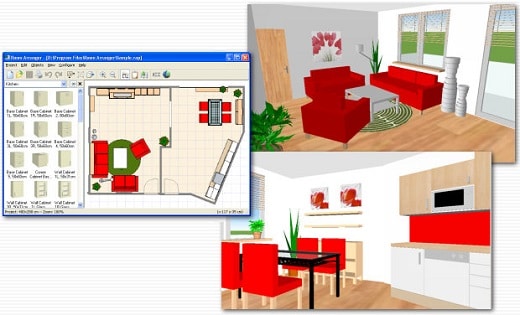
Description: Room Arranger is 3D room / apartment / floor planner with simple user interface. Once you get the basics, you can draw whatever you imagine.
Easy to Use
Room Arranger is small and compact piece of software. Still it lets you design nearly anything you imagine. Once you understand the basics it's easy to bring it to next level.

3D Visualization
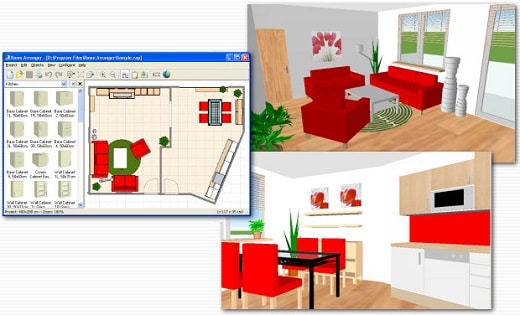
3D can give you a better impression of your design. Room Arranger will not only let you fly around the scene, but you can also walk through it like in reality. You can also have multiple floors in the single project.

Wide Object Library
There are nearly 300 objects in the standard object library. Furniture, and other equipment. For each of them, you can modify their dimensions exactly as you need - you are not limited to what we think is the most common.

Everybody needs something different. Every piece of equipment is special.
We are not able to put everything into Room Arranger. But you can quickly and easily design all your special objects on your own in it. Some contributed to our On-line object library and shared their work. The program can also be used in the variety of other areas - garden architecture, housing development (houses as objects), webdesign...

3D Visualization
Room Arranger can show your project in 3D. It uses VRML standard for it. So you can put interactive 3D scene on your web. And you can make movies here too.

Build on Floor Plan Image
Drawing walls can be quite time consuming for apartment or house design. So there is a way to make it easier in case you have an image or photo of the floor plan. Load the image of the floor plan into the Wall Editor, calibrate it, and draw walls on top of it.

Measure
There is a measurement tool in Room Arranger that helps you to check if there is enough space left for other objects, or just visualize the dimensions in the project. The software also measures the room areas, wall areas and other useful values. It will let you copy - paste them to Excel for further processing.

Print in Scale
print over more pages
Printing is the integral part of designer's work. We try to make this output precisely and in high quality. Professional architects usually require printouts in exact 1:50 or 1:100 scale, which is possible in Room Arranger. In case you have only small A4 printer, the software manages to print the project over more pages. You will just glue all sheets of paper together.

Features:
Each wall and floor can have separate color / material
Annotations
Snap objects to near walls while moving them with mouse
Baseboards and crown moldings
Doorframe has editable thickness and color
Picture can have frame with editable thickness and color
Groups within groups of objects, option to forbid ungrouping (with password)

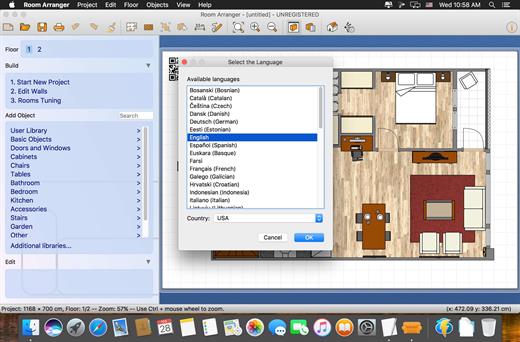
The software is translated into many languages, but we are still searching for new ones.

Release Name: Room Arranger 11.1.0.790
Size: 43 MB
Links: HOMEPAGE – NFO – Torrent Search

Download: RAPiDGATOR

7 Comments
May 19

Room Arranger 11.0.1.779

Description: Room Arranger is 3D room / apartment / floor planner with simple user interface. Once you get the basics, you can draw whatever you imagine.

Easy to Use
Room Arranger is small and compact piece of software. Still it lets you design nearly anything you imagine. Once you understand the basics it's easy to bring it to next level.

3D Visualization
3D can give you a better impression of your design. Room Arranger will not only let you fly around the scene, but you can also walk through it like in reality. You can also have multiple floors in the single project.

Wide Object Library
There are nearly 300 objects in the standard object library. Furniture, and other equipment. For each of them, you can modify their dimensions exactly as you need - you are not limited to what we think is the most common.

Everybody needs something different. Every piece of equipment is special.
We are not able to put everything into Room Arranger. But you can quickly and easily design all your special objects on your own in it. Some contributed to our On-line object library and shared their work. The program can also be used in the variety of other areas - garden architecture, housing development (houses as objects), webdesign...

3D Visualization
Room Arranger can show your project in 3D. It uses VRML standard for it. So you can put interactive 3D scene on your web. And you can make movies here too.

Build on Floor Plan Image
Drawing walls can be quite time consuming for apartment or house design. So there is a way to make it easier in case you have an image or photo of the floor plan. Load the image of the floor plan into the Wall Editor, calibrate it, and draw walls on top of it.

Measure
There is a measurement tool in Room Arranger that helps you to check if there is enough space left for other objects, or just visualize the dimensions in the project. The software also measures the room areas, wall areas and other useful values. It will let you copy - paste them to Excel for further processing.

Print in Scale
print over more pages
Printing is the integral part of designer's work. We try to make this output precisely and in high quality. Professional architects usually require printouts in exact 1:50 or 1:100 scale, which is possible in Room Arranger. In case you have only small A4 printer, the software manages to print the project over more pages. You will just glue all sheets of paper together.

Features:
Each wall and floor can have separate color / material
Annotations
Snap objects to near walls while moving them with mouse
Baseboards and crown moldings
Doorframe has editable thickness and color
Picture can have frame with editable thickness and color
Groups within groups of objects, option to forbid ungrouping (with password)

The software is translated into many languages, but we are still searching for new ones.

Release Name: Room Arranger 11.0.1.779
Size: 43 MB
Links: HOMEPAGE – NFO – Torrent Search

Download: RAPiDGATOR

4 Comments
May 15

Room Arranger 11.0.0.776

Description: Room Arranger is 3D room / apartment / floor planner with simple user interface. Once you get the basics, you can draw whatever you imagine.

Easy to Use
Room Arranger is small and compact piece of software. Still it lets you design nearly anything you imagine. Once you understand the basics it's easy to bring it to next level.

3D Visualization
3D can give you a better impression of your design. Room Arranger will not only let you fly around the scene, but you can also walk through it like in reality. You can also have multiple floors in the single project.

Wide Object Library
There are nearly 300 objects in the standard object library. Furniture, and other equipment. For each of them, you can modify their dimensions exactly as you need - you are not limited to what we think is the most common.

Everybody needs something different. Every piece of equipment is special.
We are not able to put everything into Room Arranger. But you can quickly and easily design all your special objects on your own in it. Some contributed to our On-line object library and shared their work. The program can also be used in the variety of other areas - garden architecture, housing development (houses as objects), webdesign...

3D Visualization
Room Arranger can show your project in 3D. It uses VRML standard for it. So you can put interactive 3D scene on your web. And you can make movies here too.

Build on Floor Plan Image
Drawing walls can be quite time consuming for apartment or house design. So there is a way to make it easier in case you have an image or photo of the floor plan. Load the image of the floor plan into the Wall Editor, calibrate it, and draw walls on top of it.

Measure
There is a measurement tool in Room Arranger that helps you to check if there is enough space left for other objects, or just visualize the dimensions in the project. The software also measures the room areas, wall areas and other useful values. It will let you copy - paste them to Excel for further processing.

Print in Scale
print over more pages
Printing is the integral part of designer's work. We try to make this output precisely and in high quality. Professional architects usually require printouts in exact 1:50 or 1:100 scale, which is possible in Room Arranger. In case you have only small A4 printer, the software manages to print the project over more pages. You will just glue all sheets of paper together.

Features:
Each wall and floor can have separate color / material
Annotations
Snap objects to near walls while moving them with mouse
Baseboards and crown moldings
Doorframe has editable thickness and color
Picture can have frame with editable thickness and color
Groups within groups of objects, option to forbid ungrouping (with password)

The software is translated into many languages, but we are still searching for new ones.

Release Name: Room Arranger 11.0.0.776
Size: 43.4 MB
Links: HOMEPAGE – NFO – Torrent Search

Download: RAPiDGATOR

5 Comments
Apr 14

Room Arranger 10.3.4

Room Arranger is 3D room / apartment / floor planner with simple user interface. Once you get the basics, you can draw whatever you imagine. While having wide library of objects, you can easily create your own piece of furniture. Room Arranger can show your project in 3D. It uses VRML standard for it. So you can put interactive 3D scene on your web.

Easy to Use
Room Arranger is small and compact piece of software. Still it lets you design nearly anything you imagine. Once you understand the basics it’s easy to bring it to next level. Nearly all functions have keyboard shortcuts, so you can learn to be pretty fast in Room Arranger.

What’s New

Version 10.3.4:


  • Release notes were unavailable when this listing was updated.
Compatibility

macOS 13 or later


Release Name: Room Arranger 10.3.4
Size: 44.5 MB
Links: HOMEPAGE – NFO – Torrent Search

Download: RAPiDGATOR

9 Comments
Feb 12

Room Arranger 10.3.6.748

Description: Room Arranger is 3D room / apartment / floor planner with simple user interface. Once you get the basics, you can draw whatever you imagine.

Easy to Use
Room Arranger is small and compact piece of software. Still it lets you design nearly anything you imagine. Once you understand the basics it's easy to bring it to next level.

3D Visualization
3D can give you a better impression of your design. Room Arranger will not only let you fly around the scene, but you can also walk through it like in reality. You can also have multiple floors in the single project.

Wide Object Library
There are nearly 300 objects in the standard object library. Furniture, and other equipment. For each of them, you can modify their dimensions exactly as you need - you are not limited to what we think is the most common.

Everybody needs something different. Every piece of equipment is special.
We are not able to put everything into Room Arranger. But you can quickly and easily design all your special objects on your own in it. Some contributed to our On-line object library and shared their work. The program can also be used in the variety of other areas - garden architecture, housing development (houses as objects), webdesign...

3D Visualization
Room Arranger can show your project in 3D. It uses VRML standard for it. So you can put interactive 3D scene on your web. And you can make movies here too.

Build on Floor Plan Image
Drawing walls can be quite time consuming for apartment or house design. So there is a way to make it easier in case you have an image or photo of the floor plan. Load the image of the floor plan into the Wall Editor, calibrate it, and draw walls on top of it.

Measure
There is a measurement tool in Room Arranger that helps you to check if there is enough space left for other objects, or just visualize the dimensions in the project. The software also measures the room areas, wall areas and other useful values. It will let you copy - paste them to Excel for further processing.

Print in Scale
print over more pages
Printing is the integral part of designer's work. We try to make this output precisely and in high quality. Professional architects usually require printouts in exact 1:50 or 1:100 scale, which is possible in Room Arranger. In case you have only small A4 printer, the software manages to print the project over more pages. You will just glue all sheets of paper together.

Features:
Each wall and floor can have separate color / material
Annotations
Snap objects to near walls while moving them with mouse
Baseboards and crown moldings
Doorframe has editable thickness and color
Picture can have frame with editable thickness and color
Groups within groups of objects, option to forbid ungrouping (with password)

The software is translated into many languages, but we are still searching for new ones.

Release Name: Room Arranger 10.3.6.748
Size: 23.5 MB
Links: HOMEPAGE – NFO – Torrent Search

Download: RAPiDGATOR

9 Comments
Jan 21

Room Arranger 10.3.3.741

Description: Room Arranger is 3D room / apartment / floor planner with simple user interface. Once you get the basics, you can draw whatever you imagine.

Easy to Use
Room Arranger is small and compact piece of software. Still it lets you design nearly anything you imagine. Once you understand the basics it's easy to bring it to next level.

3D Visualization
3D can give you a better impression of your design. Room Arranger will not only let you fly around the scene, but you can also walk through it like in reality. You can also have multiple floors in the single project.

Wide Object Library
There are nearly 300 objects in the standard object library. Furniture, and other equipment. For each of them, you can modify their dimensions exactly as you need - you are not limited to what we think is the most common.

Everybody needs something different. Every piece of equipment is special.
We are not able to put everything into Room Arranger. But you can quickly and easily design all your special objects on your own in it. Some contributed to our On-line object library and shared their work. The program can also be used in the variety of other areas - garden architecture, housing development (houses as objects), webdesign...

3D Visualization
Room Arranger can show your project in 3D. It uses VRML standard for it. So you can put interactive 3D scene on your web. And you can make movies here too.

Build on Floor Plan Image
Drawing walls can be quite time consuming for apartment or house design. So there is a way to make it easier in case you have an image or photo of the floor plan. Load the image of the floor plan into the Wall Editor, calibrate it, and draw walls on top of it.

Measure
There is a measurement tool in Room Arranger that helps you to check if there is enough space left for other objects, or just visualize the dimensions in the project. The software also measures the room areas, wall areas and other useful values. It will let you copy - paste them to Excel for further processing.

Print in Scale
print over more pages
Printing is the integral part of designer's work. We try to make this output precisely and in high quality. Professional architects usually require printouts in exact 1:50 or 1:100 scale, which is possible in Room Arranger. In case you have only small A4 printer, the software manages to print the project over more pages. You will just glue all sheets of paper together.

Features:
Each wall and floor can have separate color / material
Annotations
Snap objects to near walls while moving them with mouse
Baseboards and crown moldings
Doorframe has editable thickness and color
Picture can have frame with editable thickness and color
Groups within groups of objects, option to forbid ungrouping (with password)

The software is translated into many languages, but we are still searching for new ones.

Release Name: Room Arranger 10.3.3.741
Size: 23.5 MB
Links: HOMEPAGE – NFO – Torrent Search

Download: RAPiDGATOR

5 Comments
Oct 20

Room Arranger 9.8.1.641 (x64) Multilingual

Description: Room Arranger is 3D room / apartment / floor planner with simple user interface. Once you get the basics, you can draw whatever you imagine. While having wide library of objects, you can easily create your own piece of furniture.

Feature :
Easy to Use
Room Arranger is small and compact piece of software. Still it lets you design nearly anything you imagine. Once you understand the basics it’s easy to bring it to next level.

Nearly all functions have keyboard shortcuts, so you can learn to be pretty fast in Room Arranger.

3D Visualization
3D can give you a better impression of your design. Room Arranger will not only let you fly around the scene, but you can also walk through it like in reality.

Wide Object Library
There are nearly 300 objects in the standard object library. Furniture, and other equipment. For each of them, you can modify their dimensions exactly as you need – you are not limited to what we think is the most common.

Release Name: Room Arranger 9.8.1.641 (x64) Multilingual
Size: 20 MB
Links: HOMEPAGE – NFO – Torrent Search

Download: FiKPERUPLOADGiGNiTROFLARERAPiDGATOR

6 Comments
Sept 25

Room Arranger 9.8.0.640 (x64) Multilingual

Description: Room Arranger is 3D room / apartment / floor planner with simple user interface. Once you get the basics, you can draw whatever you imagine. While having wide library of objects, you can easily create your own piece of furniture.

Feature :
Easy to Use
Room Arranger is small and compact piece of software. Still it lets you design nearly anything you imagine. Once you understand the basics it’s easy to bring it to next level.

Nearly all functions have keyboard shortcuts, so you can learn to be pretty fast in Room Arranger.

3D Visualization
3D can give you a better impression of your design. Room Arranger will not only let you fly around the scene, but you can also walk through it like in reality.

Wide Object Library
There are nearly 300 objects in the standard object library. Furniture, and other equipment. For each of them, you can modify their dimensions exactly as you need – you are not limited to what we think is the most common.

Release Name: Room Arranger 9.8.0.640 (x64) Multilingual
Size: 19.4 MB
Links: HOMEPAGE – NFO – Torrent Search

Download: FiKPERUPLOADGiGNiTROFLARERAPiDGATOR

7 Comments
May 7

Room Arranger 9.6.1.624 Multilingual-P2P

Description: Room Arranger is 3D room / apartment / floor planner with simple user interface. Once you get the basics, you can draw whatever you imagine. While having wide library of objects, you can easily create your own piece of furniture.

Feature :
Easy to Use
Room Arranger is small and compact piece of software. Still it lets you design nearly anything you imagine. Once you understand the basics it’s easy to bring it to next level.

Nearly all functions have keyboard shortcuts, so you can learn to be pretty fast in Room Arranger.

3D Visualization
3D can give you a better impression of your design. Room Arranger will not only let you fly around the scene, but you can also walk through it like in reality.

Wide Object Library
There are nearly 300 objects in the standard object library. Furniture, and other equipment. For each of them, you can modify their dimensions exactly as you need – you are not limited to what we think is the most common.

Release Names: Room Arranger 9.6.1.624 Multilingual-P2P
Size: 35.9 MB
Links: HOMEPAGE – NFO – Torrent Search

Download: UPLOADGiG – NiTROFLARE – RAPiDGATOR

8 Comments
Jan 30

Room Arranger 9.5.1.606 Multilingual-P2P

Description: Room Arranger is 3D room / apartment / floor planner with simple user interface. Once you get the basics, you can draw whatever you imagine. While having wide library of objects, you can easily create your own piece of furniture.

Features:


  • Easy to Use
  • 3D Visualization
  • Wide Object Library
  • Measurement
  • Print in Scale
  • Build on Floor Plan Image
Release Names: Room.Arranger.9.5.1.606.Multilingual-P2P
Size: 50.3 MB
Links: HOMEPAGE – NFO – Torrent Search

Download: UPLOADGiG – NiTROFLARE – RAPiDGATOR

5 Comments