

Please REGISTER or RENEW your account on RAPiDGATOR.net and support us by doing through all RAPiDGATOR working download links on main posts...
Feb 11

Screegle – Clean Screen Sharing 2.2.3

Screegle lets you share any window you want over a clean desktop background image. Screegle = Screen Sharing for Professionals.
Your co-workers, team, customers, or students see a clean, uncluttered version of your desktop that only contains the windows you explicitly selected, nothing more.
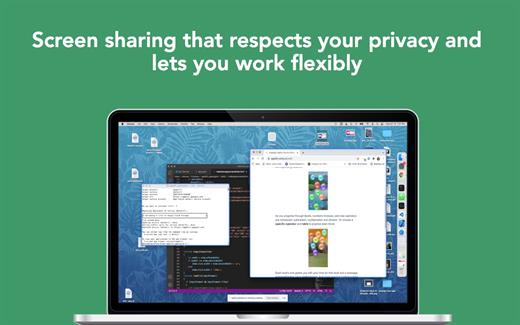
No more notifications popping up, personal web sites, files and folders that might reveal personal information.

Using Screegle is very simple:

1 – press ⌘ F1 over any window you want to select or deselect (a blue ribbon will appear around it)
2 – in your video meeting app, share the “Screegle Share” window and you’re all set!

You can also record a video of your Screegle windows, with voice.

This is useful to share clean desktops with co-workers for asynchronous communication.

And you can even add your webcam as an overlay, useful during screen recordings or when you present windows and want people to focus on you (turn off your webcam in your video app!)

What’s New

Version 2.2.3:


  • Release notes were unavailable when this listing was updated.
Compatibility

macOS 10.14 or later
Apple Silicon or Intel Core processor


Release Name: Screegle – Clean Screen Sharing 2.2.3
Size: 13.4 MB
Links: HOMEPAGE – NFO – Torrent Search

Download: UPLOADGiGNiTROFLARERAPiDGATOR

5 Comments
Jan 26

Screegle – Clean Screen Sharing 2.2.2

Screegle lets you share any window you want over a clean desktop background image. Screegle = Screen Sharing for Professionals.
Your co-workers, team, customers, or students see a clean, uncluttered version of your desktop that only contains the windows you explicitly selected, nothing more.

No more notifications popping up, personal web sites, files and folders that might reveal personal information.

Using Screegle is very simple:

1 – press ⌘ F1 over any window you want to select or deselect (a blue ribbon will appear around it)
2 – in your video meeting app, share the “Screegle Share” window and you’re all set!

You can also record a video of your Screegle windows, with voice.

This is useful to share clean desktops with co-workers for asynchronous communication.

And you can even add your webcam as an overlay, useful during screen recordings or when you present windows and want people to focus on you (turn off your webcam in your video app!)

What’s New

Version 2.2.2:


  • Release notes were unavailable when this listing was updated.
Compatibility

macOS 10.14 or later
Apple Silicon or Intel Core processor


Release Name: Screegle – Clean Screen Sharing 2.2.2
Size: 10.6 MB
Links: HOMEPAGE – NFO – Torrent Search

Download: UPLOADGiGNiTROFLARERAPiDGATOR

5 Comments
Jan 14

Screegle – Clean Screen Sharing 2.2.1

Screegle lets you share any window you want over a clean desktop background image. Screegle = Screen Sharing for Professionals.
Your co-workers, team, customers, or students see a clean, uncluttered version of your desktop that only contains the windows you explicitly selected, nothing more.

No more notifications popping up, personal web sites, files and folders that might reveal personal information.

Using Screegle is very simple:

1 – press ⌘ F1 over any window you want to select or deselect (a blue ribbon will appear around it)
2 – in your video meeting app, share the “Screegle Share” window and you’re all set!

You can also record a video of your Screegle windows, with voice.

This is useful to share clean desktops with co-workers for asynchronous communication.

And you can even add your webcam as an overlay, useful during screen recordings or when you present windows and want people to focus on you (turn off your webcam in your video app!)

What’s New

Version 2.2.1:


  • Release notes were unavailable when this listing was updated.
Compatibility

macOS 10.14 or later
Apple Silicon or Intel Core processor


Release Name: Screegle – Clean Screen Sharing 2.2.1
Size: 13.4 MB
Links: HOMEPAGE – NFO – Torrent Search

Download: UPLOADGiGNiTROFLARERAPiDGATOR

4 Comments
Dec 20

Screegle – Clean Screen Sharing 2.1.9

Screegle lets you share any window you want over a clean desktop background image. Screegle = Screen Sharing for Professionals.
Your co-workers, team, customers, or students see a clean, uncluttered version of your desktop that only contains the windows you explicitly selected, nothing more.

No more notifications popping up, personal web sites, files and folders that might reveal personal information.

Using Screegle is very simple:

1 – press ⌘ F1 over any window you want to select or deselect (a blue ribbon will appear around it)
2 – in your video meeting app, share the “Screegle Share” window and you’re all set!

You can also record a video of your Screegle windows, with voice.

This is useful to share clean desktops with co-workers for asynchronous communication.

And you can even add your webcam as an overlay, useful during screen recordings or when you present windows and want people to focus on you (turn off your webcam in your video app!)

What’s New

Version 2.1.9:


  • Release notes were unavailable when this listing was updated.
Compatibility

macOS 10.14 or later
Apple Silicon or Intel Core processor


Release Name: Screegle – Clean Screen Sharing 2.1.9
Size: 13.4 MB
Links: HOMEPAGE – NFO – Torrent Search

Download: UPLOADGiGNiTROFLARERAPiDGATOR

5 Comments
Nov 30

Screegle – Clean Screen Sharing 2.1.8

Screegle lets you share any window you want over a clean desktop background image. Screegle = Screen Sharing for Professionals.
Your co-workers, team, customers, or students see a clean, uncluttered version of your desktop that only contains the windows you explicitly selected, nothing more.

No more notifications popping up, personal web sites, files and folders that might reveal personal information.

Using Screegle is very simple:

1 – press ⌘ F1 over any window you want to select or deselect (a blue ribbon will appear around it)
2 – in your video meeting app, share the “Screegle Share” window and you’re all set!

You can also record a video of your Screegle windows, with voice.

This is useful to share clean desktops with co-workers for asynchronous communication.

And you can even add your webcam as an overlay, useful during screen recordings or when you present windows and want people to focus on you (turn off your webcam in your video app!)

What’s New

Version 2.1.8:


  • Release notes were unavailable when this listing was updated.
Compatibility

macOS 10.14 or later
Apple Silicon or Intel Core processor


Release Name: Screegle – Clean Screen Sharing 2.1.8
Size: 13.4 MB
Links: HOMEPAGE – NFO – Torrent Search

Download: UPLOADGiGNiTROFLARERAPiDGATOR

2 Comments
Nov 13

Screegle – Clean Screen Sharing 2.1.7

Screegle lets you share any window you want over a clean desktop background image. Screegle = Screen Sharing for Professionals.
Your co-workers, team, customers, or students see a clean, uncluttered version of your desktop that only contains the windows you explicitly selected, nothing more.

No more notifications popping up, personal web sites, files and folders that might reveal personal information.

Using Screegle is very simple:

1 – press ⌘ F1 over any window you want to select or deselect (a blue ribbon will appear around it)
2 – in your video meeting app, share the “Screegle Share” window and you’re all set!

You can also record a video of your Screegle windows, with voice.

This is useful to share clean desktops with co-workers for asynchronous communication.

And you can even add your webcam as an overlay, useful during screen recordings or when you present windows and want people to focus on you (turn off your webcam in your video app!)

What’s New

Version 2.1.6:


  • Release notes were unavailable when this listing was updated.
Compatibility

macOS 10.14 or later
Apple Silicon or Intel Core processor


Release Name: Screegle – Clean Screen Sharing 2.1.7
Size: 13.4 MB
Links: HOMEPAGE – NFO – Torrent Search

Download: UPLOADGiGNiTROFLARERAPiDGATOR

4 Comments
Oct 28

Screegle – Clean Screen Sharing 2.1.6

Screegle lets you share any window you want over a clean desktop background image. Screegle = Screen Sharing for Professionals.
Your co-workers, team, customers, or students see a clean, uncluttered version of your desktop that only contains the windows you explicitly selected, nothing more.

No more notifications popping up, personal web sites, files and folders that might reveal personal information.

Using Screegle is very simple:

1 – press ⌘ F1 over any window you want to select or deselect (a blue ribbon will appear around it)
2 – in your video meeting app, share the “Screegle Share” window and you’re all set!

You can also record a video of your Screegle windows, with voice.

This is useful to share clean desktops with co-workers for asynchronous communication.

And you can even add your webcam as an overlay, useful during screen recordings or when you present windows and want people to focus on you (turn off your webcam in your video app!)

What’s New

Version 2.1.6:


  • Release notes were unavailable when this listing was updated.
Compatibility

macOS 10.14 or later
Apple Silicon or Intel Core processor


Release Name: Screegle – Clean Screen Sharing 2.1.6
Size: 13.4 MB
Links: HOMEPAGE – NFO – Torrent Search

Download: UPLOADGiGNiTROFLARERAPiDGATOR

5 Comments
Oct 25

Screegle – Clean Screen Sharing 2.1.5

Screegle lets you share any window you want over a clean desktop background image. Screegle = Screen Sharing for Professionals.
Your co-workers, team, customers, or students see a clean, uncluttered version of your desktop that only contains the windows you explicitly selected, nothing more.

No more notifications popping up, personal web sites, files and folders that might reveal personal information.

Using Screegle is very simple:

1 – press ⌘ F1 over any window you want to select or deselect (a blue ribbon will appear around it)
2 – in your video meeting app, share the “Screegle Share” window and you’re all set!

You can also record a video of your Screegle windows, with voice.

This is useful to share clean desktops with co-workers for asynchronous communication.

And you can even add your webcam as an overlay, useful during screen recordings or when you present windows and want people to focus on you (turn off your webcam in your video app!)

What’s New

Version 2.1.5:


  • Release notes were unavailable when this listing was updated.
Compatibility

macOS 10.14 or later
Apple Silicon or Intel Core processor


Release Name: Screegle – Clean Screen Sharing 2.1.5
Size: 13.4 MB
Links: HOMEPAGE – NFO – Torrent Search

Download: UPLOADGiGNiTROFLARERAPiDGATOR

5 Comments
Oct 23

Screegle – Clean Screen Sharing 2.1.4

Screegle lets you share any window you want over a clean desktop background image. Screegle = Screen Sharing for Professionals.
Your co-workers, team, customers, or students see a clean, uncluttered version of your desktop that only contains the windows you explicitly selected, nothing more.

No more notifications popping up, personal web sites, files and folders that might reveal personal information.

Using Screegle is very simple:

1 – press ⌘ F1 over any window you want to select or deselect (a blue ribbon will appear around it)
2 – in your video meeting app, share the “Screegle Share” window and you’re all set!

You can also record a video of your Screegle windows, with voice.

This is useful to share clean desktops with co-workers for asynchronous communication.

And you can even add your webcam as an overlay, useful during screen recordings or when you present windows and want people to focus on you (turn off your webcam in your video app!)

What’s New

Version 2.1.4:


  • Release notes were unavailable when this listing was updated.
Compatibility

macOS 10.14 or later
Apple Silicon or Intel Core processor


Release Name: Screegle – Clean Screen Sharing 2.1.4
Size: 13.4 MB
Links: HOMEPAGE – NFO – Torrent Search

Download: UPLOADGiGNiTROFLARERAPiDGATOR

4 Comments
Oct 21

Screegle – Clean Screen Sharing 2.1.3

Screegle lets you share any window you want over a clean desktop background image. Screegle = Screen Sharing for Professionals.
Your co-workers, team, customers, or students see a clean, uncluttered version of your desktop that only contains the windows you explicitly selected, nothing more.

No more notifications popping up, personal web sites, files and folders that might reveal personal information.

Using Screegle is very simple:

1 – press ⌘ F1 over any window you want to select or deselect (a blue ribbon will appear around it)
2 – in your video meeting app, share the “Screegle Share” window and you’re all set!

You can also record a video of your Screegle windows, with voice.

This is useful to share clean desktops with co-workers for asynchronous communication.

And you can even add your webcam as an overlay, useful during screen recordings or when you present windows and want people to focus on you (turn off your webcam in your video app!)

What’s New

Version 2.1.3:


  • Release notes were unavailable when this listing was updated.
Compatibility

macOS 10.14 or later
Apple Silicon or Intel Core processor


Release Name: Screegle – Clean Screen Sharing 2.1.3
Size: 13.4 MB
Links: HOMEPAGE – NFO – Torrent Search

Download: UPLOADGiGNiTROFLARERAPiDGATOR

2 Comments