Please REGISTER or RENEW your account on RAPiDGATOR.net and support us by doing through all RAPiDGATOR working download links on main posts...
May 15

Syncovery Premium 11.15.6.206

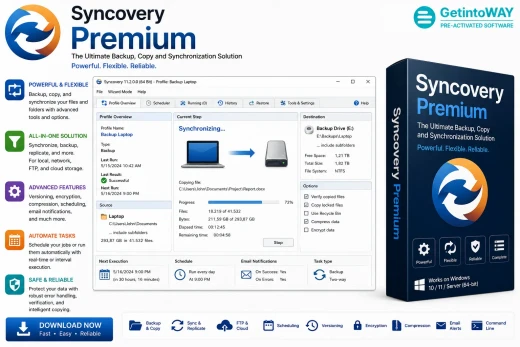
Description: The ultimate sync, backup, copy and migration tool. Syncovery will copy your data the way you need it - and fast!

Multiple Platforms
Syncovery will easily fulfill your requirements: on Windows, macOS, Linux, FreeBSD, and NAS systems. Copy between local drives, network shares, mobile devices via MTP, or using FTP, SFTP, or WebDAV and many others.

Cloud Support
Includes support for many different cloud storages, such as Google Drive, Box, Amazon S3, Azure, DropBox, OneDrive, Rackspace, Sharepoint, Backblaze B2, Citrix Sharefile, and many others.

Create multiple Jobs
Create as many different jobs as you need. Run them manually (with Sync Preview), or let the scheduler run them automatically.

Handle complex Tasks
Syncovery is rich in features, including real-time sync, compression, encryption, email notifications, and much more. It can be extended via PascalScript.

Wizard Mode makes it easy to create your first profile.
Create your first sync or backup job step by step, with explanations of the main settings you need to make. Each job (or profile) works with two paths – source and destination, or just the left and right path (since profiles can be 2-way copy tasks also).
Extremely Fast Scanning
Syncovery’s multi-threaded folder listing algorithm provides an unparalleled speed, and easily handles millions of files and huge numbers of folders. Even more speed can be gained with our Destination File List Cache and Remote Service features.

Block Level Copying
This will help you save bandwidth as well as backup space. Syncovery can detect changed blocks in large files, and copy only these. The detection works by keeping checksums in a database, or with the help of the Syncovery Remote Service, or by using our revolutionary File System Monitoring Service (the File Sytem Monitoring Service is Windows only).

Real-Time Synchronization
Real-Time Synchronization will make sure that changes are synced quickly. Syncovery listens to file system events and quickly performs the appropriate actions. For cloud servers, it can use polling to detect changes. These features are available on Windows and macOS only.

SmartTracking
The SmartTracking sync mode is frequently used in two-way sync jobs. It can detect moved files, deleted files, and conflicts (files changed on both sides).

Versioning
Syncovery allows you to keep multiple versions of modified files, allowing you to restore your files from an earlier date. The restore date can be chosen for individual files or multiple files, in our Restore Wizard.

File Server Migration
Syncovery’s advanced NTFS copying features, high speed, and scaleability enable you to perform large-scale migrations. Read our new, comprehensive Server Migration Guide.

Release Name: Syncovery Premium 11.15.6.206
Size: 70 MB
Links: HOMEPAGE – NFO – Torrent Search

Download: RAPiDGATOR

6 Comments
May 12

Syncovery Premium 11.15.5.205

Description: The ultimate sync, backup, copy and migration tool. Syncovery will copy your data the way you need it - and fast!

Multiple Platforms
Syncovery will easily fulfill your requirements: on Windows, macOS, Linux, FreeBSD, and NAS systems. Copy between local drives, network shares, mobile devices via MTP, or using FTP, SFTP, or WebDAV and many others.

Cloud Support
Includes support for many different cloud storages, such as Google Drive, Box, Amazon S3, Azure, DropBox, OneDrive, Rackspace, Sharepoint, Backblaze B2, Citrix Sharefile, and many others.

Create multiple Jobs
Create as many different jobs as you need. Run them manually (with Sync Preview), or let the scheduler run them automatically.

Handle complex Tasks
Syncovery is rich in features, including real-time sync, compression, encryption, email notifications, and much more. It can be extended via PascalScript.

Wizard Mode makes it easy to create your first profile.
Create your first sync or backup job step by step, with explanations of the main settings you need to make. Each job (or profile) works with two paths – source and destination, or just the left and right path (since profiles can be 2-way copy tasks also).

Extremely Fast Scanning
Syncovery’s multi-threaded folder listing algorithm provides an unparalleled speed, and easily handles millions of files and huge numbers of folders. Even more speed can be gained with our Destination File List Cache and Remote Service features.

Block Level Copying
This will help you save bandwidth as well as backup space. Syncovery can detect changed blocks in large files, and copy only these. The detection works by keeping checksums in a database, or with the help of the Syncovery Remote Service, or by using our revolutionary File System Monitoring Service (the File Sytem Monitoring Service is Windows only).

Real-Time Synchronization
Real-Time Synchronization will make sure that changes are synced quickly. Syncovery listens to file system events and quickly performs the appropriate actions. For cloud servers, it can use polling to detect changes. These features are available on Windows and macOS only.

SmartTracking
The SmartTracking sync mode is frequently used in two-way sync jobs. It can detect moved files, deleted files, and conflicts (files changed on both sides).

Versioning
Syncovery allows you to keep multiple versions of modified files, allowing you to restore your files from an earlier date. The restore date can be chosen for individual files or multiple files, in our Restore Wizard.

File Server Migration
Syncovery’s advanced NTFS copying features, high speed, and scaleability enable you to perform large-scale migrations. Read our new, comprehensive Server Migration Guide.

Release Name: Syncovery Premium 11.15.5.205
Size: 70 MB
Links: HOMEPAGE – NFO – Torrent Search

Download: RAPiDGATOR

5 Comments
Apr 27

Syncovery Premium 11.15.2.202

Description: The ultimate sync, backup, copy and migration tool. Syncovery will copy your data the way you need it - and fast!

Multiple Platforms
Syncovery will easily fulfill your requirements: on Windows, macOS, Linux, FreeBSD, and NAS systems. Copy between local drives, network shares, mobile devices via MTP, or using FTP, SFTP, or WebDAV and many others.

Cloud Support
Includes support for many different cloud storages, such as Google Drive, Box, Amazon S3, Azure, DropBox, OneDrive, Rackspace, Sharepoint, Backblaze B2, Citrix Sharefile, and many others.

Create multiple Jobs
Create as many different jobs as you need. Run them manually (with Sync Preview), or let the scheduler run them automatically.

Handle complex Tasks
Syncovery is rich in features, including real-time sync, compression, encryption, email notifications, and much more. It can be extended via PascalScript.

Wizard Mode makes it easy to create your first profile.
Create your first sync or backup job step by step, with explanations of the main settings you need to make. Each job (or profile) works with two paths – source and destination, or just the left and right path (since profiles can be 2-way copy tasks also).

Extremely Fast Scanning
Syncovery’s multi-threaded folder listing algorithm provides an unparalleled speed, and easily handles millions of files and huge numbers of folders. Even more speed can be gained with our Destination File List Cache and Remote Service features.

Block Level Copying
This will help you save bandwidth as well as backup space. Syncovery can detect changed blocks in large files, and copy only these. The detection works by keeping checksums in a database, or with the help of the Syncovery Remote Service, or by using our revolutionary File System Monitoring Service (the File Sytem Monitoring Service is Windows only).

Real-Time Synchronization
Real-Time Synchronization will make sure that changes are synced quickly. Syncovery listens to file system events and quickly performs the appropriate actions. For cloud servers, it can use polling to detect changes. These features are available on Windows and macOS only.

SmartTracking
The SmartTracking sync mode is frequently used in two-way sync jobs. It can detect moved files, deleted files, and conflicts (files changed on both sides).

Versioning
Syncovery allows you to keep multiple versions of modified files, allowing you to restore your files from an earlier date. The restore date can be chosen for individual files or multiple files, in our Restore Wizard.

File Server Migration
Syncovery’s advanced NTFS copying features, high speed, and scaleability enable you to perform large-scale migrations. Read our new, comprehensive Server Migration Guide.

Release Name: Syncovery Premium 11.15.2.202
Size: 70 MB
Links: HOMEPAGE – NFO – Torrent Search

Download: RAPiDGATOR

6 Comments
Apr 24

Syncovery Premium 11.14.6

Syncovery is used to back-up your data and synchronize Macs, servers, notebooks, and online storage space.
You can set up as many different jobs as you need and run them manually or using the scheduler. The software comes with support for FTP, WebDAV, Amazon S3, and AES file encryption, as well as SSH and ZIP compression. There are powerful synchronization modes, including Standard Copying, Exact Mirror, and SmartTracking.

Numerous improvements to make an extremely versatile synchronizing and back-up tool. The wealth of features fulfills all requirements that users typically have, while still being easy to use.

What’s New

Version 11.14.6:


  • Release notes were unavailable when this listing was updated.
Compatibility

macOS 10.13.0 or later

Apple Silicon or Intel Core processor


Release Name: Syncovery Premium 11.14.6
Size: 126.8 MB
Links: HOMEPAGE – NFO – Torrent Search

Download: RAPiDGATOR

4 Comments
Apr 22

Syncovery Premium 11.14.8.189

Description: The ultimate sync, backup, copy and migration tool. Syncovery will copy your data the way you need it - and fast!

Multiple Platforms
Syncovery will easily fulfill your requirements: on Windows, macOS, Linux, FreeBSD, and NAS systems. Copy between local drives, network shares, mobile devices via MTP, or using FTP, SFTP, or WebDAV and many others.

Cloud Support
Includes support for many different cloud storages, such as Google Drive, Box, Amazon S3, Azure, DropBox, OneDrive, Rackspace, Sharepoint, Backblaze B2, Citrix Sharefile, and many others.

Create multiple Jobs
Create as many different jobs as you need. Run them manually (with Sync Preview), or let the scheduler run them automatically.

Handle complex Tasks
Syncovery is rich in features, including real-time sync, compression, encryption, email notifications, and much more. It can be extended via PascalScript.

Wizard Mode makes it easy to create your first profile.
Create your first sync or backup job step by step, with explanations of the main settings you need to make. Each job (or profile) works with two paths – source and destination, or just the left and right path (since profiles can be 2-way copy tasks also).

Extremely Fast Scanning
Syncovery’s multi-threaded folder listing algorithm provides an unparalleled speed, and easily handles millions of files and huge numbers of folders. Even more speed can be gained with our Destination File List Cache and Remote Service features.

Block Level Copying
This will help you save bandwidth as well as backup space. Syncovery can detect changed blocks in large files, and copy only these. The detection works by keeping checksums in a database, or with the help of the Syncovery Remote Service, or by using our revolutionary File System Monitoring Service (the File Sytem Monitoring Service is Windows only).

Real-Time Synchronization
Real-Time Synchronization will make sure that changes are synced quickly. Syncovery listens to file system events and quickly performs the appropriate actions. For cloud servers, it can use polling to detect changes. These features are available on Windows and macOS only.

SmartTracking
The SmartTracking sync mode is frequently used in two-way sync jobs. It can detect moved files, deleted files, and conflicts (files changed on both sides).

Versioning
Syncovery allows you to keep multiple versions of modified files, allowing you to restore your files from an earlier date. The restore date can be chosen for individual files or multiple files, in our Restore Wizard.

File Server Migration
Syncovery’s advanced NTFS copying features, high speed, and scaleability enable you to perform large-scale migrations. Read our new, comprehensive Server Migration Guide.

Release Name: Syncovery Premium 11.14.8.189
Size: 69.8 MB
Links: HOMEPAGE – NFO – Torrent Search

Download: RAPiDGATOR

5 Comments
Apr 21

Syncovery Premium 11.14.7.188

Description: The ultimate sync, backup, copy and migration tool. Syncovery will copy your data the way you need it - and fast!

Multiple Platforms
Syncovery will easily fulfill your requirements: on Windows, macOS, Linux, FreeBSD, and NAS systems. Copy between local drives, network shares, mobile devices via MTP, or using FTP, SFTP, or WebDAV and many others.

Cloud Support
Includes support for many different cloud storages, such as Google Drive, Box, Amazon S3, Azure, DropBox, OneDrive, Rackspace, Sharepoint, Backblaze B2, Citrix Sharefile, and many others.

Create multiple Jobs
Create as many different jobs as you need. Run them manually (with Sync Preview), or let the scheduler run them automatically.

Handle complex Tasks
Syncovery is rich in features, including real-time sync, compression, encryption, email notifications, and much more. It can be extended via PascalScript.

Wizard Mode makes it easy to create your first profile.
Create your first sync or backup job step by step, with explanations of the main settings you need to make. Each job (or profile) works with two paths – source and destination, or just the left and right path (since profiles can be 2-way copy tasks also).

Extremely Fast Scanning
Syncovery’s multi-threaded folder listing algorithm provides an unparalleled speed, and easily handles millions of files and huge numbers of folders. Even more speed can be gained with our Destination File List Cache and Remote Service features.

Block Level Copying
This will help you save bandwidth as well as backup space. Syncovery can detect changed blocks in large files, and copy only these. The detection works by keeping checksums in a database, or with the help of the Syncovery Remote Service, or by using our revolutionary File System Monitoring Service (the File Sytem Monitoring Service is Windows only).

Real-Time Synchronization
Real-Time Synchronization will make sure that changes are synced quickly. Syncovery listens to file system events and quickly performs the appropriate actions. For cloud servers, it can use polling to detect changes. These features are available on Windows and macOS only.

SmartTracking
The SmartTracking sync mode is frequently used in two-way sync jobs. It can detect moved files, deleted files, and conflicts (files changed on both sides).

Versioning
Syncovery allows you to keep multiple versions of modified files, allowing you to restore your files from an earlier date. The restore date can be chosen for individual files or multiple files, in our Restore Wizard.

File Server Migration
Syncovery’s advanced NTFS copying features, high speed, and scaleability enable you to perform large-scale migrations. Read our new, comprehensive Server Migration Guide.

Release Name: Syncovery Premium 11.14.7.188
Size: 69.9 MB
Links: HOMEPAGE – NFO – Torrent Search

Download: RAPiDGATOR

5 Comments
Apr 15

Syncovery Premium 11.14.4.185

Description: The ultimate sync, backup, copy and migration tool. Syncovery will copy your data the way you need it - and fast!

Multiple Platforms
Syncovery will easily fulfill your requirements: on Windows, macOS, Linux, FreeBSD, and NAS systems. Copy between local drives, network shares, mobile devices via MTP, or using FTP, SFTP, or WebDAV and many others.

Cloud Support
Includes support for many different cloud storages, such as Google Drive, Box, Amazon S3, Azure, DropBox, OneDrive, Rackspace, Sharepoint, Backblaze B2, Citrix Sharefile, and many others.

Create multiple Jobs
Create as many different jobs as you need. Run them manually (with Sync Preview), or let the scheduler run them automatically.

Handle complex Tasks
Syncovery is rich in features, including real-time sync, compression, encryption, email notifications, and much more. It can be extended via PascalScript.

Wizard Mode makes it easy to create your first profile.
Create your first sync or backup job step by step, with explanations of the main settings you need to make. Each job (or profile) works with two paths – source and destination, or just the left and right path (since profiles can be 2-way copy tasks also).

Extremely Fast Scanning
Syncovery’s multi-threaded folder listing algorithm provides an unparalleled speed, and easily handles millions of files and huge numbers of folders. Even more speed can be gained with our Destination File List Cache and Remote Service features.

Block Level Copying
This will help you save bandwidth as well as backup space. Syncovery can detect changed blocks in large files, and copy only these. The detection works by keeping checksums in a database, or with the help of the Syncovery Remote Service, or by using our revolutionary File System Monitoring Service (the File Sytem Monitoring Service is Windows only).

Real-Time Synchronization
Real-Time Synchronization will make sure that changes are synced quickly. Syncovery listens to file system events and quickly performs the appropriate actions. For cloud servers, it can use polling to detect changes. These features are available on Windows and macOS only.

SmartTracking
The SmartTracking sync mode is frequently used in two-way sync jobs. It can detect moved files, deleted files, and conflicts (files changed on both sides).

Versioning
Syncovery allows you to keep multiple versions of modified files, allowing you to restore your files from an earlier date. The restore date can be chosen for individual files or multiple files, in our Restore Wizard.

File Server Migration
Syncovery’s advanced NTFS copying features, high speed, and scaleability enable you to perform large-scale migrations. Read our new, comprehensive Server Migration Guide.

Release Name: Syncovery Premium 11.14.4.185
Size: 69.9 MB
Links: HOMEPAGE – NFO – Torrent Search

Download: RAPiDGATOR

6 Comments
Apr 13

Syncovery Premium 11.14.0

Syncovery is used to back-up your data and synchronize Macs, servers, notebooks, and online storage space.
You can set up as many different jobs as you need and run them manually or using the scheduler. The software comes with support for FTP, WebDAV, Amazon S3, and AES file encryption, as well as SSH and ZIP compression. There are powerful synchronization modes, including Standard Copying, Exact Mirror, and SmartTracking.

Numerous improvements to make an extremely versatile synchronizing and back-up tool. The wealth of features fulfills all requirements that users typically have, while still being easy to use.

What’s New

Version 11.14.0:


  • Release notes were unavailable when this listing was updated.
Compatibility

macOS 10.13.0 or later

Apple Silicon or Intel Core processor


Release Name: Syncovery Premium 11.14.0
Size: 70 MB
Links: HOMEPAGE – NFO – Torrent Search

Download: RAPiDGATOR

9 Comments
Apr 8

Syncovery Premium 11.14.3.184

Description: The ultimate sync, backup, copy and migration tool. Syncovery will copy your data the way you need it - and fast!

Multiple Platforms
Syncovery will easily fulfill your requirements: on Windows, macOS, Linux, FreeBSD, and NAS systems. Copy between local drives, network shares, mobile devices via MTP, or using FTP, SFTP, or WebDAV and many others.

Cloud Support
Includes support for many different cloud storages, such as Google Drive, Box, Amazon S3, Azure, DropBox, OneDrive, Rackspace, Sharepoint, Backblaze B2, Citrix Sharefile, and many others.

Create multiple Jobs
Create as many different jobs as you need. Run them manually (with Sync Preview), or let the scheduler run them automatically.

Handle complex Tasks
Syncovery is rich in features, including real-time sync, compression, encryption, email notifications, and much more. It can be extended via PascalScript.

Wizard Mode makes it easy to create your first profile.
Create your first sync or backup job step by step, with explanations of the main settings you need to make. Each job (or profile) works with two paths – source and destination, or just the left and right path (since profiles can be 2-way copy tasks also).

Extremely Fast Scanning
Syncovery’s multi-threaded folder listing algorithm provides an unparalleled speed, and easily handles millions of files and huge numbers of folders. Even more speed can be gained with our Destination File List Cache and Remote Service features.

Block Level Copying
This will help you save bandwidth as well as backup space. Syncovery can detect changed blocks in large files, and copy only these. The detection works by keeping checksums in a database, or with the help of the Syncovery Remote Service, or by using our revolutionary File System Monitoring Service (the File Sytem Monitoring Service is Windows only).

Real-Time Synchronization
Real-Time Synchronization will make sure that changes are synced quickly. Syncovery listens to file system events and quickly performs the appropriate actions. For cloud servers, it can use polling to detect changes. These features are available on Windows and macOS only.

SmartTracking
The SmartTracking sync mode is frequently used in two-way sync jobs. It can detect moved files, deleted files, and conflicts (files changed on both sides).

Versioning
Syncovery allows you to keep multiple versions of modified files, allowing you to restore your files from an earlier date. The restore date can be chosen for individual files or multiple files, in our Restore Wizard.

File Server Migration
Syncovery’s advanced NTFS copying features, high speed, and scaleability enable you to perform large-scale migrations. Read our new, comprehensive Server Migration Guide.

Release Name: Syncovery Premium 11.14.3.184
Size: 69 MB
Links: HOMEPAGE – NFO – Torrent Search

Download: RAPiDGATOR

7 Comments
Apr 7

Syncovery Premium 11.14.2.183

Description: The ultimate sync, backup, copy and migration tool. Syncovery will copy your data the way you need it - and fast!

Multiple Platforms
Syncovery will easily fulfill your requirements: on Windows, macOS, Linux, FreeBSD, and NAS systems. Copy between local drives, network shares, mobile devices via MTP, or using FTP, SFTP, or WebDAV and many others.

Cloud Support
Includes support for many different cloud storages, such as Google Drive, Box, Amazon S3, Azure, DropBox, OneDrive, Rackspace, Sharepoint, Backblaze B2, Citrix Sharefile, and many others.

Create multiple Jobs
Create as many different jobs as you need. Run them manually (with Sync Preview), or let the scheduler run them automatically.

Handle complex Tasks
Syncovery is rich in features, including real-time sync, compression, encryption, email notifications, and much more. It can be extended via PascalScript.

Wizard Mode makes it easy to create your first profile.
Create your first sync or backup job step by step, with explanations of the main settings you need to make. Each job (or profile) works with two paths – source and destination, or just the left and right path (since profiles can be 2-way copy tasks also).

Extremely Fast Scanning
Syncovery’s multi-threaded folder listing algorithm provides an unparalleled speed, and easily handles millions of files and huge numbers of folders. Even more speed can be gained with our Destination File List Cache and Remote Service features.

Block Level Copying
This will help you save bandwidth as well as backup space. Syncovery can detect changed blocks in large files, and copy only these. The detection works by keeping checksums in a database, or with the help of the Syncovery Remote Service, or by using our revolutionary File System Monitoring Service (the File Sytem Monitoring Service is Windows only).

Real-Time Synchronization
Real-Time Synchronization will make sure that changes are synced quickly. Syncovery listens to file system events and quickly performs the appropriate actions. For cloud servers, it can use polling to detect changes. These features are available on Windows and macOS only.

SmartTracking
The SmartTracking sync mode is frequently used in two-way sync jobs. It can detect moved files, deleted files, and conflicts (files changed on both sides).

Versioning
Syncovery allows you to keep multiple versions of modified files, allowing you to restore your files from an earlier date. The restore date can be chosen for individual files or multiple files, in our Restore Wizard.

File Server Migration
Syncovery’s advanced NTFS copying features, high speed, and scaleability enable you to perform large-scale migrations. Read our new, comprehensive Server Migration Guide.

Release Name: Syncovery Premium 11.14.2.183
Size: 69 MB
Links: HOMEPAGE – NFO – Torrent Search

Download: RAPiDGATOR

8 Comments