

Art Text 4.2.1
Art Text is graphic design software specifically tuned for lettering, typography, text mockups and various artistic text effects. Supplied with a great variety of ready to use styles and materials, selection of textures, icons, fonts and backgrounds, special designed effects and shape transformations, Art Text guarantees striking appearance of your badges, logos, cards, flyers and presentations.
Both professional designers and amateurs will be amazed by the exceptional ease of creating sophisticated effects such as realistic 3D text with any natural material on it – wood, rust, shatter glass, or even chocolate, soft shadow and glow, graphics painted by oil or watercolors, aged and grunge style, and many more.
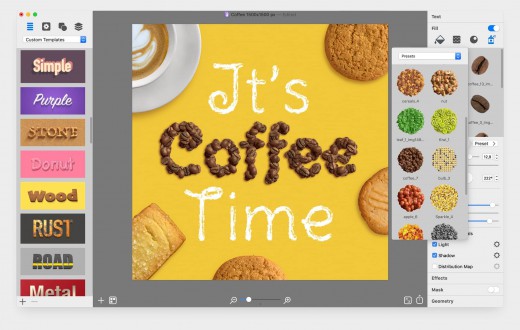
- Customizable Templates – Ready-made templates will help with logo design, produce beautiful word art, web elements and picture captions.
- Fill Tools – Gradient presets, textures, and shading materials.
- 2D Effects – Adjustable shadow and glow effects, over 30 masks.
- Graphic Content – Vector icons, symbols and shapes; flash, flare, sparkle, and light trace objects; and backgrounds and textures.
- 3D Materials – Customize 3D materials using textures, bump map surfaces, and environment map textures.
- 3D Effects – Apply soft-edged shadow or glow to 3D objects. Use optical effect tools to make background objects out of focus.
- Geometry Transformations – Apply transformation shapes to 2D or 3D texts to bend, warp, or give the text a wavy shape.
- Sharing the Result – Share the art on Facebook, Twitter and Instagram with just one click, or export to an image file to use virtually anywhere.
Version 4.2.1:
- Changed the approach to creating an animation. Now users have to add a keyframe and then make motion or text effects changes.
- Introduced animation preview into Templates Gallery for templates that include animation.
- Introduced keyframe selection that allows users to edit animation.
- The animation export dialog now has animation preview.
- Introduced the ability to resize objects from their center by holding the Option key.
- The background image now has a new selection with no resize handles. The background resize is possible with the document resize only.
- Fixed the problem with video tutorials playback in the Design Gallery dialog for some users on macOS 13 Ventura.
- Resolved the problem with Copy/Paste and Drag/Drop of several images from Finder.
- Object will have raster/vector properties on copy/paste depending on the effects applied to it.
- Fixed the problem with the entire document copying when no object is selected.
macOS 10.13.0 or later
Support M1 Apple silicon.
Release Name: Art Text 4.2.1
Size: 752.7 MB
Links: HOMEPAGE – NFO – Torrent Search
Download: UPLOADGiG – NiTROFLARE – RAPiDGATOR



