

BetterZip 5.3

BetterZip lets you quickly inspect archives without first extracting their contents.
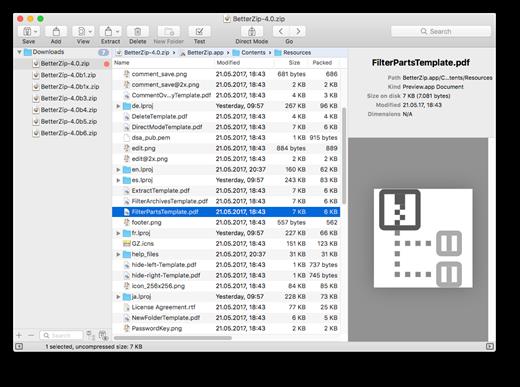
- Extract Only Files You Really Need: If you only need a few files or folders from a larger archive, you don’t have to extract the whole thing. Simply drag the files you need from the BetterZip window to any Finder window or the desktop.
- Open Archives Without Extracting: Not only can BetterZip open archives without first extracting them but you can also search for a file using the iTunes-like interface. BetterZip can open and extract archives with the most common formats: ZIP, SIT, TAR, XAR, XZ, GZip, BZip2, RAR, 7-Zip, CPIO, ARJ, LZH/LHA, JAR, WAR, CAB, ISO, CHM, RPM, DEB, NSIS, BIN, HQX, DMG, EPUB, and Winmail.dat.
- Create Archives: Simply drag files and folders from your hard drives, disks, or network places into your new zip file. You no longer have to copy all the files into a temporary folder first. The supported formats are ZIP, TAR, GZip and BZip2 compressed TAR, XAR, 7-ZIP, and RAR (using the external RAR commandline tool). Large archives can also be split.
- Protect Your Data: BetterZip can protect your data with a password and create AES-256 encrypted archives. 7-zip and rar archives can also be protected.
- Update Archives: Add new or updated files to existing archives. Remove any file or folder from an archive, or even move files around inside the archive as if it were a normal folder.
- Make Archives Compatible: Strip Mac-specific files and resource forks from archives for best compatibility with systems like Windows or Linux.
Version 5.3:
Enhancements
- Added option to not have an icon in the Finder contextual menu. (BetterZip > Preferences > Advanced)
- Added a size limit for tar archives to be listed in the Quick Look extension. Since compressed tar files can take a time proportionate to their size to list, it can stall the system for a long time, if you try to Quick Look a very large archive. If you ever run into this problem, set an MB limit in BetterZip > Preferences > Quick Look.
- The set password button in the preset configuration was disabled without a hint why, when the password manager was locked. This should be easier to understand now.
- The columns in the presets table were too narrow and some headers were cut off.
- Increased the size of the Quick Look panel and optimized column widths.
- When BetterZip was installed in a folder with a space character in its name, extracting tar based formats could crash BetterZip.
- Since the rar commandline utility is now available as Intel or Apple Silicon executable, BetterZip can download, install, and update the version fitting your Mac.
- The AppleScript unarchive option “receptacle” did not work.
- Rewrote the Alfred workflows, since macOS no longer bundles Python 2.
- ISO files were mounted as .BetterZipTempfolder; now the volume name will be the filename without extension.
- The option “Don’t include the single root folder in the archive” prevented the display of the save panel when compressing a single folder.
- Fixed some string translations.
- The icon for the “files” preferences tab was missing.
- Quarantining extracted executables did not work under certain conditions.
- In save panels, the automatic loading of a preset that does not use zip format could lead to a double extension, e.g., name.zip.rar.
macOS 10.13.0 or later
Release Name: BetterZip 5.3
Size: 28 MB
Links: HOMEPAGE – NFO – Torrent Search
Download: UPLOADGiG – NiTROFLARE – RAPiDGATOR



