

BusyCal 2022.3.1
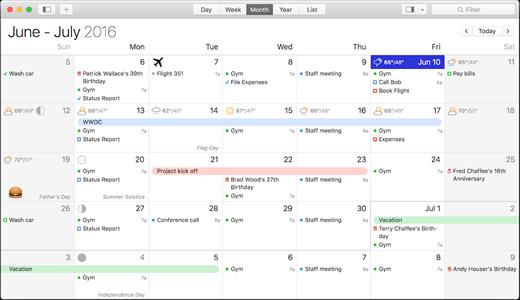
BusyCal is an award-winning desktop calendar that combines personal productivity features for individuals with powerful calendar sharing capabilities for families and workgroups. Its unique features include a non-modal Info Panel for easier data entry; To Dos that display in the calendar and auto-forward until completed; repeating To Dos; customizable calendar views including a List view and scrolling Month and Week views; adjustable font styles and sizes, live weather feeds, moon phases, graphics, sticky notes and more. And when you first launch BusyCal, all of your iCal data is instantly imported. BusyCal automatically syncs with iCal, iPhone, iPad, iPod Touch, and other apps and devices that sync with MobileMe or Sync Services. If you later decide to switch back to iCal, all of your calendar data will be current.
BusyCal allows families and workgroups to share calendars with MobileMe, Google Calendar, iCal Server, and other CalDAV Servers. You can even share calendars with other BusyCal users on a local area network without the need of a server. And BusyCal syncs with iCal, iPhone, iPad, iPod Touch, and other apps and devices that sync with MobileMe or Sync Services.
Features
- View and edit event details in a non-modal info panel.
- Create repeating To Dos that display in the calendar and carry-forward until completed.
- Scrolling Month and Week Views.
- Customizable list view lets you filter and sort events by date, calendar, and more.
- View live weather forecasts, sunrise/sunset times, and moon phases right in your calendar.
- Customizable event fonts, sizes, styles and colors.
- Add graphics to your calendar.
- Add virtual sticky notes to your calendar.
- Sync with the iPad, iPhone, and iPod Touch via MobileMe, Google Calendar, or iTunes.
- Sync with MobileMe Calendar and other computers/devices that sync with MobileMe.
- Sync with Google Calendar and other computers/devices that sync with Google Calendar.
- Sync with other BusyCal users on a local area network or over the internet.
- Share calendars with others, with password-protection and SSL encryption.
- iCal compatible
Version 2022.3.1:
- Events can now be assigned a color via a new drop-down option (using the Info Panel). BusyCal automatically keeps this setting in-sync with the already supported Colored Tags feature.
- Event colors from Google Calendar now sync directly with BusyCal
- Read-only events, such as holidays, can now also be assigned a color. BusyCal manages this by adding a colored tag to "My Tags".
"Time To Event" count-down added to the Info Panel. You no longer have to decipher start dates and times. This count-down is context aware and works with both events and tasks. It automatically takes travel-time into account where available. - Automatic Tagging is here. You can now create rules to automatically assign specific tags to incoming items during sync. See Preferences > Accounts > Automation. Combine this with colored-tags and smart filters to create powerful workflows.
- Push Sync support for Google Calendars (where available)
- Smart filters now support adding filters on: start time, end time and due time. You can now filter to show only the events that start within the next 30 minutes, for example.
- Spotting "Today" feels like Finding Waldo? Not anymore. BusyCal now highlights the current day when needed. This can be turned on permanently from under Preferences > Appearance > Accessibility.
- You can now set a default priority for new tasks. See Preferences > Tasks.
- Support for Time Sensitive notifications when using Notification Center alarms
- Ability to snooze events and mark tasks as completed when using Notification Center alarms
- New badge count options under Preferences > General > Dock badge count
- Events marked as "Free" appear with a dashed color band in day / week view
- Today's date now momentarily highlights after opening the app
- Improved handling of large-sized custom fonts
- Dates with overflowing events no longer disrupt month view scrolling. Hold down the Option key or select the date to scroll within a day instead.
- Availability viewer no longer hides when losing focus
- Fixed bug where after moving an event, the popover would at times only display the notes section
- Fixed bug where the cursor would jump to the starting position in the notes section, at times, when editing a recurring item
- Fixed bug where the info panel would at times lose keyboard focus immediately after creating a new task
- Ongoing stability improvements
macOS 10.12 or later
Apple Silicon or Intel Core processor
Release Name: BusyCal 2022.3.1
Size: 54.2 MB
Links: HOMEPAGE – NFO – Torrent Search
Download: UPLOADGiG – NiTROFLARE – RAPiDGATOR



