
Dec 28

Classroom Spy Professional 5.4.13
Computer Monitoring Software for Schools. Classroom monitoring software is an essential tool for improving student engagement and class productivity. Built-in classroom monitoring lets you see what everyone's doing - without leaving your desk. You can monitor the activity of all student computers in your school remotely. Plus, you can share your screen with your students' record activity, control computers, make demos, limit the internet usage, block applications and much more.
What is Classroom Management?
In short, it is a process that ensures teachers to run lessons smoothly, keeping students organized, productive, and focused on tasks. Effective classroom management may be difficult to achieve for many teachers because it is almost impossible for them to eliminate disruptions of some students, especially when computers are used in the teaching process.

Use of Classroom Management Software
We have already talked about the challenges teachers have when trying to do teaching as effectively as possible.

Luckily technology can help with a wide range of different classroom management software. Thanks to such applications, teachers can keep students engaged while easily monitoring student activities because classroom monitoring capability is a part of every modern classroom management application.

Eliminate Distractions
Distraction elimination is one of the main goals of classroom management. In those days computers are an essential part of many classrooms. While computers bring a lot of benefits, they offer also some temptations in the form of students trying to surf the forbidden web pages, play games, or try to install additional applications on the computer.

Advanced classroom management software can solve those challenges by allowing the teacher to temporarily lock computers, block illegal web pages, prevent certain application execution...

Regain Control
The teacher can sometimes feel powerless teaching a group of students when they are sitting behind the computers. It is difficult to know what each student is doing if you don't see their screens. As mentioned such software offers a solution in the form of classroom monitoring where the teacher can see live computer screens of every student. Additionally, the teacher can control when students are allowed to use the computers and when it is time to listen to the teacher or do some other exercise. Having control is crucial for successful classroom management.

Personalization, Differentiation, Individualization
As we all know students differ in their capabilities, interests, talents, learning approaches... Such differences require a personalized approach to individuals. Here the classroom management software can help since the teacher can use it to easily track the progress of each individual student. Depending on the individual student progress, a teacher can decide to lead the class differently e.g. by providing additional assignments for students that already finished their tasks, or provide help to students that need it.

Release Name: Classroom Spy Professional 5.4.13
Size: 114.7 MB
Links: HOMEPAGE – NFO – Torrent Search

Download: RAPiDGATOR

Feel free to post your Old Classroom Spy Professional 5.4.13 torrent, subtitles, samples, free download, quality, NFO, direct link, free link, uploaded.to, rapidgator, turbobit, openload, mega.co.nz, filefactory, crack, serial, keygen, requirements or whatever-related comments here. Don't be rude (permban), use only English, don't go offtopic and read FAQ before asking a question. Owners of this website aren't responsible for content of comments.

If you are purchasing an account from Rapidgator's Resellers, please be sure to read this guide before purchasing.

  • Single Link Download
  • RLSBB
  • wineo
  • Sharp
    Dec 28th, 2025 at 11:47 AM

    Release Name: Classroom Spy Professional 5 4 13
    Size:114.79 MB
    https://usersdrive.com/n86c2vmss5qt/Classroom.Spy.Professional.5.4.13.rar

  • IamBack
  • wineo
    Dec 28th, 2025 at 11:48 AM

    Classroom-Spy-Professional-5-4-13-Rar
    size: 114,79 MB
    FileDown:
    https://down.mdiaload.com/1elsxli1mrm6/Classroom.Spy.Professional.5.4.13.rar.html
    .

  • audiozdwn
    Dec 28th, 2025 at 11:48 AM

    Classroom.Spy.Professional.5.4.13.rar | 114 MB
    https://frdl.io/huei9593th9b/Classroom.Spy.Professional.5.4.13.rar.html

  • audiozdwn.
    Dec 28th, 2025 at 11:53 AM

    Classroom.Spy.Professional.5.4.13.rar | 114 MB
    https://usersdrive.com/qnam14usi2oe.html
    Classroom.Spy.Professional.5.4.13.rar | 114 MB
    https://frdl.io/huei9593th9b/Classroom.Spy.Professional.5.4.13.rar.html

  • Oryad
  • RUDOS
    Dec 28th, 2025 at 00:58 PM
  • Katzddl.net
    Dec 28th, 2025 at 04:17 PM

    Classroom Spy Pro 5.4.13 | Size: 114.69 MB
    Language: English
    Simple and effective classroom management software. Put classroom management to a higher level. This software lets you see what everyone's doing - without leaving your desk. You can monitor the activity of all student computers in your classroom remotely. Plus, you can share your screen with your students' record activity, control computers, make demos, limit the internet usage, block applications and much more.
    Take Control Now
    It is hard to teach a group of people how to use a computer. Discipline in classroom can be an issue. We can truly help you with this. Yes, such training isn't easy. For someone who's doing something right, there are probably two others doing it wrong, playing games, checking email, shopping...
    Main Features
    Displaying a live picture of a remote computer.
    You can take control of a remote computer by controlling its mouse and keyboard.
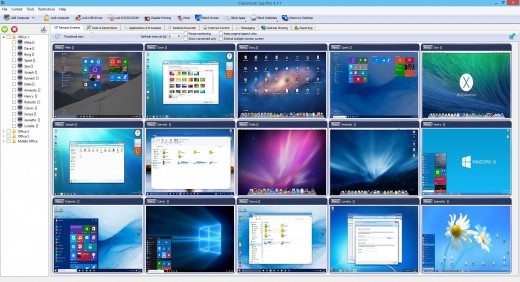
    More remote screens can be displayed in a table.
    Computers can be organized in computer groups (e.g. classrooms)
    A remote screen can be zoomed to an actual size.
    The name of the connected user is displayed.
    Record remote computers screens to MPG4 files.
    Show your desktop to students or show student desktop to students
    Power on/off, restart, hibernate, suspend remote computers
    Log off desktop users
    Lock workstation
    Clear desktop
    Control screen-saver
    Block Internet
    Block applications
    Mute remote computers
    Limit remote computers audio volume level
    Disable printing
    Disable Ctr+Alt+Del
    Blank screen
    Start program on remote computers and see the output
    Open web page on remote computers
    Multi-monitor support
    Control over running processes and applications
    You can lock selected remote computers
    You can display a message on selected remote computers.
    When lower bandwidth is required, the refresh interval can be enlarged.
    Automatic connection to a remote computer is optional.
    Settings for the agent are encrypted and password protected.
    Connection to a remote computer is password protected.
    Access to monitoring the console is password protected. If more users use the same computer, different profiles and access passwords can be set.
    More monitoring consoles can be connected to the same remote computeyou can monitor your students from different locations.
    Agent can be remotely installed.
    Fast users switching is supported.
    Multi-session support for Remote Desktop, Terminal Services, Citrix,...
    Console can be used on smart phone or tablet
    What are the major benefits of using Classroom Spy Pro?
    Installation and use of the application is very easy since all of the functions can be accessed with a few mouse clicks.
    You have complete control over what remote users are doing.
    This application provides you with a live picture of the remote computer screens.
    You can make the presentation by showing your live screen to students or presenting student screen to others.
    Application allows you to take over the remote computer by controlling its mouse and keyboard.
    The remote computers´ screens are represented in the table with a customizable number of rows as thumbnails.
    Schedule remote computers desktop recording to MPEG4 files
    Execute several actions on all remote computers with on click
    Block applications and Internet access
    Log visited web pages
    Log used applications
    Log keystrokekeylogger
    ...and much morsee feature list and screen-shots
    What's new
    HOMEPAGE: https://classroomspy.com/
    FREE DOWNLOAD LINKS:
    https://rapidgator.net/file/61f89ee902bba6dc5bd77470b1b09845/Classroom_Spy_Pro_5.4.13.rar
    https://nitroflare.com/view/30C738725A1B5C4/Classroom_Spy_Pro_5.4.13.rar

  • Katzddl.net
    Jan 19th, 2026 at 05:12 PM

    Classroom Spy Pro 5.5.1 | Size: 114.69 MB
    Language: English
    Simple and effective classroom management software. Put classroom management to a higher level. This software lets you see what everyone's doing - without leaving your desk. You can monitor the activity of all student computers in your classroom remotely. Plus, you can share your screen with your students' record activity, control computers, make demos, limit the internet usage, block applications and much more.
    Take Control Now
    It is hard to teach a group of people how to use a computer. Discipline in classroom can be an issue. We can truly help you with this. Yes, such training isn't easy. For someone who's doing something right, there are probably two others doing it wrong, playing games, checking email, shopping...
    Main Features
    Displaying a live picture of a remote computer.
    You can take control of a remote computer by controlling its mouse and keyboard.
    More remote screens can be displayed in a table.
    Computers can be organized in computer groups (e.g. classrooms)
    A remote screen can be zoomed to an actual size.
    The name of the connected user is displayed.
    Record remote computers screens to MPG4 files.
    Show your desktop to students or show student desktop to students
    Power on/off, restart, hibernate, suspend remote computers
    Log off desktop users
    Lock workstation
    Clear desktop
    Control screen-saver
    Block Internet
    Block applications
    Mute remote computers
    Limit remote computers audio volume level
    Disable printing
    Disable Ctr+Alt+Del
    Blank screen
    Start program on remote computers and see the output
    Open web page on remote computers
    Multi-monitor support
    Control over running processes and applications
    You can lock selected remote computers
    You can display a message on selected remote computers.
    When lower bandwidth is required, the refresh interval can be enlarged.
    Automatic connection to a remote computer is optional.
    Settings for the agent are encrypted and password protected.
    Connection to a remote computer is password protected.
    Access to monitoring the console is password protected. If more users use the same computer, different profiles and access passwords can be set.
    More monitoring consoles can be connected to the same remote computeyou can monitor your students from different locations.
    Agent can be remotely installed.
    Fast users switching is supported.
    Multi-session support for Remote Desktop, Terminal Services, Citrix,...
    Console can be used on smart phone or tablet
    What are the major benefits of using Classroom Spy Pro?
    Installation and use of the application is very easy since all of the functions can be accessed with a few mouse clicks.
    You have complete control over what remote users are doing.
    This application provides you with a live picture of the remote computer screens.
    You can make the presentation by showing your live screen to students or presenting student screen to others.
    Application allows you to take over the remote computer by controlling its mouse and keyboard.
    The remote computers´ screens are represented in the table with a customizable number of rows as thumbnails.
    Schedule remote computers desktop recording to MPEG4 files
    Execute several actions on all remote computers with on click
    Block applications and Internet access
    Log visited web pages
    Log used applications
    Log keystrokekeylogger
    ...and much morsee feature list and screen-shots
    What's new
    HOMEPAGE: https://classroomspy.com/
    FREE DOWNLOAD LINKS:
    https://rapidgator.net/file/06c038b8d480c0bb2c0857b6d25b2342/Classroom_Spy_Pro_5.5.1.rar
    https://nitroflare.com/view/6F5FA134662E88F/Classroom_Spy_Pro_5.5.1.rar
