

EagleFiler 1.9.9

EagleFiler makes managing your information easy. It lets you archive and search mail, Web pages, PDF files, word processing documents, images, and more. Use it to collect information from a variety of sources. Browse different types of files using a standard three-pane interface. Organize them into folders and annotate them with tags and notes, or leave everything in one folder and pin-point the information you need using the live search. Since EagleFiler stores its library in Finder format, you can use it in concert with the other tools in your Mac ecosystem.
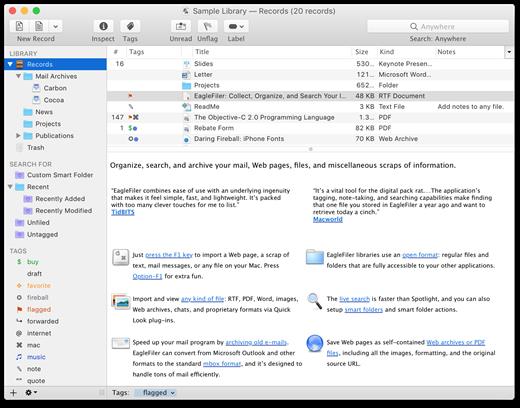
EagleFiler in a nutshell:
- With a single keypress, import Web pages, mail messages, or any file on your Mac.
- EagleFiler stores them in an open format: regular files and folders that are fully accessible to your other applications.
- Optionally: encrypt the files, add tags, notes, color-coded labels, and other metadata.
- Browse by folder or by tag, or use the live search to find the information you need (faster than Spotlight).
- View, edit, or create documents directly in EagleFiler’s streamlined interface, or double-click to edit using another application.
EagleFiler is a digital filing cabinet, a research assistant, and a snippet collector. You can use it to write a journal, track all the files for a project or job, save your favorite Web articles, store financial statements, run a paperless office, plan a trip, collect your course notes, archive your e-mail correspondence, search mailing list archives, research a purchase, remember recipes to cook or books to read, store scientific papers, gather legal case notes, or assemble a scrapbook. It’s the most flexible tool on your Mac.
What’s New
Version 1.9.9:
- Made various code modernizations.
- Worked around a change in Apple News that prevented EagleFiler from showing up in the Share menu.
- The RTF viewer now supports clickable file links created by Nisus Writer Pro.
- Renamed Preferences to Settings for macOS 13.
- EagleFiler is better at detecting which part of a filename to select when renaming in the records list.
- Indexing e-mail attachments is faster.
- When an error occurs, EagleFiler no longer brings the Errors window to the front if it’s already visible.
- The Importing Mail From Airmail section of the manual now explains how to import multiple messages at once.
- Updated the How do Finder tags work with EagleFiler? section of the manual.
- Updated the Rename for Dropbox Windows script.
- EagleFiler now requires macOS 10.13 or later.
- Fixed a bug where an e-mail message could accumulate an extra newline when round-tripping through merging to a mailbox and then extracting to individual files.
- Fixed a bug where the Import From Apple Mail script could fail with certain message encodings.
- Fixed a bug where extracting an e-mail message could fail if the subject contained an emoji that was too new for the file system.
- Fixed a bug where the Remove Duplicate Messages script would sometimes report spurious errors if the Message-ID header was long.
macOS 10.13.0 or later
Apple Silicon or Intel Core processor
Release Name: EagleFiler 1.9.9
Size: 35.4 MB
Links: HOMEPAGE – NFO – Torrent Search
Download: UPLOADGiG – NiTROFLARE – RAPiDGATOR



