

eBookBinder 1.12.9

eBookBinder is the super-easy tool to create your own ebooks using your existing documents. When compiling your book project, eBookBinder creates an epub file. There are just three major steps to your very own eBook:
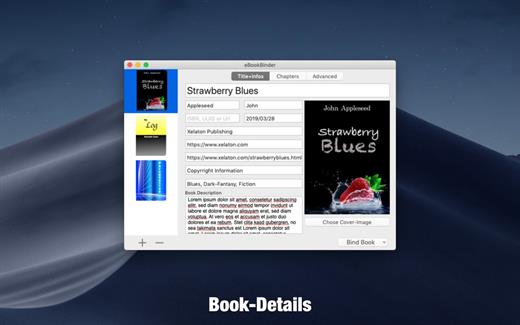
- Enter book details. Name of the book and its author, add an image for the book-cover, webpage of the publisher and other details can be entered. There is no need to fill all fields, at least you should enter a name for your book.
- Add text files as chapters to your book project. Every single text file you add to eBookBinder is treated as a single chapter. Give your chapters a name and order them per drag-and-drop to your desired sequence of chapters.
- Create your ebook. Just hit the “Bind Book” Button and eBookBinder will compile the ebook for you. That’s all!
What can be added to eBookBinder:
- eBookBinder supports several different types of text files. Next to plain-text files also DOC, ODT, RTF, RTFD, HTML, Textbundle, Textpack and webarchive files are supported by eBookBinder.
- Support of markup languages eBookBinder also accepts plain-text files written in Markdown, MultiMarkdown, Textile, Wikitext, and Smark as input. These will be converted on the fly when adding these as chapters to your book-process. Visit the preferences of eBookBinder to determine the file extensions which should be treated for conversion. All files with appropriate file extensions will be converted when imported.
What’s New
Version 1.12.9:
- Release notes were unavailable when this listing was updated.
macOS 10.10 or later, 64-bit processor
Release Name: eBookBinder 1.12.9
Size: 5.3 MB
Links: HOMEPAGE – NFO – Torrent Search
Download: RAPiDGATOR



