
May 19

High-Logic FontCreator Pro 16.0.0.3064
Description: The world's most popular font editor. With over 5 million downloads to date, FontCreator is considered the world's most popular and best font editor. Create and edit (variable) OpenType and web fonts. An advanced feature set makes it the tool of choice for professionals, and its intuitive interface is straightforward enough for users at any expertise level.
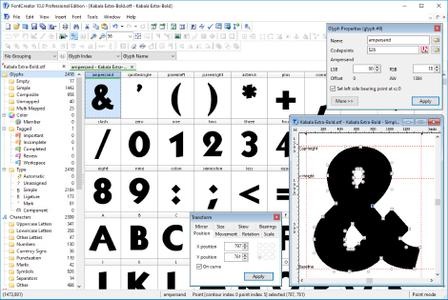
The newest release of FontCreator introduces hybrid glyph outlines, allowing designers to combine contours and components for greater creative flexibility. Now supporting the .glyphs file format, the software enhances collaboration by improving the interchangeability of font project resources. FontCreator provides a "what you see is what you get" (WYSIWYG) editing environment with real-time font proofing and testing during the design process. An upgraded shaping engine and interactive proofing tool further enhance your editing capabilities. Additionally, the join contours feature now supports cubic curves.

When you open or create a font in FontCreator, it displays all available characters in an overview. You can easily add missing characters or select and modify existing ones. The software enables you to import scanned images of signatures or company logos, and even create fonts from your own handwriting. You can adjust character code-points, font names, glyph names, and kerning pairs. At any point, you can preview your typefaces before installing them. FontCreator also allows you to create Variable Fonts by defining axes and outline layers. OpenType features are preserved when opening a font, and the OpenType Designer lets you visually edit these features and lookups. The OpenType proofing tool helps you quickly identify and fix text layout issues. Supporting both quadratic and cubic-based contours, this professional font editor includes smart features to ensure smooth connections where needed. Its validation tools assist in locating and resolving possible outline and interpolation issues.

As a fully native font editor, FontCreator doesn't require any additional purchases or installations of third-party tools or extensions.

Font Overview with Categories
The glyph and character category panel gives you quick and easy access to the glyphs, character subsets and Unicode ranges.

OpenType, TrueType and Web fonts
FontCreator supports all common font formats, including OpenType, TrueType, and Web Open Font Format (WOFF and WOFF2). These fonts are universally accessible across Windows, Mac OS X, Linux, and all modern web browsers.

Design High Quality Fonts
The standard and professional edition include font validation features which enable you to improve the quality of your fonts by locating and solving common glyph problems.

Optimize Contours
Optimizing glyph outlines will reduce the number of points that make up the contour(s). It supports both quadratic and cubic bezier curves.

Import Vector Images
High quality vector graphics can be easily imported. You can even copy and paste between FontCreator and your favorite vector editing software.

Import Raster (bitmap) Images
Effortlessly import scanned images of your handwriting or manuscript into fully-fledged glyph outlines.

Scalable Color Fonts
FontCreator is a versatile font editor that allows you to make scalable color fonts, supporting both COLR and SVG color extensions. This allows you to create multi-colored glyphs for systems that support it, while maintaining backwards compatibility for systems that do not.

Visual OpenType Designer
The intuitive OpenType Designer allows you to easily generate and modify OpenType layout features for both glyph substitutions and glyph positioning. The build-in anchor manager makes adding and editing mark to base and mark to mark positioning a breeze!

Kerning
Manually add kern pairs to your font supporting both individual glyphs and glyph classes. Alternatively let Autokerning take care of kerning for you in the standard and professional edition.

Powerful Transform Wizard
Both the standard and professional editions offer a robust transform wizard, simplifying the glyph transformation process with just a few clicks. Effortlessly add characters for other languages, small capitals, and beyond or transform your font to Italic or Bold.

OpenType Feature Proofing
Use FontCreator to debug OpenType layout features with the interactive proofing tool. It uses an advanced shaping engine which allows you to view, create, edit, and debug even the most complex fonts.

Optical Metrics
The optical metrics feature in the professional edition simplifies one of the most complex and time-consuming tasks in font design. It analyzes a set of the most common characters to find the best left and right side-bearings for each of these glyphs.

Complete Composites
The standard and professional edition allow intelligent generation of character outlines for more than 3000 (mostly accented) composite characters. It supports both composite data definitions and anchor based positioning .

Release Name: High-Logic FontCreator Pro 16.0.0.3064
Size: 29 MB
Links: HOMEPAGE – NFO – Torrent Search

Download: RAPiDGATOR

Feel free to post your Old High-Logic FontCreator Pro 16.0.0.3064 torrent, subtitles, samples, free download, quality, NFO, direct link, free link, uploaded.to, rapidgator, turbobit, openload, mega.co.nz, filefactory, crack, serial, keygen, requirements or whatever-related comments here. Don't be rude (permban), use only English, don't go offtopic and read FAQ before asking a question. Owners of this website aren't responsible for content of comments.

If you are purchasing an account from Rapidgator's Resellers, please be sure to read this guide before purchasing.

  • Single Link Download
  • RLSBB
  • wineo
  • Oryad
  • Oryad
    May 19th, 2026 at 06:56 PM
  • Katzddl.net
    May 29th, 2026 at 11:20 PM

    High-Logic FontCreator Pro 16.0.0.3064 (x64) | Size: 29.04 MB
    Language: English
    With over 4.5 million downloads to date, FontCreator is the world's most popular font editor. An advanced feature set makes it the tool of choice for professionals, and its intuitive interface is straightforward enough for users at any expertise level. Create your own fonts, redesign existing characters, add kerning, edit advanced OpenType layout features, and much more.
    When you create or open a font, FontCreator displays an overview of all available characters. You can simply add missing characters, or select an existing character, and modify its appearance. You can import (scanned) images of your signature or company logo, or make a font from your own handwriting. With FontCreator you can also fix character code-points, font names, glyph names, kerning pairs, and at all times you can preview your typefaces before installing. OpenType features are preserved upon opening a font. This professional font editor supports both quadratic- and cubic-based contours, and has several smart features to ensure smooth connections where you need them. The validation features help you locate and fix possible outline issues.
    Font Overview with Categories
    The glyph and character category panel gives you quick and easy access to the glyphs, character subsets and Unicode ranges.
    Work with OpenType, TrueType and Web fonts
    FontCreator supports Open Type, True Type and Web Open Font Format (WOFF) fonts which can be used on Windows, Mac OS X, Linux, and in all modern web browsers.
    Design High Quality Fonts
    The standard and professional edition include font validation features which enable you to improve the quality of your fonts by locating and solving common glyph problems.
    Optimize Contours
    Optimizing glyph outlines will reduce the number of points that make up the contour(s).
    Import SVG Images
    High quality vector graphics can be easily imported. You can even copy and paste between FontCreator and your favorite vector editing software.
    Import Raster (bitmap) Images
    Import (scanned) images and convert them into glyphs. Create your own handwriting font by scanning your handwriting and import it into FontCreator.
    Scalable Color Fonts
    FontCreator is the first font editor to support the new scalable color fonts extension. This new feature allows you to create multi-colored glyphs for systems that support it, while maintaining backwards compatibility for systems that do not. Watch the video above for a quick introduction on how to create color fonts with FontCreator.
    Visual OpenType Designer
    The intuitive OpenType Designer allows you to easily add and modify OpenType Layout Features for glyph positioning. The build-in anchor manager makes adding and editing Mark to Base and Mark to Mark positioning a breeze!
    OpenType Layout Scripts Editor
    The Script Editor allows you to quickly add and modify OpenType Glyph Substitutions through an easy to learn scripting language.
    OpenType Layout Features Made Easy
    Common OpenType layout features are automatically added to your fonts and with the standard and professional editions you can take full control over these features through custom scripts.
    Easy Access to Common Glyph Properties
    The glyph properties toolwindow gives you easy access to the glyph's name, codepoints and bearings.
    Kerning
    Manually add kerning to your font or let the Autokerning take care of kerning for you in the standard and professional edition.
    Optical Metrics
    The Optical metrics feature in the professional edition simplifies one of the most complex and time consuming tasks in font design. It analyzes a set of most common characters to find the best left and right side bearings of each of these glyphs.
    Test Your Fonts
    At any time during your font development, you can test it in other applications. You can even generate a local webpage to test it as a Web font.
    Powerful Transform Wizard
    The standard and professional edition come with a powerful transform wizard that allows you to easily transform glyphs with just a few clicks. Transform your font to Italic, Bold, automatically add characters for other languages, small capitals and more.
    Easily Rename Fonts
    On the font properties dialog you can view and edit the font name, legal and copyright information, embedding rights and more.
    Complete Composites
    The standard and professional edition allow intelligent generation of outlines for more than 2,200 (mostly accented) composite characters.
    Operating System: Windows 11, 10, 8, and 7
    HOMEPAGE: http://www.high-logic.com/
    FREE DOWNLOAD LINKS:
    https://rapidgator.net/file/fd6051710facd17ac1d451e080d54561/High-Logic_FontCreator_Pro_16.0.0.3064_x64.zip
    https://nitroflare.com/view/AB6228913338112/High-Logic_FontCreator_Pro_16.0.0.3064_x64.zip
