

MWeb Pro 4.3.2

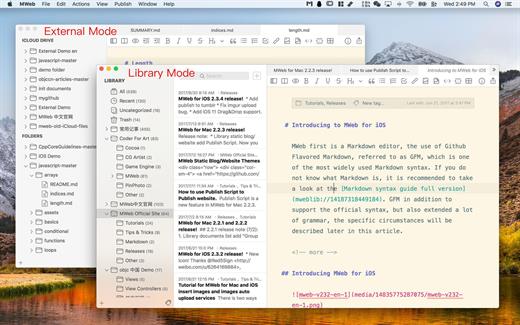
MWeb can handle professional-level markdown with support for markdown extensions. It provides publishing to various social networks and blogging formats, as well as various preview themes. It also has two work modes: external, which allows the addition of external folders; and library, designed for note-taking and static blogging.
Features
- Full GFM (GitHub Flavored Markdown) supported
- Publish/Update to WordPress, Metaweblog API services, WordPress.com, Evernote, Blogger, Tumblr.
- Drag-and-drop or paste to insert pictrue and display immediately.
- Live preview and export to PDF/HTML/RTF/DOCX
- External folder, library, static blog/website generator
Version 4.3.2:
- Added: Now when opening a document, it will automatically scroll to the position when the document was last closed.
- Added: Added "Automatic Equation Numbering" option for LaTeX equations, in "Preferences - General - LaTeX more settings".
- Added "Export as Textbundle..." to the menu item of the share button.
- The shortcut key for inserting a table has been changed from the invalid "Ctrl + Shift + T" to "Command + T".
- Added: holding a option key and click a category in the Library or a folder in External folder mode will "expand/collapse" all subcategories.
- Improved: When importing a theme, if an existing name is detected, it will first ask whether to overwrite the theme with the same name.
- Other bug fixes and improvements.
macOS 10.13 or later
Apple Silicon or Intel Core processor
Release Name: MWeb Pro 4.3.2
Size: 32.5 MB
Links: HOMEPAGE – NFO – Torrent Search
Download: UPLOADGiG – NiTROFLARE – RAPiDGATOR



