

ScreenFlow 10.5.2
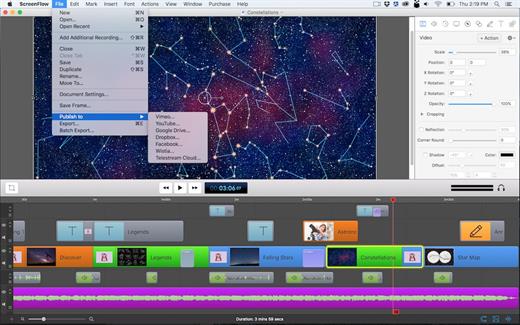
ScreenFlow is powerful, easy-to-use screencasting software for the Mac. With ScreenFlow you can record the contents of your entire monitor while also capturing your video camera, microphone and your computer audio. The easy-to-use editing interface lets you creatively edit your video, and add additional images, text, music and transitions for a truly professional-looking video. The finished result is a QuickTime or Windows Media movie, ready for publishing to your Web site or blog or directly to YouTube or Vimeo. Use ScreenFlow to create high-quality software demos, tutorials, app previews, training, presentations and more.
What’s New
Version 10.5.2:
Improvements
- New Screen Recording capabilities
- Add ability to exclude ScreenFlow from recordings (can exclude Recording Monitor)
- Add ability to exclude specific applications from recordings
- Add ability to include only specific applications in recordings
- Recording Monitor improvements
- Display desktop preview from recorder
- Display audio levels from microphones
- Display audio levels received from recorder
- Add native system audio recording using 'Basic Computer Audio' : No driver installation necessary
- Add AI Virtual Assistant
- Add Line Spacing
- Add a feature to duplicate clips on the Timeline when dragging with Option key
- SF-274: Fixed SRT files with malformed timecode separators show blank captions when imported.
- SF-270: Fixed some transitions apply to the entire canvas instead of the selected clip
- SF-262: Fixed some help links throughout the app
- SF-253: Fixed audio from disabled channel 1 plays back after reopening project
- SF-246: Fixed recording fails when Continuity Camera is selected
- SF-244: Fixed ScreenFlow records at doubled resolution when display is set to non-native size
- SF-243: Fix export file size warning visible when it shouldn't be
- SF-242: Fixed ScreenFlow doesn’t record the first few seconds of audio from AirPods
- SF-237: Fixed canvas resize tool does not update document settings
- SF-230: Fixed the waveform is not visible for channel 1 in multichannel audio clips when opening a document
- SF-219: Show a warning when the user saves or opens a ScreenFlow document in Cloud storage
- SF-205: Fixed the Stock Media Library does not populate until the user searches
- SF-197: Fixed runtime error when editing a document
- SF-195: Fixed runtime error when dragging video from Stock Media Library
- SF-191: Fixed adding a proxy to a video clip breaks media rotation
- SF-186: Fixed crash when dragging an unsupported media file into timeline
- SF-178: Filter out audio devices that do not provide audio to external applications
- SF-175: Fixed can’t scroll audio input window after it overflows
- SF-174: Fixed system audio capture driver does not work until a system reboot
- SF-172: Fixed offline activation fails
- SF-162: Fixed ScreenFlow hangs when a recording is stopped
- SF-160: Fixed ScreenFlow export window default preset does not load correctly
- SF-155: Fix the recording overlay shown before recording sometimes gets stuck
- SF-151: Fixed Desktop icons are not recorded when the user’s profile is set to automatically hide the Dock
- SF-146: Fix disposing and recreating audio filter objects when generating waveforms
- SF-138: Prevent repeatedly reopening a project which crashes ScreenFlow
- SF-133: Fix audio plugins crashing when they are disposed on non-main thread
- SF-125: Show caption track after importing captions
- SF-124: Improve performance when certain video effects are combined
- SF-122: Fix crash when generating waveforms for nested clips
- SF-104: Fix font list text is dark in dark mode
- SF-103: Fix various bugs when creating and editing clips with multiple application audio
- SF-94: Fix thumbnail generation in Single mode leaks resources for Nested clips
- SF-62: Fix speech clip modal sheet doesn't dismiss fully
- SF-34: Fix Text Properties panel is showing incorrect properties in various scenarios
- SF-32: Fix various text editing Text Clips
- SF-17: Fix and restore Bullet Points
- SF-31: Make text caret blink again
- FLOW-11744: Fix keyboard shortcuts apply style from before style update
macOS 10.15.0 or later
Release Name: ScreenFlow 10.5.2
Size: 94.7 MB
Links: HOMEPAGE – NFO – Torrent Search
Download: RAPiDGATOR



