

SoundSource 5.5.6
SounceSource lets you adjust your input, output, and sound-effects devices and volume settings in mere moments, right from the menu bar. Enable soft play-thru of input devices to your desired output, so you can hear sound coming in through any microphone or other source. With SoundSource, you get fast access to your Mac’s most important audio settings.
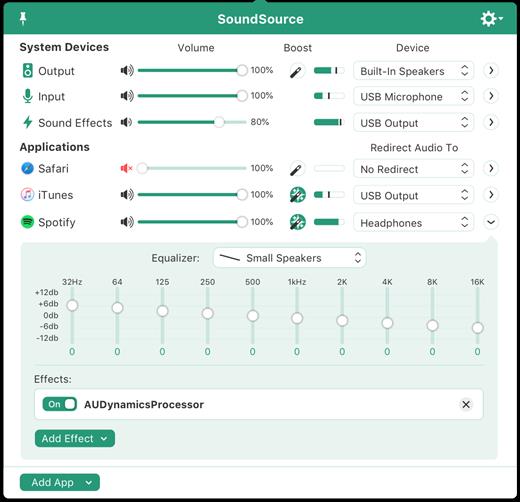
- Instant Audio-Device Switching – With just two clicks, you can switch the audio devices your Mac is using for input, output, and even sound effects.
- Fast Volume Control – SoundSource provides easy access to the volume controls for your audio devices as well.
- Audio Play-Thru, Too – SoundSource’s Play-Thru window makes it easy to monitor the audio coming from any input device.
- Comprehensive – SoundSource gives you one place to go for all Mac’s most important audio controls.
- At Your Fingertips – With SoundSource running in your menu bar, your audio controls are always available.
- Lightweight – When you don’t need SoundSource, it stays out of your way.
Version 5.5.6:
- Full MacOS 13 (Ventura) Compatibility
SoundSource now has full compatibility with MacOS 13 (Ventura), with no known issues. - New “Background Sound” Special Source
On MacOS 13 (Ventura), the new “Background Sound” special source makes it possible to adjust audio from this new feature, which can be found in Ventura’s “Accessibility” System Settings. - Improvements in ACE 11.9.1
The ACE audio capture engine has been updated with several small bug fixes for improved performance. - A meter channel mapping issue which could trigger a coreaudiod crash has been resolved.
- Several different crashes have been fixed.
- If the “Check for Test Releases” hidden preference is enabled, checks will now run regardless of the status of the “Software Update” preference/setting.
- On MacOS 13 (Ventura) and up, SoundSource’s “Preferences” window is now called “Settings”, to match the new MacOS convention. As well, the “System” menu, found in the Options (Gear) menu, now has a renamed “Open Sound Settings” option.
macOS 10.14.0 or later
Apple Silicon or Intel Core processor
Release Name: SoundSource 5.5.6
Size: 31.2 MB
Links: HOMEPAGE – NFO – Torrent Search
Download: UPLOADGiG – NiTROFLARE – RAPiDGATOR



