Tenorshare ReiBoot for Android Pro 2.1.7.2 Multilingual
Repair Android System to Normal At Your Fingers
- Totally free to enter and exit Android fastboot mode by one click. free
- Enter and exit Android recovery mode. Free and simple operation.free
- Free to enter and exit Android download (odin) mode.free
- Fix 50+ Android system issues like stuck on Samsung logo, app crashing, black screen, and so on.
- One click to clear Android system cache to keep your phone optimized.
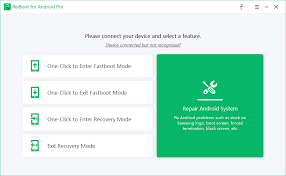
Totally Free to Enter & Exit Android Fastboot Mode by One Click
- Boot into fastboot (Bootloader) mode on any Android device by one click.
- 1-Click to get out of fastboot mode when our phone is stuck in fastboot mode.
- No need to use the key combination method. Fast and hassle-free!
Easiest and Safest Way to Enter/Exit Android Recovery Mode
How to enter Android recovery mode easily? The key combination is not working? The process of entering/exiting Android recovery mode is varied in different brands and not easy for beginners. Any misoperation would brick your Android device.
Now, ReiBoot for Android offers a one-click solution to boot your Android device into recovery mode without manually holding down any buttons, and guides you how to safely exit Android recovery mode as well. No risk! Just 1 click!
Enter Android Download Mode
Download mode is also known as Odin mode. You won't be unfamiliar with this tech term if you ever tried to flash ROM/Kernel or restore your Samsung devices to fix system glitches like being stuck on black screen. ReiBoot for Android illustrates the detailed instructions to enter download mode on Samsung, Huawei, etc.
One Click to Exit Android Download Mode
Phone is stuck on "Downloading… Do not turn off target" screen? Though the odds are low, your phone may still be stuck in download/odin mode after a security update. Instead of trying repeatedly by using key combinations, you can get out of Android download mode on any phone by a simple click, thanks to ReiBoot for Android
Goodbye Slow & Stuck, Hello Fast & Smooth
Your android phones store temporary system files used for things like OS updates in a cache partition. These files can be corrupted and cause issues. Clearing the system cache can wipe cache partition and make your phone clean and smooth.
- Delete system cache on Android phone.
- Wipe system cache partition without data loss.
- Update or restore Android OS to fix sluggish performance.
- Just one click away.
Size: 40.7 MB
Links: HOMEPAGE – NFO – Torrent Search
Download: UPLOADGiG – NiTROFLARE – RAPiDGATOR