

Transmit 5.9.2

Transmit is a powerful and versatile Mac OS X application that makes it easy for you to manage and organize large files on various servers on clouds.
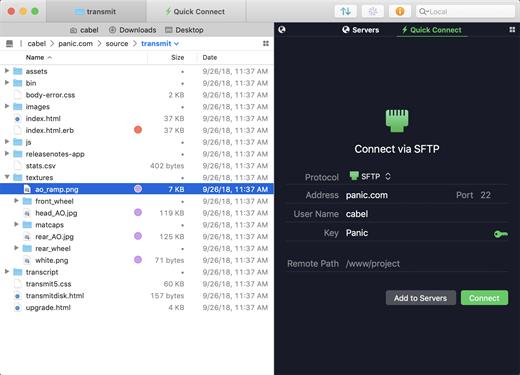
User-oriented interface with support for multiple tabs
With Transmit’s help you can quickly and effortlessly transfer files to SFTP or FTP server, as well as Amazon S3 or WevDAV from within a user-oriented interface.
Transmit comes a simple and reliable solution for users that need to maintain websites, upload numerous photos or perform backups.
Transmit comes with a “Twin-Turbo Engine”, multi-connection transfer and FXP support fact that makes it a fast, smooth-running and dependable client for most Mac users.
On top of that, Transmit enables you to limit the bandwidth, synchronize or compare files with ease.
Choose between a single or dual pane window
From Transmit’s two-panel window you can view the files stored locally and the ones saved on the server. At the same time, Transmit helps you create a list with favorite servers add a new FTP, SFTP, Amazon S3 or WebDAV server.
The top toolbar allows you to switch between the thumbnail, list, column and Cover Flow view mode and change from the a dual pane to a single pane window. In addition, Transmit seamlessly integrates Mac OS X’s Quick Look feature, a fact that helps you preview files before transferring them.
Handy synchronization features
By accessing the Action drop-down menu, you can open the Info window, copy the file path or URL address, move items to Trash or the desired location, create duplicates, compress or label files. On top of that, you have the option to create new folders or files, refresh the list and open a folder in a new tab or new window.
Thanks to the built-in search form, you can quickly and effortlessly filter the displayed items as soon as you start typing. The Preferences window enables you to change the default FTP client and configure Transmit to synchronize your favorite items via iCloud or Dropbox.
What’s New
New
- Added support for opening
ftp+tls://URLs from the command line
- S3: Removed dialog when moving files to a destination with different ACLs per user requests
- Local files displayed in Icon view now display thumbnail previews
- Addressed a potential crash when performing remote to local File Sync
- Moving disconnected remote tabs between windows no longer triggers auto-connect unexpectedly
- Resolved a potential hang when canceling large transfers with very many files
- S3: Changes to file permissions from the info sidebar are no longer potentially interrupted by file navigation
- S3: Transfers of many files are no longer terminated with a “Too many open files” error in some circumstances
- B2: Empty child folders whose names contain
/are no longer displayed as containing themselves, recursively - AppleScript: Addressed an issue where “Connect to address” command would not use passive mode for FTP connections
- Various cosmetic fixes and improvements
macOS 10.15.0 or later
Apple Silicon or Intel Core processor
Release Name: Transmit 5.9.2
Size: 34.5 MB
Links: HOMEPAGE – NFO – Torrent Search
Download: UPLOADGiG – NiTROFLARE – RAPiDGATOR



