

Pixelmator Pro 2.4.5
Pixelmator Pro is an incredibly powerful, beautiful, and easy to use image editor designed exclusively for Mac.
With a wide range of professional-grade, nondestructive image editing tools, Pixelmator Pro lets you bring out the best in your photos, create gorgeous compositions and designs, draw, paint, apply stunning effects, design beautiful text, and edit images in just about any way you can imagine. And thanks to its intuitive and accessible design, Pixelmator Pro is delightfully easy to use – whether you’re just starting out with image editing or you’re a seasoned pro.
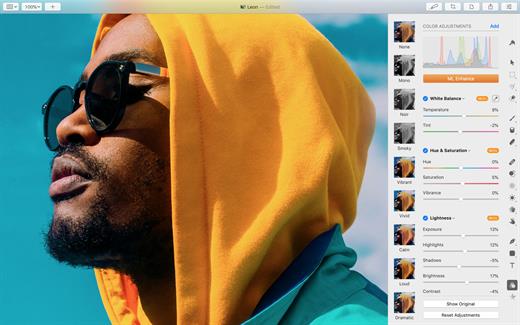
The modern, single-window interface is designed exclusively for working with images on a Mac. An intuitive and accessible design makes it easy for anyone to edit images – from complete beginners to design professionals.
The new ML Super Resolution feature lets you increase the resolution of images without blurriness or reduced quality using state-of-the-art machine learning.
What’s New
Version 2.4.5:
All-New Shapes Browser
- Thanks to the new shapes browser, finding and inserting shapes into your designs is now quicker and easier than ever.
- Find the new shapes browser in the Shape tool's options pane, the Add Layer menu at the top of the Layers sidebar, or add the new shapes browser button to your toolbar.
- Enjoy larger and easier-to-navigate shape thumbnails.
- Easily find shapes by name using the search bar.
- Seamlessly browse your entire shapes library without switching between different shape categories.
- The photo browser is now even more stable and powerful, bringing a smoother image browsing and search experience.
- Use the new Zoom slider to change the size of image thumbnails.
- Show image thumbnails as square or in full aspect ratio.
- Add images to favorites using a Favorite button in the toolbar.
- Preview image names by hovering the pointer over their thumbnails.
- The photo browser will now show progress when downloading photos from iCloud and when indexing image search results.
- You can now Control-click an image thumbnail to access a shortcuts menu with additional image opening options.
- Option-click the Open button in the photo browser to open the original, unedited image (for images edited in Photos or using third-party extensions).
- If an image fails to open, Pixelmator Pro will show more informative errors to help you troubleshoot issues quicker.
- You can now add and edit layer styles of multiple selected layers. Original styles — fills, strokes, and shadows — applied to each individual layer are kept.
- You can also add, paste, and reset layer styles, color adjustments, and effects of multiple layers at a time.
- When exporting an image multiple times during the same editing session, Pixelmator Pro will now remember the last used document color profile setting.
- Advanced shapes exported to Motion file format will now be more accurate.
- Added improvements to better handle text in SVG files.
- RAW layers will now open with depth masks when inserted from Photos (using Insert > Photos) or when dragged to Pixelmator Pro from Finder.
- Improved color accuracy of Adobe Photoshop adjustment layers.
- You can now reset all Crop and Quick Export presets to default. The Reset All option will appear when pressing and holding Option while in the preset shortcut menu.
- Images with certain effects would sometimes look different when exported. Fixed.
- Copy and Paste as Layer and Cut and Paste as Layer features would not work with selections on RAW layers. Fixed.
- WebP Quick Export presets would not be displayed correctly in the Quick Export menu. Fixed.
- Pixelmator Pro would occasionally stop responding when saving changes. Fixed.
- Trying to load a Photos library that's been deleted or removed with an external storage drive would cause Pixelmator Pro to quit unexpectedly. Fixed.
macOS 10.13 or later
Apple Silicon or Intel Core processor
Release Name: Pixelmator Pro 2.4.5
Size: 416 MB
Links: HOMEPAGE – NFO – Torrent Search
Download: UPLOADGiG – NiTROFLARE – RAPiDGATOR



